Flame Review (2026): Pricing, Features & Honest Verdict
TLDR
Flame is a self-hosted startpage and application dashboard that organizes your homelab services with a clean, customizable interface and Docker integration. Best for: self-hosters wanting a pretty service dashboard. Price: Free (open-source). Rating: 7.1/10
What is Flame?
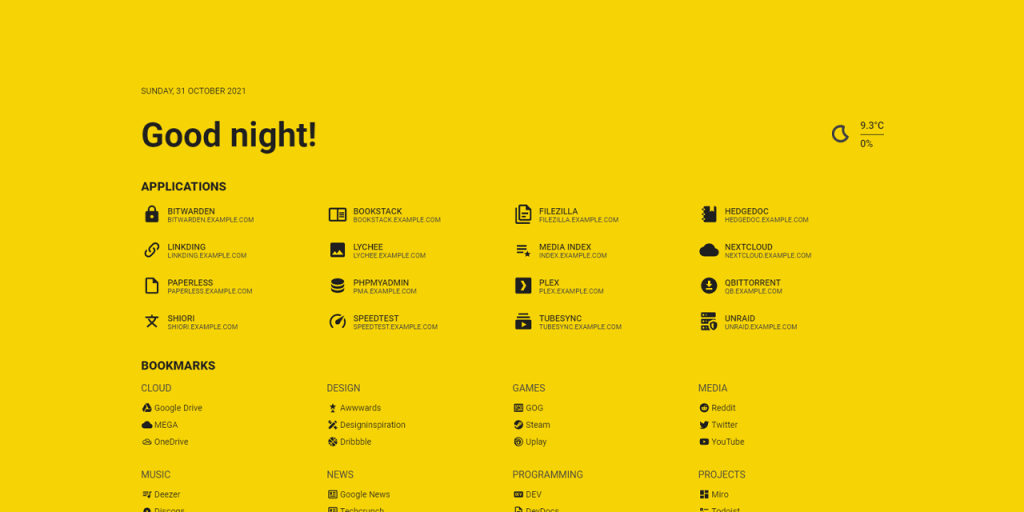
Flame is a self-hosted startpage designed to serve as a central hub for accessing all your web applications and services. Think of it as a bookmark manager specifically built for homelab and self-hosted environments. It provides a visually appealing grid of application links with icons, categories, and optional Docker container status monitoring.
Unlike more complex dashboard solutions like Heimdall or Homarr, Flame focuses on simplicity and aesthetics. It is a single Docker container that runs quietly in the background, giving you a clean landing page whenever you open a new browser tab pointing to your server. The project gained popularity in the self-hosting community for its minimal setup requirements and attractive default theme.
Key Features
Application Bookmarks
The core of Flame is its bookmark management system. You can add applications with custom names, URLs, icons, and categories. The interface displays these as a responsive grid of cards that adapt to your screen size. Each bookmark can have a custom icon pulled from a built-in icon library (Material Design Icons and weather icons), or you can upload your own. The category system lets you group related services together for easier navigation.
Docker Integration
Flame can automatically detect and display Docker containers running on the same host. By adding specific labels to your Docker containers, Flame will automatically create bookmark entries for them. This means new services you deploy will appear on your dashboard without manual configuration. The integration also shows basic container status, so you can see at a glance which services are running.
Weather Widget
A built-in weather widget displays current conditions and forecasts using the OpenWeatherMap API. While this might seem like an odd feature for a server dashboard, it makes Flame more useful as a browser startpage that you look at throughout the day. You can configure your location and choose between Celsius and Fahrenheit.
Search Bar
The integrated search bar supports multiple search providers (Google, DuckDuckGo, and custom providers). You can also configure it to search your bookmarks first, making it quick to find and jump to specific services. Custom search provider support means you can add internal search tools like your wiki or documentation system.
Theming and Customization
Flame offers extensive theme customization, including custom CSS injection. You can change colors, backgrounds, and layout options to match your preferences. The default dark theme looks polished out of the box, but the customization options let you create a unique look. Community-created themes are available on GitHub for those who want inspiration.
Pricing
Flame is completely free and open-source under the MIT license. There are no paid versions or premium features. Everything is available to all users at no cost.
Pros and Cons
Pros
- Beautiful, clean UI that works well as a daily browser startpage
- Docker label integration automatically discovers new services
- Very lightweight with minimal resource consumption
- Easy to set up with a single Docker container
- Good customization options with theme support and custom CSS
Cons
- Project development has stalled with no updates in over a year
- No health check monitoring beyond basic Docker container status
- Limited to a single Docker host, no remote server support
- No authentication system for multi-user environments
- Missing integrations with external services and APIs
| Plan | Price | Plan Features | Best For |
|---|---|---|---|
| Open Source | Free | All features included, unlimited bookmarks, community support | Everyone |
Who Should Use Flame?
Flame is perfect for homelab enthusiasts who want a clean, attractive startpage for their self-hosted services. If you run a dozen or so services on a single server and want a convenient way to access them all from one page, Flame delivers exactly that with minimal setup effort.
It falls short if you need actual monitoring capabilities, health checks, or multi-server support. Flame is a bookmark dashboard, not a monitoring tool. If you need to know when services go down or want detailed status information, you should pair Flame with a proper monitoring solution or consider Homarr, which combines dashboard and monitoring features in one package.
Alternatives
Homer
Homer is a static startpage generator that produces a fast, simple dashboard from a YAML configuration file. It has no Docker integration or dynamic features, but it loads instantly and is extremely reliable. If you prefer configuration-as-code and do not need Docker auto-discovery, Homer is lighter and more predictable than Flame.
Homarr
Homarr is a more feature-rich dashboard that combines bookmark management with service monitoring, calendar integration, and media management widgets. It is actively maintained and has a larger development team. If you want more than just a startpage and need actual monitoring capabilities, Homarr is the natural upgrade from Flame.
Heimdall
Heimdall is an application dashboard focused on organizing web applications with enhanced features like API-based status tiles and search integration. It supports more service integrations than Flame and has a more mature codebase. The downside is a heavier resource footprint and a less modern-looking interface.
FAQ
Is Flame still being maintained?
Development has stalled, with no significant updates in over a year. The project is still functional and can be deployed from the existing Docker image, but do not expect new features or bug fixes. Community forks may emerge as alternatives.
Can Flame monitor service uptime?
Flame only shows basic Docker container status (running/stopped). It does not perform health checks, ping services, or monitor uptime. For actual monitoring, pair it with Uptime Kuma or a similar tool.
How does Flame compare to Organizr?
Organizr is primarily a tab-based service aggregator that embeds multiple web UIs into a single interface with authentication. Flame is simpler, serving as a bookmark dashboard rather than an app aggregator. Choose Organizr if you want to access services without switching tabs, and Flame if you want a clean startpage.
Flame Pros & Cons
What We Like
- Beautiful, clean UI that works well as a daily startpage
- Docker label integration auto-discovers new services
- Very lightweight with minimal resource consumption
- Easy single Docker container setup
- Good customization with theme support and custom CSS
What Could Be Better
- Project development has stalled with no recent updates
- No health check monitoring beyond basic container status
- Limited to single Docker host, no remote server support
- No authentication system for multi-user setups
- Missing integrations with external services
Flame FAQ
Is Flame still being maintained?
Development has stalled with no significant updates in over a year. The project remains functional but should not be expected to receive new features or bug fixes.
Can Flame monitor service uptime?
Flame only shows basic Docker container status. It does not perform health checks or monitor uptime. Pair it with Uptime Kuma for actual monitoring.
How does Flame compare to Organizr?
Organizr embeds multiple web UIs into tabs with authentication. Flame is a simpler bookmark dashboard. Choose based on whether you want embedded access or a clean startpage.
What is Flame?
Self-hosted startpage and application dashboard for organizing bookmarks and monitoring Docker containers with a clean, customizable UI.
How much does Flame cost?
Flame pricing starts at Free (open-source). A free plan is available.
Is Flame worth it?
Flame is a beautiful startpage for self-hosters who value aesthetics and simplicity. The Docker auto-discovery is genuinely useful, and the minimal resource footprint means it runs happily alongside your other services. The stalled development is concerning, but for a simple dashboard, the current feature set is sufficient. We rate it 7.1/10.






