Ulysses Review (2026): Pricing, Features & Honest Verdict
TLDR
Ulysses is a polished writing app for Apple devices with strong library management, writing goals, and direct publishing. Best for: Mac and iPad writers who want organization alongside their editor. Price: $5.99/mo ($49.99/yr). Rating: 7.6/10
What is Ulysses?
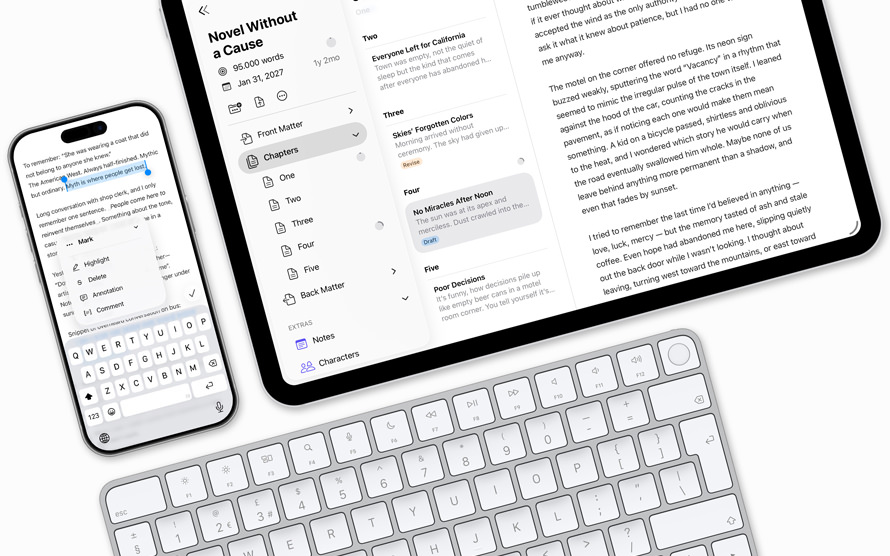
Ulysses is a writing application exclusively for Apple platforms (Mac, iPad, and iPhone) that combines a clean Markdown editor with a robust library management system. Developed by The Soulmen, a German indie studio, Ulysses has been around since 2003 and has evolved from a niche Mac app into one of the most popular writing tools in the Apple ecosystem.
The app positions itself as the all-in-one writing environment: draft, organize, revise, and publish without leaving the app. It competes directly with iA Writer on the minimalist end and with Scrivener on the feature-heavy end, landing somewhere in between.
Key Features
Library Management
The library is where Ulysses differentiates itself most clearly from competitors. Every document lives in a unified library organized by groups (folders), filters, and keywords (tags). Smart filters let you create dynamic views based on any combination of criteria. If you write across multiple projects, the library keeps everything accessible without hunting through file systems.
Writing Goals
You can set word count, character count, or time-based goals for individual documents or entire projects. A small progress indicator shows how close you are to hitting your target. It is a simple feature, but for writers working toward deadlines or daily word counts, it adds useful accountability.
Markdown XL
Ulysses uses its own flavor of Markdown called Markdown XL, which extends standard Markdown with annotations, footnotes, and other writing-specific features. The editor renders formatting inline, so headings look like headings and bold looks bold, while the underlying syntax remains plain text. One trade-off: Ulysses stores files in its own format internally, though you can export to standard .md at any time.
Publishing
Direct publishing to WordPress, Medium, Ghost, and Micro.blog is built in. You can configure multiple publishing accounts, set categories and tags, and preview how your post will look before hitting publish. The WordPress integration is solid, supporting featured images, excerpts, and scheduling.
iCloud Sync
Everything syncs via iCloud across Mac, iPad, and iPhone. The sync is fast and reliable in practice. Because Ulysses is Apple-only, it leans fully into the iCloud ecosystem rather than offering alternatives like Dropbox or Google Drive.
Export Options
Ulysses exports to PDF, ePub, DOCX, HTML, and plain text. The PDF and ePub exports include customizable styles, making it possible to produce reasonably polished documents directly from the app without a dedicated layout tool.
Pricing
Ulysses uses a subscription model:
- Monthly: $5.99/month
- Yearly: $49.99/year (about $4.17/month)
The subscription covers Mac, iPad, and iPhone with a single purchase. There is no free tier or one-time purchase option. A free trial is available. Compared to iA Writer’s one-time $49.99 (Mac only), Ulysses costs more over time but includes all Apple platforms in one subscription. The subscription model is the most common complaint from users.
Pros
- Excellent library management with groups, keywords, and smart filters
- Writing goals keep you on track for deadlines and targets
- Seamless iCloud sync across all Apple devices
- Strong publishing integration with WordPress, Medium, and Ghost
- Versatile export options including ePub and styled PDFs
- Polished, well-designed interface that feels native to Apple platforms
Cons
- Subscription-only pricing with no one-time purchase option
- Apple-only, with no Windows, Android, or web version
- Proprietary internal file format creates some lock-in
- Markdown XL syntax is non-standard and does not transfer to other editors
- No real-time collaboration features
- Overkill for casual or occasional writers
| Plan | Price | Plan Features | Best For |
|---|---|---|---|
| Monthly | $5.99/mo | Mac, iPad, iPhone access, all features, iCloud sync | Trying it out |
| Yearly | $49.99/yr | Mac, iPad, iPhone access, all features, iCloud sync, save ~$22/yr | Committed writers |
Who is Ulysses Best For?
Ulysses works best for committed writers on Apple devices who juggle multiple projects and want everything organized in one place. Journalists, bloggers, authors working on long-form content, and anyone who publishes regularly to WordPress or Medium will get the most value from the library and publishing features.
It is less suited for casual note-takers (Bear does that better and cheaper), cross-platform users (no option there), or writers who object to subscription pricing on principle.
Alternatives
iA Writer
iA Writer offers a more focused, stripped-down writing experience with a one-time purchase model. It lacks Ulysses’ library management but excels at distraction-free writing with its focus mode and style check. Better for writers who prefer simplicity and avoiding subscriptions.
Scrivener
Scrivener is a heavyweight writing tool built for long-form projects like novels and screenplays. It offers a binder, corkboard, outliner, and research folder that dwarf Ulysses’ organizational features. At $49 one-time, it is cheaper long-term but has a steeper learning curve.
Bear
Bear is a note-taking app with strong Markdown support and a beautiful tag-based organization system. At $2.99/month, it is cheaper than Ulysses and works well for shorter-form writing. It lacks direct publishing integrations and writing goals.
Verdict
Ulysses is a capable, well-designed writing app that earns its place in the Apple ecosystem. The library management and publishing integrations are its strongest selling points, and the overall experience feels polished and reliable. The subscription model and Apple exclusivity will be dealbreakers for some, and the proprietary file format adds a layer of lock-in that competing apps avoid. If you write professionally on Apple devices and value organization, Ulysses is worth the monthly cost. If you just want to write without ongoing fees, iA Writer is the better pick.
FAQ
Can I use Ulysses on Windows or Android?
No. Ulysses is exclusively available on Mac, iPad, and iPhone. There is no Windows, Android, Linux, or web version. If you need cross-platform access, consider iA Writer (Mac and Windows) or Obsidian (all platforms).
Does the Ulysses subscription cover all devices?
Yes. A single subscription gives you access on Mac, iPad, and iPhone. You do not need to pay separately for each device, unlike iA Writer which charges per platform.
Can I export my writing from Ulysses to standard Markdown?
Yes. While Ulysses stores files in its own format internally, you can export individual sheets or entire groups to standard .md, .txt, PDF, DOCX, ePub, or HTML at any time.
Ulysses Pros & Cons
What We Like
- Excellent library management with groups, keywords, and smart filters
- Writing goals keep you on track for deadlines and targets
- Seamless iCloud sync across all Apple devices
- Strong publishing integration with WordPress, Medium, and Ghost
- Versatile export options including ePub and styled PDFs
- Polished, well-designed interface native to Apple platforms
What Could Be Better
- Subscription-only pricing with no one-time purchase option
- Apple-only with no Windows, Android, or web version
- Proprietary internal file format creates some lock-in
- Markdown XL syntax is non-standard
- No real-time collaboration features
Ulysses FAQ
Can I use Ulysses on Windows or Android?
No. Ulysses is exclusively available on Mac, iPad, and iPhone. For cross-platform access, consider iA Writer or Obsidian.
Does the subscription cover all devices?
Yes. A single subscription gives access on Mac, iPad, and iPhone. No per-device charges.
Can I export to standard Markdown?
Yes. You can export to .md, .txt, PDF, DOCX, ePub, or HTML at any time despite the proprietary internal format.
What is Ulysses?
Apple-exclusive writing app with library management, writing goals, iCloud sync, and direct publishing to WordPress, Medium, and Ghost. $5.99/mo subscription.
How much does Ulysses cost?
Ulysses pricing starts at $5.99/mo.
Is Ulysses worth it?
Ulysses is a capable, well-designed writing app that earns its place in the Apple ecosystem. The library management and publishing integrations are its strongest points. The subscription model and Apple exclusivity will be dealbreakers for some, and the proprietary format adds lock-in that competitors avoid. We rate it 7.6/10.






