AgentDock Review (2026): Pricing, Features & Honest Verdict
TLDR
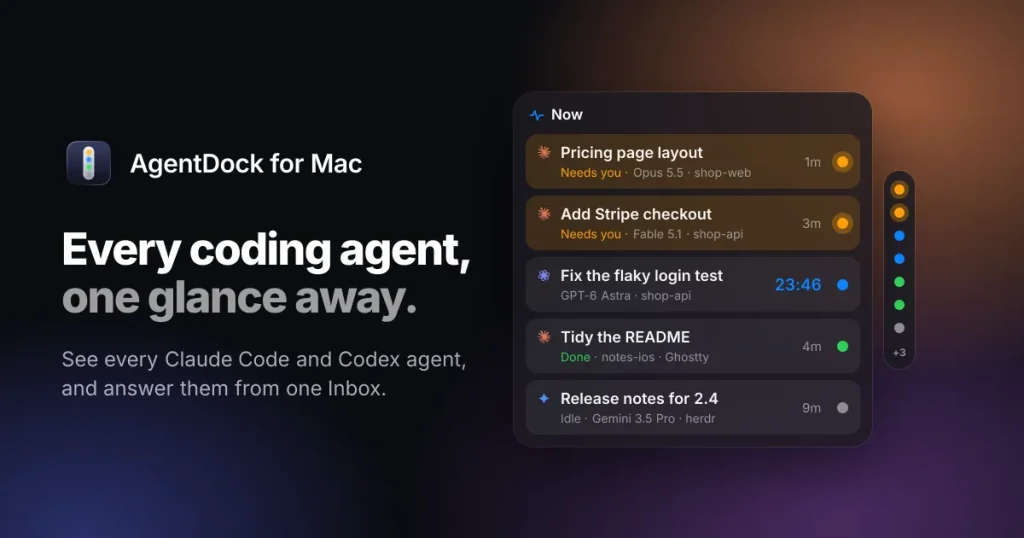
AgentDock is a $19 one-time Mac menu bar app that shows each Claude Code and Codex session as a coloured status light and collects their questions in one Inbox. Small, private and useful, though only days old. Best for: Mac developers juggling several terminal agents. Price: from $19 one-time, free plan yes (status dots only). Rating: 7.0/10.
What is AgentDock?
We spotted AgentDock on Product Hunt, where it launched on 9 October 2026 as a companion for the agents you run in a terminal. The idea is simple. Every Claude Code, Codex or Grok Build session becomes a small coloured light at the screen’s edge: blue while it works, amber when it needs you, green when it has finished. Their questions and permission prompts collect in one Inbox, and you answer with a single key press instead of hunting through terminal windows.
The vendor also writes the name as AgentDock for Mac. Its terms name Ideas All Day Ltd of Sofia, Bulgaria as the company behind it. The app is a 5.2 MB download for macOS 15 or newer, Apple silicon or Intel, and lives in the menu bar rather than as a window. It started on 7 October 2026 as a helper for the cmux terminal only; by 11 October, eighteen builds on, it read agents in most Mac terminals and in the Claude and Codex desktop apps.
What Are AgentDock’s Key Features?
Status dots for every agent
Each running agent sits as a coloured light on a thin strip at the screen edge. Agents idle for fifteen minutes fold into one “+N” entry so the strip stays short. Hovering opens a card with the agent’s folder, git branch, model, turn timer and last activity, so three Claude Code sessions on one repository read as shop-web on main, on feature/login and on fix/checkout. An optional setting swaps the colours for provider logos (Claude, Codex, Gemini, Grok) while the colour still carries the status.
One Inbox with a two-second undo
The Inbox (Control-Option-I) lists every question, permission prompt and finished turn across agents. You press 1 to 9 to pick an answer, J and K to move, R to reply and Return to jump to the agent. AgentDock then types your choice into the agent’s terminal after checking the question is still on screen. Every answer waits two seconds first so you can undo it, which is the only safety net between a stray keypress and an approved shell command.
Press Option twice to message any agent
A double tap on the Option key from any app opens a small composer. You type a request, pick the agent by name or by git branch with a colon prefix (“login: run the tests”), and send. In the terminals AgentDock can type into (cmux, tmux, iTerm, WezTerm, kitty and herdr) the message lands in the agent’s prompt. In Ghostty, Apple’s Terminal, Alacritty and the editors it can show status and answer Claude Code through its hook, but it cannot type.
Recaps and a token meter, computed on your Mac
When an agent finishes, Apple Intelligence writes a one-line recap and three suggested next steps you can send with Command-1, 2 or 3. That needs macOS 26 with Apple Intelligence; on macOS 15 the recaps are off and Settings says why. The hover card can also show tokens written, context used and a chart of today’s usage, read from the agents’ own session files. The update notes admit the early token meter ran up to 40 percent high before version 0.5.5 fixed double-counting of resumed sessions.
What Is It Like to Use AgentDock?
We did not install or run AgentDock; we downloaded the build to inspect it and read the vendor’s site and update notes for the workflow. Setup is light. The app runs with no account or sign-in. A Settings tab called Apps lists each terminal and editor, what works there, and buttons that do the configuration: turning on the Claude Code hook, asking macOS for permission to control iTerm or Terminal, or copying the two config lines one terminal needs.
The Claude Code hook is the key piece outside cmux. Turning it on adds an entry to ~/.claude/settings.json after keeping a backup, and a bundled helper build reports events over a local connection. The privacy policy and the build match: we grepped the app’s main executable and the only outbound endpoints are the licence API on the vendor’s domain and on a hosting provider’s domain, plus the update feed in the vendor’s public releases repository. No analytics or crash-reporting strings appear.
There is also an iPhone page. Switch it on in Settings, scan a QR code, and your agents and the Inbox open in Safari on the same Wi-Fi, served from the Mac. A native iPhone app with an end-to-end encrypted forwarding server is listed as coming soon on the marketing site, though the 0.5.1 update notes already describe it pairing with a code. We could not find any AgentDock app on the US App Store when we searched on 11 October 2026.
Where Does AgentDock Fall Short?
It is very new. Eighteen builds shipped between 7 and 11 October 2026, and the update notes include a crash on the first hook event in two builds, Codex dots that stayed blue during approvals, and iTerm replies that were typed but never submitted. Version 1.0.2 lists a long end-to-end test matrix, which is reassuring, but a buyer today is an early adopter.
Supported macOS versions come in two halves. The 1.0.0 and 1.0.1 update feed entries required macOS 26; 1.0.2 lowered that to macOS 15, and the Info.plist confirms 15.0. On 15 you lose the recaps and the glass look. The description page of the public releases repository still says macOS 26 and cmux are required and that the source is private, so the documentation lags the build by a version.
Company depth is thin. The notarised build is signed by an individual Developer ID account, and its copyright string names a person rather than Ideas All Day Ltd. The releases repository had no stars and 19 downloads across the three 1.0.x builds when we checked, and the marketing site carries no testimonials. None of that is a fault, but it does mean one small team stands between you and the next Claude Code or Codex update that changes a prompt format.
The terms and the build both reference a Setapp edition, yet we could not find AgentDock on setapp.com on 11 October 2026; two guessed listing URLs returned 404. Mac only, no Linux or Windows, and one popular terminal gets status but no typing because its screen cannot be read from outside.
How Much Does AgentDock Cost?
AgentDock costs $19 one-time, plus sales tax or VAT where it applies, for up to 3 Macs that you use. The purchase includes every 1.x update; the terms say a future 2.0 may be a paid upgrade and that the version you own keeps working. There is no subscription and no account. Payment runs through Link, a Stripe service, which is the merchant of record and collects the tax.
The trial lasts 7 days from the first time you open version 1.0 or newer, with nothing locked. When it ends, the status dots and the hover card keep working for free with no time limit. Answering from the Inbox, Option-Option messages and the iPhone page need a licence. We mark the free plan as yes for that permanent dots mode only; a trial on its own would not count.
Refunds are generous on paper: ask within 30 days of buying, by replying to Link’s receipt or emailing the vendor, and you get the full amount back, after which the licence stops working. Activation sends your key plus a label built from the Mac model and a short code derived from its hardware ID to the licence server; the label is stored with your purchase at the payment processor.
Against the field, $19 once is cheap but not the cheapest. The two terminal-side tools it integrates with most tightly, an open-source terminal and an open-source agent host, are free. A cloud orchestrator for agent teams gives its local mode away and charges $50 a month for Pro and $60 per user per month for Teams. A popular AI terminal charges $20 a month ($18 billed yearly) for its Build plan, though that bundles model usage, which AgentDock never does.
| Plan | Price | Plan Features | Best For |
|---|---|---|---|
| Free (after trial) | $0 | Status dots and hover card only; no Inbox answers, Option-Option messages or iPhone page | Developers who want a glance-level view of which agent needs them |
| Licence | $19 one-time plus tax | Up to 3 Macs, every 1.x update, Inbox answering, Option-Option messages, iPhone page, 7-day trial first, 30-day refund | Mac developers running several Claude Code or Codex sessions |
Who is AgentDock Best For?
Use AgentDock if you run three or more Claude Code or Codex sessions at once on a Mac, already live in cmux or one of the four other terminals it can type into, and lose time switching windows to answer “Allow this command?” prompts. The permanent free dots mode alone is worth installing for anyone who wants a glance-level view of which agent needs them.
Skip AgentDock if you work in Apple’s Terminal or a terminal AgentDock cannot type into and want to type replies from the Inbox, if you are on Linux or Windows, or if you want cloud workspaces, parallel worktree management or a web dashboard rather than a status strip. Teams that need a company-signed build with an audit trail should also wait a few versions.
Best AgentDock Alternatives
cmux
cmux is a free, open-source macOS terminal with a vertical list of open sessions and notification rings when agents need attention. Its site calls it GPL-licensed and its public repository had 28,104 stars on 11 October 2026. AgentDock began as a cmux companion and still works best inside it, so cmux alone covers the “which agent needs me” question at $0, without the Inbox or the message composer.
herdr
herdr is a free, Apache 2.0 agent host for macOS, Linux and Windows that keeps each agent in its own terminal, shows working, idle, blocked and done states, and lets you reconnect from another machine. Its site claimed 42,441 repository stars and over 1.29 million installs on 11 October 2026 and publishes no paid plan. AgentDock reads herdr’s agents, so the two can run together.
Conductor
Conductor is a Mac app for running a team of coding agents in local workspaces, with cloud workspaces on paid plans. Its pricing page lists Free at $0, Pro at $50 a month with cloud workspaces, an API and an iPhone app, Teams at $60 per user per month, and a custom Enterprise tier. It is a heavier orchestration layer than AgentDock’s status strip and costs more than AgentDock’s one-time fee within a month.
Final Verdict: Is AgentDock Worth It?
AgentDock does one job with care: it turns a pile of agent terminals into a strip of status lights and a single Inbox, keeps everything on your Mac, and charges $19 once with a 30-day refund. The privacy claims match what we saw in the build, the licence terms are clear, and the company and governing law are stated. For a Mac developer who already runs several Claude Code or Codex sessions, that is an easy purchase.
The caution is age. The product was public for four days when we wrote this, the update notes show real bugs being fixed hourly, the native iPhone app has not shipped, and the build is signed by an individual account rather than the named company. Try the free trial, keep the free dots mode if the Inbox does not win you over, and buy once a 1.0.x build has survived a week unchanged. Rating: 7.0 out of 10.
AgentDock Pros & Cons
What We Like
- $19 one-time for up to 3 Macs with every 1.x update included, no subscription and no account
- Permanent free mode: the status dots and hover card keep working after the 7-day trial ends
- Private by design: no analytics strings in the build, session files read locally, recaps written on-device by Apple Intelligence
- Two-second undo on every answer the app types into a terminal, plus a 30-day full refund in the terms
- Notarised universal build for Apple silicon and Intel, 5.2 MB, with a signed update feed
What Could Be Better
- Public for only four days at review time, with eighteen builds and several crash and typing fixes in the update notes
- Recaps and the glass look need macOS 26 with Apple Intelligence; macOS 15 gets status and the Inbox only
- Build is signed by an individual Developer ID account and its copyright names a person, not the company in the terms
- The native iPhone app is still coming soon, and the Setapp edition the terms mention could not be located on setapp.com
AgentDock FAQ
What is AgentDock?
AgentDock is a Mac menu bar app from Ideas All Day Ltd that shows every Claude Code, Codex or Grok Build session as a coloured status light on the screen edge, collects their questions and permission prompts in one Inbox, and types your answers into the agent's terminal. It runs on macOS 15 or newer with no account and keeps everything on your Mac.
How much does AgentDock cost?
AgentDock costs $19 one-time plus sales tax or VAT where it applies, for up to 3 Macs, with every 1.x update included. There is a 7-day free trial with nothing locked and a 30-day full refund. Payment goes through Link, a Stripe service. A future 2.0 may be a paid upgrade.
Is AgentDock worth it?
Yes for Mac developers who run three or more terminal agents at once and lose time switching windows to answer prompts. It is days old, so try the trial first and keep the free dots mode if the Inbox does not win you over. We rate it 7.0 out of 10.
What are the best AgentDock alternatives?
cmux is a free open-source Mac terminal with notification rings for agents that need attention. herdr is a free Apache 2.0 agent host that shows working, idle, blocked and done states across machines. Conductor runs teams of coding agents on a Mac with a Free tier, Pro at $50 a month and Teams at $60 per user per month.
Does AgentDock offer a free plan?
Yes, in one specific sense. After the 7-day trial ends, the status dots and hover card keep working for free with no time limit. Answering from the Inbox, Option-Option messages and the iPhone page need the $19 licence. The trial alone would not count as a free plan.
Who is AgentDock best for?
Mac developers who run several Claude Code or Codex sessions in cmux, tmux, iTerm, WezTerm or kitty and want one place to see status and answer prompts. It is not for Linux or Windows users, or for teams wanting cloud workspaces and a web dashboard.






