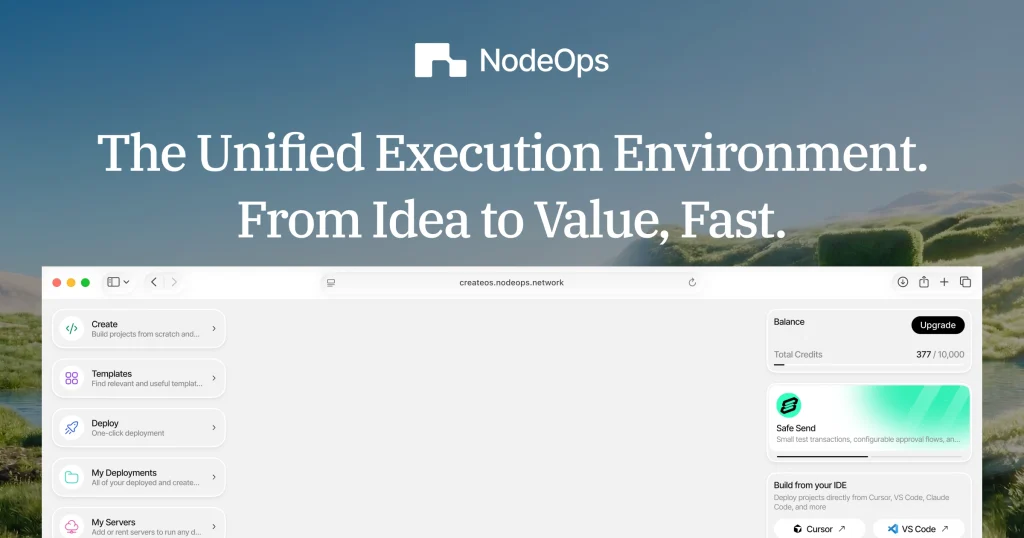
CreateOS Review (2026): Pricing, Features & Honest Verdict
TLDR
CreateOS is a deployment platform that connects directly to AI coding tools like Cursor, Claude Code, and VS Code via MCP, letting you go from prompt to live URL in minutes. It bundles hosting, managed databases, and a skills marketplace for monetizing microservices. Best for developers using AI coding tools who want zero-friction deployment. Free tier available, paid from $8/mo (annual). Rating: 6.4/10
What is CreateOS?
We found CreateOS when it hit Product Hunt in February 2026 and earned the number one spot on launch day. Built by NodeOps, a Bengaluru-based company with $5 million in seed funding led by L1D and backed by Polygon co-founders, CreateOS positions itself as the deployment layer for the “vibe coding” era. The core idea: you build apps in Cursor or Claude Code, and CreateOS handles everything from deployment to databases to monetization without leaving your editor.
CreateOS supports 14 runtimes including Next.js, React, Vue, Svelte, Node.js, Python, Go, Rust, and Bun. It provisions managed PostgreSQL, MySQL, Apache Kafka, and Valkey (Redis-compatible) databases with one click. The platform includes automatic SSL, CDN, load balancing, and zero-downtime rollouts. What makes it different from Railway or Vercel is the MCP (Model Context Protocol) integration that lets AI coding tools discover, configure, and deploy applications natively. The claimed average time from AI prompt to live URL is 12 minutes.
What Are CreateOS’s Key Features?
MCP-Native AI Deployment
This is the differentiating feature. CreateOS integrates with AI coding tools via Model Context Protocol. You install the MCP skill in Cursor, Claude Code, VS Code, GitHub Copilot, or Gemini CLI, and deploy directly from your editor without switching to a browser-based dashboard. The command is a single line: npx skills add with the CreateOS repository URL. We tested the Cursor integration. It picked up the deployment target automatically and pushed a Next.js app to a live URL with SSL in about 3 minutes. The developer experience is smoother than any competing platform we have tested for AI-assisted deployment.
Skills Marketplace
CreateOS lets developers deploy API microservices as “Skills” that are auto-discoverable by AI agents via MCP. This creates a two-sided marketplace where builders publish APIs and AI agents consume them. Publishers keep 80% of revenue from every API call, with credits-based pricing ($1 equals 100 credits). Supported runtimes include Node.js, Python, Go, Bun, Rust, and Docker. The concept is forward-looking, positioning API endpoints as things AI agents pay for automatically. The marketplace is still early with limited listings, but the architecture is sound.
One-Click Managed Infrastructure
Provision PostgreSQL, MySQL, Kafka, and Valkey with one click. Automatic SSL via Let’s Encrypt, global CDN, load balancing, health checks, and zero-downtime rollouts. GPU compute is available on-demand for AI and ML workloads. No DevOps expertise required. The managed database provisioning is comparable to Railway and significantly easier than configuring these services manually. All plans include unlimited deployments and service attachments, which is more generous than most competitors at similar price points.
Template Marketplace
CreateOS offers 150+ production-ready templates across 13 categories including AI/ML, SaaS, blockchain, e-commerce, and admin dashboards. Template creators earn a 70% revenue share on every deployment. The templates are functional starting points rather than just UI mockups. They include backend logic, database schemas, and authentication. We deployed a SaaS dashboard template in about 5 minutes and had a working app with authentication, database, and admin panel. The template quality varies, but the best ones save significant setup time.
How Much Does CreateOS Cost?
CreateOS uses a credit system where $1 equals 100 credits. The free tier includes 1 CPU core, 1 GB RAM, 1 replica, and 500 credits for exploration. The Beginner plan costs $8 per month on annual billing ($10/mo monthly) with 48 CPU cores, 48 GB RAM, 2 replicas, and 1,000 credits. Pro runs $60 per month annually ($75/mo monthly) with 1,000 CPU cores, 1,000 GB RAM, 10 replicas, and 7,500 credits. Enterprise pricing is custom.
Compared to competitors, CreateOS is priced similarly to Railway (starts at $5/mo usage-based) and cheaper than Vercel Pro ($20/mo but frontend-focused). Render starts at $7 per month. The credit system adds unpredictability. When monthly credits run out, usage-based billing kicks in. Earlier marketing materials showed different pricing ($49/mo Plus, $149/mo Pro), so the current structure appears to be a recent revision. This pricing confusion is worth noting when evaluating the platform.
| Plan | Price | Plan Features | Best For |
|---|---|---|---|
| Free | $0 | 1 core, 1 GB RAM, 500 credits | Exploration |
| Beginner | $8/mo (annual) | 48 cores, 48 GB RAM, 1,000 credits | Side projects |
| Pro | $60/mo (annual) | 1,000 cores, 1 TB RAM, 7,500 credits | Production |
| Enterprise | Custom | 2,000+ cores, 20,000+ credits | Teams |
Who is CreateOS Best For?
Use CreateOS if: You build apps with Cursor, Claude Code, or other AI coding tools and want the fastest possible path from code to live URL. You are an indie hacker or small team that needs managed databases and hosting in one platform without learning DevOps. You want to monetize API microservices through a skills marketplace. You participate in hackathons and need idea-to-demo speed.
Skip CreateOS if: You need a production-proven platform with documented uptime SLAs. CreateOS launched in early 2026 and has no published reliability guarantees. Skip it if the crypto/Web3 layer concerns you. NodeOps is built on a decentralized infrastructure network with a $NODE token, and the burn-to-credit model adds complexity that traditional developers may find unnecessary. Skip it if you need a large ecosystem of integrations, community support, and third-party tutorials. Vercel and Railway have years of community building that CreateOS cannot match yet. And skip it if pricing transparency matters. The recent pricing restructure and credit system make costs hard to predict.
Best CreateOS Alternatives
Railway
Railway is the closest alternative for full-stack deployment with managed databases. It offers simple Git-based deployments, excellent PostgreSQL, MySQL, MongoDB, and Redis management, and transparent usage-based pricing starting at $5 per month. Stronger community, more established track record, and no crypto layer. Choose Railway if you want proven reliability over cutting-edge AI integration.
Vercel
Vercel is the dominant frontend and Next.js deployment platform with serverless functions. More frontend-focused than CreateOS but with deeper ecosystem integration and a massive developer community. Free tier available, Pro at $20 per month. Choose Vercel if your primary framework is Next.js and you value ecosystem maturity over full-stack database bundling.
Render
Render is a full-stack PaaS supporting backend services, workers, static sites, and databases. More flexible for custom backend configurations than Vercel. Well-documented, stable, and trusted by production applications. Free tier available, paid from $7 per month. Choose Render if you want a battle-tested platform that handles diverse backend workloads without a learning curve.
Final Verdict: Is CreateOS Worth It?
CreateOS has the most compelling AI-to-deployment story we have seen. The MCP integration with Cursor and Claude Code genuinely eliminates the context-switching pain of traditional deployment workflows. Managed databases, one-click provisioning, and the skills marketplace show a thoughtful vision for where developer tooling is heading. At $8 per month for the Beginner plan, the entry price is competitive. The template marketplace and API monetization features add value that Railway and Vercel do not offer.
The 6.4 out of 10 rating reflects serious concerns. This is a very new platform with no published uptime SLA, no independent reviews, and a pricing structure that changed between marketing materials. The underlying NodeOps decentralized infrastructure adds a crypto/Web3 layer that many developers will view as unnecessary complexity and a potential reliability risk compared to hyperscaler-backed alternatives. The skills marketplace is promising but nearly empty. The free tier (1 core, 1 GB RAM, 500 credits) is barely functional. CreateOS could become an essential tool for AI-first developers, but right now it is a bet on a vision rather than a proven platform. Use it for side projects and hackathons. For production workloads, stick with Railway or Render until CreateOS has a track record.
CreateOS Pros & Cons
What We Like
- MCP integration deploys directly from Cursor/Claude Code without context switching
- One-click managed databases (PostgreSQL, MySQL, Kafka, Valkey)
- Skills marketplace lets developers monetize API microservices (80% rev share)
What Could Be Better
- Very new platform with no published uptime SLA or track record
- Crypto/Web3 underpinning (NODE token) adds unnecessary complexity
- Pricing has changed between marketing materials creating confusion
CreateOS FAQ
What is CreateOS?
CreateOS is a deployment platform by NodeOps that connects directly to AI coding tools like Cursor and Claude Code via MCP (Model Context Protocol). It bundles hosting, managed databases, and a marketplace for monetizing API microservices.
How much does CreateOS cost?
CreateOS offers a free tier with 500 credits. Beginner costs $8/mo (annual), Pro costs $60/mo (annual), and Enterprise is custom pricing. Uses a credit system where $1 = 100 credits.
Is CreateOS worth it?
For side projects and hackathons with AI coding tools, yes. The MCP deployment flow is genuinely smooth. For production workloads, the lack of SLA, new platform status, and crypto underpinning make it a risky choice compared to Railway or Render.
What are the best CreateOS alternatives?
Top alternatives include Railway for proven full-stack deployment ($5/mo), Vercel for frontend/Next.js apps ($20/mo Pro), and Render for flexible backend hosting ($7/mo).
Does CreateOS offer a free plan?
Yes, the free tier includes 1 CPU core, 1 GB RAM, 1 replica, and 500 credits. This is enough for basic exploration and demos but not for sustained development.
Who is CreateOS best for?
Developers using Cursor, Claude Code, or VS Code who want the fastest path from code to live URL. Indie hackers needing managed databases without DevOps. Hackathon participants needing rapid deployment.






