CVAT Review (2026): Pricing, Features & Honest Verdict
TLDR
CVAT is an open-source computer vision annotation tool for labeling images, video, and 3D point clouds. It is the strongest free option for video and 3D work, if you can handle the learning curve. Best for: ML teams building vision datasets. Price: free self-hosted, cloud from $23/mo, free plan yes. Rating: 7.7/10.
What is CVAT?
CVAT (Computer Vision Annotation Tool) is a web-based platform for annotating visual data so you can train machine learning models. It handles image classification, object detection, segmentation, video tracking, keypoint skeletons, and 3D point cloud labeling, exporting to 20-plus formats like YOLO, COCO, and PASCAL VOC.
The project started inside Intel back in 2018 and grew through open-source contribution into one of the most-used annotation tools in the field, with over 16,000 GitHub stars. It is now maintained by CVAT.ai Corporation, which offers a free MIT-licensed Community edition you self-host alongside a hosted cloud product and an enterprise edition.
What Are CVAT’s Key Features?
Video and 3D annotation
This is where CVAT pulls ahead. Keyframe interpolation lets you annotate one frame, skip ahead, annotate again, and CVAT fills in the frames between, which makes labeling long video sequences far less tedious. It also handles LIDAR point clouds and 3D cuboids, which most lightweight tools cannot touch.
AI-assisted auto-annotation
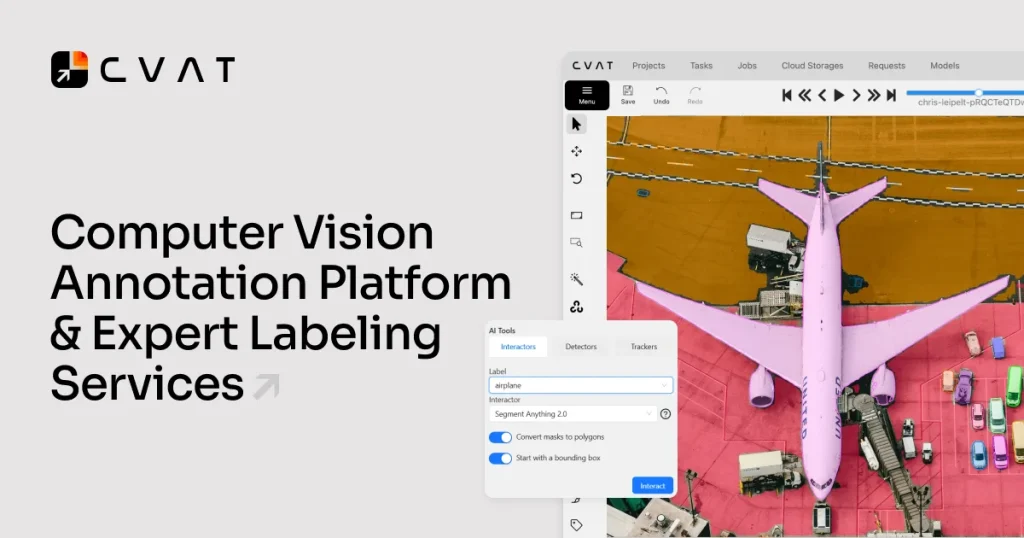
CVAT can pre-label data using integrated AI models or your own custom models served through its serverless infrastructure, which the company says speeds up labeling up to 10x. Interactive tools like intelligent scissors also cut down the clicks needed for polygon and mask work.
Developer tooling and formats
CVAT ships a Python SDK, a CLI, and a REST API, so you can wire annotation into a training pipeline rather than treating it as a standalone app. With 20-plus import and export formats, it slots into whatever framework you already use.
Team collaboration and quality control
Projects, task assignment, role-based access, and review workflows let multiple annotators work together, while management analytics track annotator productivity so you can spot bottlenecks. Cloud storage connectors for AWS S3, Google Cloud Storage, and Azure Blob keep large datasets out of local disk.
How Much Does CVAT Cost?
The self-hosted Community edition is free under the MIT license, so your only cost is server hosting and the DevOps time to maintain it. If you prefer hosted, CVAT Online has a free tier (10 tasks, 500MB), a Solo plan at $23/mo billed annually ($33 monthly), and a Team plan from $46/mo annually ($66 monthly, two-user minimum, $23 per extra seat). Enterprise on-prem licensing starts around $12,000/year.
Against competitors, that is a strong value story. Roboflow’s private-data plans start around $249/mo, and Labelbox is priced for organizations processing hundreds of thousands of annotations. Label Studio’s open-source edition is also free, but its enterprise tier runs well into four figures per month.
| Plan | Price | Plan Features | Best For |
|---|---|---|---|
| Free (Cloud) | Free | Up to 10 tasks, 500MB data, capped AI calls and compute | Trying CVAT Online or small one-off projects |
| Solo | $23/mo annual ($33 monthly) | Single user, higher task and storage limits | Individual researchers and solo annotators |
| Team | From $46/mo annual ($66 monthly), 2-user min | Adds collaboration and analytics; +$23/seat annual | Small to mid-size annotation teams |
| Enterprise | From ~$12,000/yr | On-prem hosting, SSO/SAML, RBAC, support | Large orgs needing private hosting and controls |
| Community (Self-hosted) | Free (MIT) | Unlimited self-hosted; you cover server and DevOps costs | Teams that want full control and no per-seat fees |
Who Is CVAT Best For?
Use CVAT if you are an ML engineer or annotation team building computer vision datasets, especially with video or 3D data, and you want either open-source control or a low-cost hosted option. The self-hosted route is ideal if you have DevOps support and want to avoid per-seat fees entirely.
Skip CVAT if you need a polished, beginner-friendly interface with zero setup, or if your work spans text, audio, and time-series data rather than just vision. In those cases a more turnkey tool will get you labeling faster.
What Are the Best CVAT Alternatives?
Label Studio
The closest open-source rival, Label Studio is free forever in its Community edition and goes beyond vision to handle text, audio, and time-series data. It has a more polished UI but weaker frame-by-frame video tooling. Enterprise pricing starts in the low thousands per month.
Roboflow
Roboflow is the friendlier, faster-to-start option with strong AI-powered labeling and an end-to-end dataset-to-deployment workflow. Public projects are free; private-data plans start around $249/mo, so it costs more than self-hosted CVAT.
Labelbox
Labelbox is an enterprise data platform supporting images, video, text, audio, and documents with active learning built in. It makes sense at high annotation volumes but is hard to justify for smaller teams on a budget.
Final Verdict: Is CVAT Worth It?
CVAT is the strongest open-source annotation tool for computer vision, full stop. Its video interpolation and 3D point cloud support are genuinely best-in-class, the format support is exhaustive, and the developer tooling makes it pipeline-friendly. For teams that can self-host, the licensing cost is zero.
The catches are real: the interface is built for power users, self-hosting demands Docker and ongoing maintenance, and the enterprise tier gets expensive. But if you do serious vision work and either have DevOps support or are happy on the affordable cloud plans, CVAT is an easy recommendation.
CVAT Pros & Cons
What We Like
- Fully open-source (MIT) and free to self-host with no data or user caps
- Best-in-class video annotation with keyframe interpolation and object tracking
- Handles images, video, and 3D point clouds plus 20+ export formats (YOLO, COCO, PASCAL VOC)
- AI-assisted auto-annotation speeds up labeling and integrates custom models
- Mature project with 16k+ GitHub stars, Python SDK, CLI, and REST API
What Could Be Better
- Self-hosting requires Docker and ongoing DevOps maintenance
- Interface is power-user oriented and has a steep learning curve
- Enterprise on-prem licensing starts around $12,000/year
- Cloud free tier is tight at 10 tasks and 500MB
CVAT FAQ
What is CVAT?
CVAT (Computer Vision Annotation Tool) is an open-source data annotation platform for labeling images, video, and 3D point clouds to build datasets for computer vision and machine learning. It supports bounding boxes, polygons, masks, keypoints, and cuboids, plus AI-assisted auto-labeling.
How much does CVAT cost?
The self-hosted Community edition is free under the MIT license. CVAT Online has a free cloud tier, a Solo plan at $23/mo billed annually ($33 monthly), and a Team plan from $46/mo annually ($66 monthly, two-user minimum). Enterprise on-prem starts around $12,000/year.
Is CVAT worth it?
Yes, if you do serious computer vision work. It is the most capable open-source annotation tool for video and 3D, and self-hosting costs nothing in licensing. The trade-off is a steep learning curve and DevOps effort if you self-host.
What are the best CVAT alternatives?
Label Studio is the top open-source alternative and handles text and audio too. Roboflow is more beginner-friendly with strong AI tooling (from ~$249/mo for private data). Labelbox is an enterprise-grade data platform geared toward high-volume annotation.
Does CVAT offer a free plan?
Yes. The self-hosted Community edition is completely free under the MIT license with no user or data caps. CVAT Online also has a free cloud tier limited to 10 tasks and 500MB of data.
Who is CVAT best for?
CVAT is best for ML engineers and annotation teams building image, video, and 3D vision datasets, particularly those who want open-source control or specialize in frame-by-frame video labeling.






