Finlens Review (2026): Pricing, Features & Honest Verdict
TLDR
Finlens is an AI accounting co-pilot built on top of QuickBooks. Automates categorization, provides real-time MRR/ARR/burn dashboards, and generates tax-ready reports. No migration needed. Best for: startup founders using QuickBooks. Price: free (from $49/mo). Rating: 7.7/10
What is Finlens?
We found Finlens on Product Hunt where it earned 735 upvotes as “AI accounting for founders and accountants.” The key insight: most startup founders already use QuickBooks but hate the experience. Finlens does not try to replace it. It sits on top of QuickBooks and makes it actually useful.
Founded in 2024 by Md Halim and Pawan Rochwani in San Francisco, Finlens went through Y Combinator and received investment from Accel. They have analyzed over 30 million transactions across their user base. The team is small (about 6 people) but the backing is strong.
| Plan | Price | Plan Features | Best For |
|---|---|---|---|
| Starter (Free) | $0 | Up to $50K/mo expenses, 1 bank account, 1 user | Early-stage founders |
| AI Accounting | $49/mo | Up to $100K/mo expenses, 3 bank accounts, unlimited users | Growing startups needing AI categorization |
| Full-Service | Custom | Unlimited banks, Stripe reconciliation, monthly bookkeeping | Funded startups wanting hands-off accounting |
What Finlens Gets Right
Zero Migration Is the Killer Feature
Every competing product asks you to move your data. Export from QuickBooks, import into the new tool, reconcile the differences, retrain your accountant. Finlens skips all of that. Connect your QuickBooks account and it starts working immediately with two-way real-time sync. Your accountant keeps using QuickBooks. You get a better interface on top of it. This is the smartest architectural decision in the product.
Dashboards That Founders Actually Need
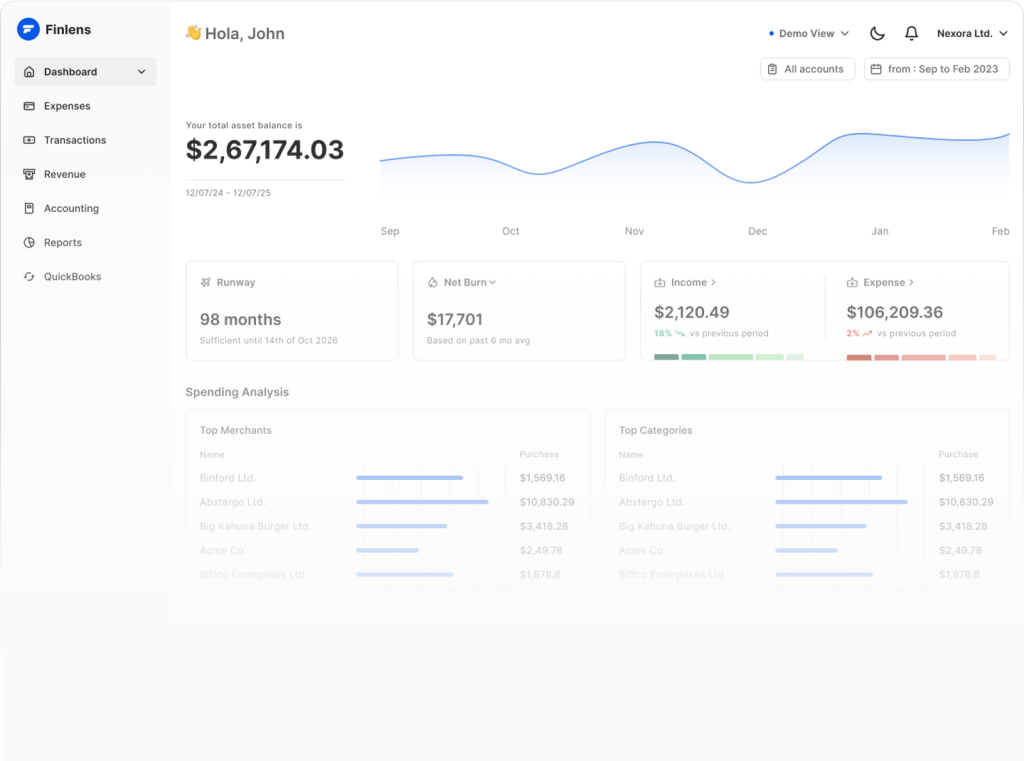
QuickBooks shows you debits and credits. Finlens shows you MRR, ARR, burn rate, runway, cash flow, and vendor spend. These are the metrics founders discuss in board meetings and investor updates. Having them update in real-time from your actual accounting data (not estimates in a spreadsheet) saves hours of manual reporting every month.
AI Categorization Saves the Most Time
Transaction categorization is the most tedious part of bookkeeping. Every Stripe payment, every AWS charge, every team lunch on the company card needs a category. Finlens AI learns your patterns and categorizes transactions automatically with GAAP compliance. It handles split transactions and receipt capture too. For a solo founder doing their own books, this reclaims hours every month.
The Free Plan Actually Works
Up to $50K per month in expenses, 1 bank account, dashboards, and tax-ready reports. For a pre-seed or bootstrapped startup, this covers your needs completely at zero cost. Most AI accounting tools start at $100+/month. Finlens gives you real value before asking for payment.
Where Finlens Falls Short
US Only
If your company is based outside the US or uses international accounting standards, Finlens does not support you yet. International expansion is planned within 6 months, but today it is a US-only product. For the many startups incorporated in the US but operating globally, this creates a gap.
QuickBooks Dependency
No QuickBooks, no Finlens. If you use Xero, FreshBooks, or Wave, you are out of luck. This is a deliberate product decision (focus on one integration deeply rather than many shallowly), but it limits the addressable market. If you ever want to switch away from QuickBooks, Finlens goes with it.
Tiny Team
Six people building an AI accounting product. Support response times may be slow. Feature requests will take time. If a critical bug affects your financial data, the resolution depends on a very small team. For accounting software where accuracy matters, this is worth considering.
Finlens Pricing Breakdown
The Starter plan is free for up to $50K/month in expenses with 1 bank account. AI Accounting at $49/month (currently discounted from $99) supports $100K/month expenses, 3 bank accounts, unlimited users, and includes AI-powered categorization with Slack support. Full-Service is custom pricing with Stripe reconciliation, monthly bookkeeping, and unlimited integrations.
Who Should Use Finlens
US-based startup founders who use QuickBooks and want real-time financial dashboards and automated bookkeeping. The free plan makes it a no-brainer for early-stage companies. CPA firms managing multiple startup clients will benefit from the multi-account dashboard.
If you use Xero or operate outside the US, wait for their expansion or look at alternatives.
Alternatives
QuickBooks
The system Finlens builds on top of. QuickBooks handles core accounting but lacks startup-specific dashboards (MRR, burn rate, runway) and intelligent categorization. Using both together gives you the best of traditional accounting and AI automation.
Pilot
YC-backed bookkeeping service for startups. Full-service with human accountants, not just software. More expensive than Finlens but includes dedicated bookkeeping. Better for funded startups that want to fully outsource accounting.
Xero
Cloud accounting platform popular outside the US. Better international support than QuickBooks. Does not have the startup-specific dashboards Finlens provides. Best for non-US companies or those preferring Xero ecosystem.
The Bottom Line
Finlens found the right approach: enhance QuickBooks rather than replace it. The zero-migration architecture, real-time startup dashboards, and AI categorization solve real problems. The free plan is genuinely useful. US-only and QuickBooks dependency are the main limitations. If you are a US founder already on QuickBooks, connecting Finlens is the easiest financial upgrade you can make.
Finlens Pros & Cons
What We Like
- Works on top of QuickBooks with zero migration or data transfer needed
- Free plan genuinely useful for founders with under $50K/month expenses
- Real-time MRR, ARR, burn rate, and runway dashboards in one view
- Backed by Y Combinator and Accel with 30M+ transactions analyzed
What Could Be Better
- US-only currently, no support for international accounting standards
- Requires QuickBooks as the underlying system (no standalone mode)
- Small team of ~6 people limits support capacity and feature velocity
- AI categorization accuracy requires verification, especially for unusual transactions
Finlens FAQ
Does Finlens replace QuickBooks?
No. Finlens sits on top of QuickBooks and enhances it with AI categorization, dashboards, and automation. You keep QuickBooks as your system of record. Finlens syncs bidirectionally in real-time.
Can my accountant use Finlens?
Yes. Finlens has a CPA firm dashboard for managing multiple client accounts. Accountants can view and manage 5-50+ clients from one interface, reducing back-and-forth emails.
Is the free plan limited?
The free plan covers up to $50K per month in expenses with 1 bank account and 1 user. It includes dashboards (runway, burn, cash flow) and tax-ready reports. For most pre-seed startups, this is sufficient.
What is Finlens?
AI accounting co-pilot built on QuickBooks that automates bookkeeping tasks and provides financial insights for small businesses.
How much does Finlens cost?
Finlens pricing starts at $0 (from $49/mo). A free plan is available.
Is Finlens worth it?
Finlens is an AI accounting co-pilot that sits on top of QuickBooks. It automates transaction categorization, provides real-time MRR/ARR/burn dashboards, and generates tax-ready reports. No migration required. Free plan covers up to $50K/month in expenses. YC and Accel-backed. Best for founders who need financial clarity without the overhead of a full-time accountant. We rate it 7.7/10.






