Ayven Review (2026): Pricing, Features & Honest Verdict
TLDR
Ayven is an AI coordinator from Alknoma Ltd that lives in Slack and Microsoft Teams, chases answers from named people, files approved tickets in Jira, YouTrack or Asana and keeps multi-week missions moving. Careful product, lagging paperwork. Best for: small product teams drowning in follow-ups. Price: from $179/mo billed yearly, free plan yes. Rating: 7/10.
What is Ayven?
Ayven caught our eye on Product Hunt, where it launched on 11 October 2026 with a tagline about carrying and driving a team’s agenda. The product is an agent that watches the work flowing through Slack or Microsoft Teams, cuts a request into pieces, puts an owner and a date on each piece, files those pieces in Jira, YouTrack or Asana, and then follows up with whoever owes an answer. When a reply lands in Slack, the board updates.
It comes from Alknoma Limited, a private limited company incorporated in England in November 2024 with a registered office on City Road in London, which the footer confirms with a Companies House link. Alknoma’s own site presents the company as a coordination layer for teams and lists Ayven as its only product. The vendor writes about Ayven as “she” across the marketing site and docs; we use “it” in this review.
What Are Ayven’s Key Features?
Delegation that waits for your yes
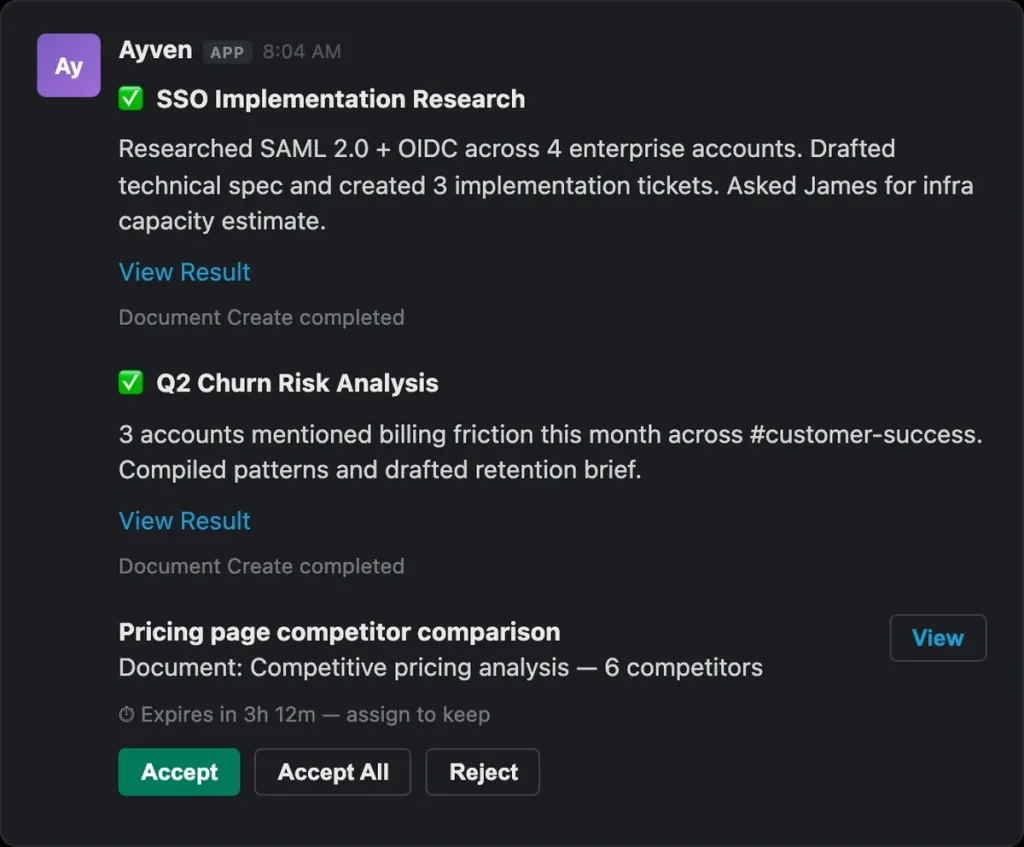
Ayven never writes to a tracker straight from a conversation. The architecture docs describe a consent pipeline: the agent proposes operations, each with a readable consent message, a person approves from Slack, Teams or the web app, and only then does an executor apply exactly that operation. The write surface is a closed set: create ticket, assign, update state, comment, set parent or sprint, add or remove a label, link tickets. Some types can be set to auto-approve. One documented exception: the status comment it leaves on an overdue ticket posts without approval.
Missions for work that outlives attention
A mission is how Ayven holds a multi-week initiative. It records who each wait is on and a give-up date; when that date passes it moves the question to someone else with the context attached rather than asking again. It wakes itself on a weekly rhythm, re-checks the details a mission depends on (who owns what, who is away) and emails you when a launch projects past its date. Missions can be Open, Paused (blocked on input, or circuit-broken after repeated failures) or Closed, and may reopen if conditions change.
Research and documents in your own storage
Ask a question and Ayven searches the open web, your connected documents or both, with web sources listed per question and a confidence level on findings. Documents are planned section by section and written into Google Drive or Notion, or kept inside Ayven if you connect nothing. A team intelligence layer rereads recent chat once a day to learn who knows what; the docs say DMs and private channels are excluded and that what it learns is stored as scored statements rather than raw messages.
An HTTP API and an MCP endpoint
Any account can create an access key in the web app and message its agent over HTTP, with optional per-key rate limits and expiry. The same key connects Claude Code and similar MCP clients, which gain tools to send messages, read transcripts, list pending approvals and answer open questions. The agent’s own tools are built to hand approvals back to a human rather than letting another AI decide them. The FAQ still says API access is for enterprise customers only, which the docs flatly contradict.
What Is It Like to Use Ayven?
We did not install Ayven, so this is the workflow as the vendor’s docs and site describe it. Slack is a normal OAuth install with a fixed scope set. Microsoft Teams is rougher: the footer link downloads a .zip app package (version 1.6.2, dated July 2026) that an admin uploads by hand. The package description says an Ayven account is required, created through Google sign-in or an email magic link; the first person in a workspace creates the team’s agent and teammates join it with a command.
Nothing has to be connected on the first day. Ayven files native web tickets, keeps its own asks, and sends a morning email listing the ones due from you. Connecting a tracker happens in the web app and uses an API token for Jira Cloud, a permanent token for YouTrack and a personal access token for Asana, verified live before anything is saved. GitHub is read-only and connected per user. There is no background sync: every board check is a live query with your credentials.
Google Drive is the sore spot. A dedicated docs page explains that Google has not yet verified the app, so every connection shows Google’s unverified-app warning, and Google limits how many people may connect while the review is open. The permission requested is the full one: see, edit, create and delete your Drive files, narrowed afterwards to one folder. The live demo at /try is a nicer first touch: type a request in your own words and the real model plans a mission in about two minutes, with no signup.
Where Does Ayven Fall Short?
The FAQ has not kept pace with the product. It says the Standard plan has one execution slot and that anyone needing more should contact sales for enterprise, while the pricing page sells a Premium plan with three autonomous and five interactive slots. It lists SharePoint as coming soon, while the marketing site, the docs and the Teams package show SharePoint reads as live, plus GitHub, which the FAQ never mentions. It says connections run on OAuth; the architecture page shows the three trackers use copied tokens instead.
Security claims outrun the paperwork. “SOC 2 Type II Certified” sits in every footer and in the FAQ, but it is a label with a small icon, not a link: there is no trust page, no auditor is named, and the FAQ says only that enterprise customers can request the report. We could not verify the certification from anything public.
The legal pages come from a policy generator and they disagree with the FAQ. The FAQ promises a 14-day money-back guarantee on subscriptions; the terms, last updated 22 January 2026, contain no refund clause at all, only cancellation at the end of the paid term and automatic renewal. The terms list Visa and Mastercard as the accepted cards; the FAQ adds American Express.
The privacy policy carries a “last updated” date of 31 December 2027, which is in the future. It names OpenAI, ElevenLabs, Google Cloud AI and Anthropic as AI providers, where the FAQ names only Anthropic and OpenAI, and the no-training promise lives in the FAQ and docs rather than in the policy itself.
Smaller gripes: no customer logos or testimonials appear anywhere on the site, the marketing site’s line about teams hiring a chief of staff at a $160,000 median salary cites no source, and Teams sideloading will stall in any organisation whose admins block custom apps. Ayven’s own FAQ says it works best in English, with weaker research on non-English sources.
How Much Does Ayven Cost?
Ayven starts at $179 per month on the Standard plan when charged yearly, which is $2,148 paid in advance, or $199 month to month with no commitment. Standard removes credit counting entirely and gives one autonomous slot (background work: monitoring, scheduled runs, discovery) plus three interactive slots (direct messages to Ayven). Premium is $358 per month yearly or $398 monthly for three autonomous and five interactive slots, so it costs exactly double Standard for triple the background concurrency. Enterprise is custom, with unlimited slots, SSO and data residency options.
The Free plan is a real free plan: $0, no card, 500 credits a month that reset monthly, one autonomous and one interactive slot, and every integration. A credit is one finished run, from a web search to a filed ticket. Credit packs top it up without a subscription: 500 credits for $40 (8 cents each) or 2,000 for $100 (5 cents each). Packs never expire, carry over when you upgrade, and are non-refundable per the FAQ. When credits run out Ayven pauses rather than charging you.
The arithmetic sets the crossover. At 5 cents a credit, $199 buys 3,980 runs, so a team finishing fewer than about 4,000 runs a month is cheaper on the Free plan plus packs than on Standard, provided one interactive slot is enough. The FAQ says a slot delivers 6,000 to 12,000 executions a month depending on complexity, which puts a busy Standard plan at 1.5 to 3 cents a run. “Unlimited” is defined by concurrency, not volume, and we saw no fair-use clause in the terms that narrows it.
Against the field, Ayven’s flat pricing favours bigger teams. Members use the plan at no extra cost, so ten people pay $179 a month in total. A per-seat assistant builder we checked charges $29.99 per user per month for 3,000 credits, so ten people pay $299.90. The AI add-on inside a leading all-in-one work platform is $9 per user per month on top of a plan from $7 yearly. A credit-based rival starts at $100 a month for 40,000 credits. Ayven is dearer for three people and cheaper from about six seats up.
| Plan | Price | Plan Features | Best For |
|---|---|---|---|
| Free | $0 | 500 credits a month (one credit per finished run), 1 autonomous slot, 1 interactive slot, all integrations, basic support, no card | Trying Ayven with a whole team in one channel |
| Standard | $179/mo billed yearly or $199/mo monthly | Unlimited usage with no credit count, 1 autonomous slot, 3 interactive slots, all integrations, priority support, advanced analytics | Teams finishing more than about 4,000 runs a month |
| Premium | $358/mo billed yearly or $398/mo monthly | Unlimited usage, 3 autonomous slots, 5 interactive slots, all integrations, priority support, advanced analytics | Teams running several background missions at once |
| Enterprise | Custom | Unlimited slots, custom deployment, dedicated infrastructure, SSO, data residency options, account manager | Organisations needing SSO, residency and the SOC 2 report |
| Credit packs | 500 credits for $40 or 2,000 for $100 | 8 cents or 5 cents per run, never expire, carry over on upgrade, non-refundable | Free-plan teams that run out before the monthly reset |
Who is Ayven Best For?
Use Ayven if your team is between five and fifty people, already runs on Slack, tracks work in Jira, YouTrack or Asana, and loses days to “any update?” messages. The approval gate means you can let it chase people without fearing a rogue ticket, and the Free plan’s 500 runs are enough to find out whether the follow-ups land. Product managers and founders who play chief of staff by default get the most from it.
Skip Ayven if your tracker is anything other than Jira, YouTrack or Asana, since it can only read GitHub and cannot write to any other board. Skip it if your IT department blocks sideloaded Teams apps or unverified Google connections, since both friction points are live today. Teams that need the SOC 2 report in hand before a trial run should ask for it first, and anyone who needs written refund terms should get them in the contract, because the public terms do not provide them.
Best Ayven Alternatives
Lindy
Lindy lets you build AI assistants that answer in Slack, email and elsewhere, and charges per seat: every active user is billed from $29.99 a month for 3,000 credits, with top-ups at $10 per 1,000 credits and a one-time $50 credit allowance that lasts seven days. It is far more general than Ayven and far less opinionated about follow-ups and ownership; you assemble the chasing behaviour yourself.
ClickUp Brain
ClickUp bundles its AI inside the work platform itself. The Brain AI add-on is $9 per user per month on top of a plan that runs from free to $7 per user per month charged yearly ($10 monthly), with an Everything AI tier at $28 per user per month and extra AI credits at $10 per 10,000. The catch is that you have to move your work into ClickUp; Ayven sits on top of the tracker you already have.
Viktor
Viktor is a credit-based agent for operational work with a free tier that fronts you $100 of credits and a Team plan at $100 a month for 40,000 shared credits that carry over. Its page title still advertises plans from $50 a month, which none of the cards show. It is closer to a general operator than to a coordinator, and it does not have Ayven’s named-wait and give-up-date model.
Final Verdict: Is Ayven Worth It?
Ayven is one of the more thoughtful agent products we have looked at in recent weeks. The approval gate with a closed set of operations, live reads instead of a mirror copy of your tracker, named waits with give-up dates, and an MCP endpoint that refuses to let another AI approve things for you all show a team that has thought about what goes wrong when software messages your colleagues. Flat pricing with a usable free plan is the right shape for a product whose value grows with headcount.
What holds it to a 7 is everything around the product: a FAQ that contradicts the pricing page and the docs, a SOC 2 claim with nothing public behind it, template terms with no refund clause under a 14-day guarantee, a privacy policy dated in the future, an unverified Google Drive connection and a Teams app you install by hand. Start on the Free plan, run it in one Slack channel against one tracker for a month, and upgrade when the credits run out and the follow-ups have stuck.
Ayven Pros & Cons
What We Like
- Every ticket write waits for a human yes, from a closed set of operations with a full approval trail
- Missions record who each wait is on and a give-up date, then reroute the question when the date passes
- Flat team pricing: members use the plan at no extra cost, and the free plan gives 500 runs a month with no card
- Live reads of your tracker with your own credentials, no background sync or shadow copy
- Open HTTP API and MCP endpoint on every account, so Claude Code and similar clients can message the agent
What Could Be Better
- FAQ contradicts the pricing page and docs on slots, API access, integrations and OAuth
- SOC 2 Type II claim has no trust page, auditor or report link behind it
- Template terms have no refund clause despite a 14-day guarantee in the FAQ, and the privacy policy is dated 31 December 2027
- Microsoft Teams requires sideloading a .zip package and Google Drive still shows Google's unverified-app warning
Ayven FAQ
What is Ayven?
Ayven is an AI coordinator from Alknoma Limited that lives in Slack and Microsoft Teams. It cuts requests into owned, dated pieces, files them in Jira, YouTrack or Asana once you approve, follows up with the people who owe answers and keeps multi-week missions moving.
How much does Ayven cost?
The Standard plan is $179 a month charged yearly or $199 month to month, with unlimited usage and 1 autonomous plus 3 interactive slots. Premium is $358 yearly or $398 monthly for 3 autonomous and 5 interactive slots. Credit packs cost $40 for 500 or $100 for 2,000 and never expire.
Is Ayven worth it?
For Slack-based teams that lose days to follow-ups and track work in Jira, YouTrack or Asana, yes. The approval gate and flat team pricing are strong. The stale FAQ, template legal pages and unverified SOC 2 claim mean larger buyers should ask for documents before paying.
What are the best Ayven alternatives?
Lindy charges from $29.99 per user per month for 3,000 credits. ClickUp Brain is a $9 per user per month add-on on top of a plan from $7 per user per month yearly. Viktor offers a free tier with $100 of credits and a Team plan at $100 a month for 40,000 credits.
Does Ayven offer a free plan?
Yes. The Free plan costs $0 with no card, includes 500 credits a month that reset monthly, one autonomous and one interactive slot, and every integration. Each finished run uses one credit, and Ayven pauses rather than charging you when credits run out.
Who is Ayven best for?
Product teams of five to fifty people on Slack or Microsoft Teams who already use Jira, YouTrack or Asana and want an agent to chase answers and file tickets with approval. Teams on any other tracker, or whose IT blocks sideloaded Teams apps, should wait.






