GoAccess Review (2026): Pricing, Features & Honest Verdict
TLDR
GoAccess is a blazing-fast, open-source web log analyzer with real-time terminal and HTML dashboards. Best for: developers and sysadmins who want server analytics without JavaScript tracking. Price: Free (open source). Rating: 7.8/10.
What is GoAccess?
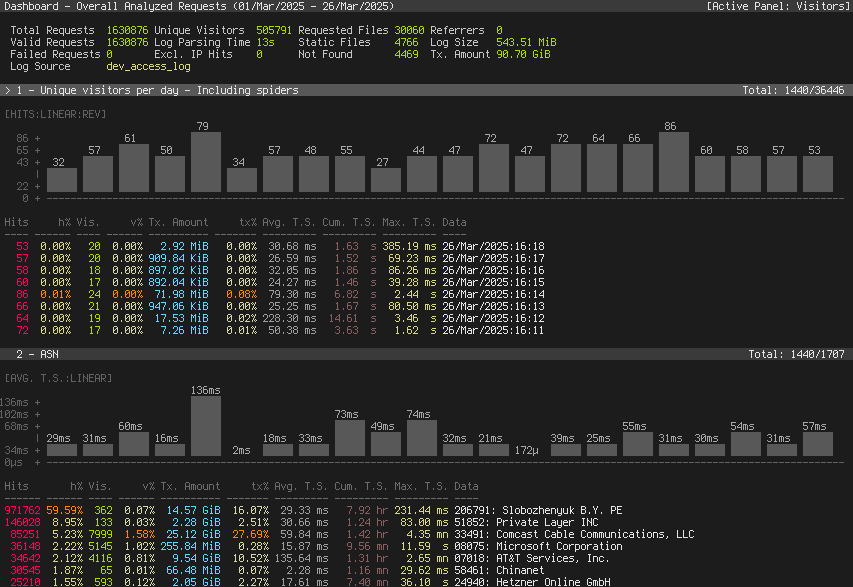
GoAccess is an open-source, real-time web log analyzer built in C. It parses your web server logs (Nginx, Apache, Caddy, and others) and gives you a visual dashboard right in your terminal using ncurses. You can also generate standalone HTML reports with interactive charts and a WebSocket-powered live view.
The key selling point is speed. Written in C with careful memory management, GoAccess chews through millions of log lines in seconds. There is no JavaScript snippet to add to your site, no third-party data collection, and no performance penalty for visitors. It reads what your server already records.
Key Features
Real-Time Terminal Dashboard
The ncurses-based terminal interface is where GoAccess shines. It updates in real-time as new requests hit your server. You get panels for visitors, requested files, static requests, 404s, referring sites, operating systems, browsers, and more. Keyboard navigation makes it surprisingly fast to dig through data.
HTML Report Generation
For sharing with teammates who prefer a browser, GoAccess generates a self-contained HTML file with charts and tables. The real-time HTML mode uses WebSockets to push updates to the dashboard as logs stream in. No external dependencies needed.
Multi-Format Log Support
GoAccess handles Combined Log Format, Common Log Format, and custom formats. It works with Nginx, Apache, Amazon S3, Amazon CloudFront, Elastic Load Balancer, and Caddy logs. If your server writes logs, GoAccess can probably read them.
GeoIP Tracking
With GeoIP databases (MaxMind), GoAccess maps visitor locations by country and city. Useful for understanding geographic traffic distribution without any client-side tracking.
Incremental Log Processing
GoAccess supports incremental processing with on-disk B+ trees, so you can process logs over time without re-parsing everything from scratch. This is critical for servers generating massive log volumes.
Pricing
GoAccess is completely free and open source under the MIT license. There are no paid tiers, no premium features behind a paywall, and no usage limits. You download it, compile it (or install via your package manager), and run it. The only cost is your time setting it up and maintaining your server.
GoAccess in Practice
Setting up GoAccess typically takes about 10 minutes. Install via your package manager (apt, brew, yum), point it at your log file, and the terminal dashboard appears immediately. For HTML output, pipe it to an output file and serve that file via your web server.
The real-time WebSocket mode requires a bit more configuration but is well-documented. Most users set up a cron job or systemd service to keep the HTML dashboard updated continuously. The learning curve is gentle if you are comfortable with the command line.
Where GoAccess struggles is when you need user-level analytics. It cannot tell you which specific user visited which page, track conversions, or show you click patterns. It sees requests, not people. If you need that level of detail, you will need a JavaScript-based tool alongside GoAccess.
Alternatives
AWStats
AWStats is another classic open-source log analyzer, built in Perl. It generates static HTML reports from server logs. AWStats is more dated in its interface and slower than GoAccess, but it has been around longer and some hosting providers bundle it automatically.
Matomo
Matomo is a self-hosted, JavaScript-based analytics platform. Unlike GoAccess, it tracks actual user behavior with page tags. It offers heatmaps, session recordings, and conversion funnels. The trade-off is added complexity and a JavaScript payload on your site.
Plausible
Plausible is a lightweight, privacy-focused JavaScript analytics tool. It offers a clean dashboard and is much simpler than Google Analytics. It requires a small script on your pages but is designed to be GDPR-compliant out of the box.
FAQ
Does GoAccess work with Nginx?
Yes. GoAccess supports Nginx access logs natively and can parse custom log formats. You just point it at your log file and it handles the rest.
Can GoAccess generate HTML reports?
Absolutely. GoAccess can output a self-contained HTML report with interactive charts. You can also run it in real-time mode with WebSocket support for a live-updating dashboard.
Is GoAccess a replacement for Google Analytics?
Not exactly. GoAccess analyzes server logs rather than tracking user behavior with JavaScript. It shows traffic patterns, popular pages, referrers, and status codes, but it cannot track clicks, conversions, or user journeys the way GA can.
How does GoAccess handle large log files?
Very well. Because it is written in C and uses an in-memory hash table, GoAccess can process millions of log lines in seconds. It is one of the fastest log analyzers available.
| Plan | Price | Plan Features | Best For |
|---|---|---|---|
| Open Source | Free | Full features, self-hosted, MIT license | Everyone |
GoAccess Pros & Cons
What We Like
- Blazing fast C-based parsing handles massive log files without breaking a sweat
- Beautiful terminal dashboard plus HTML reports, no browser dependency needed
- Zero JavaScript on your site means zero performance impact on visitors
- Completely free and open source with an active community
- Works with every major web server out of the box
What Could Be Better
- No built-in user behavior tracking like heatmaps or session recordings
- Requires command-line comfort, not ideal for non-technical teams
- Historical analysis requires feeding old logs manually or setting up pipelines
- No built-in alerting or anomaly detection features
GoAccess FAQ
Does GoAccess work with Nginx?
Yes. GoAccess supports Nginx access logs natively and can parse custom log formats. You just point it at your log file and it handles the rest.
Can GoAccess generate HTML reports?
Absolutely. GoAccess can output a self-contained HTML report with interactive charts. You can also run it in real-time mode with WebSocket support for a live-updating dashboard.
Is GoAccess a replacement for Google Analytics?
Not exactly. GoAccess analyzes server logs rather than tracking user behavior with JavaScript. It shows traffic patterns, popular pages, referrers, and status codes, but it cannot track clicks, conversions, or user journeys the way GA can.
How does GoAccess handle large log files?
Very well. Because it is written in C and uses an in-memory hash table, GoAccess can process millions of log lines in seconds. It is one of the fastest log analyzers available.
What is GoAccess?
Open-source, real-time web log analyzer with a fast terminal (ncurses) interface and optional HTML dashboard. Built in C, works with Nginx, Apache, and Caddy logs. No JavaScript tracking required.
How much does GoAccess cost?
GoAccess pricing starts at Free (open source). A free plan is available.






