Portainer Review (2026): Pricing, Features & Honest Verdict
TLDR
Portainer is a lightweight container management UI that simplifies Docker and Kubernetes operations through an intuitive web dashboard. Best for: small to mid-size dev teams managing containerized apps. Price: Free (Community Edition, up to 5 nodes) or $5/node/month (Business). Rating: 7.8/10
What is Portainer?
If you have ever SSHed into a server and fumbled through Docker CLI commands just to restart a container, Portainer was built for you. It wraps Docker, Docker Swarm, and Kubernetes in a clean web UI that lets you deploy, manage, and troubleshoot containers without memorizing every flag and subcommand.
Founded in New Zealand and now backed by over 31,000 GitHub stars, Portainer has quietly become the default “first thing I install on a new server” tool for thousands of developers. The Community Edition is genuinely free and covers most use cases. The Business tier adds RBAC, GitOps deployments, and enterprise support for teams that need governance.
The pitch is simple: visual container management without the overhead of a full orchestration platform. You get a dashboard, role-based access, environment management across multiple endpoints, and enough Kubernetes support to handle most small-to-medium workloads. It is not trying to replace Rancher or OpenShift for massive multi-cluster setups. It is trying to make containers accessible to teams that do not have a dedicated platform engineering group.
Key Features
Web-Based Dashboard
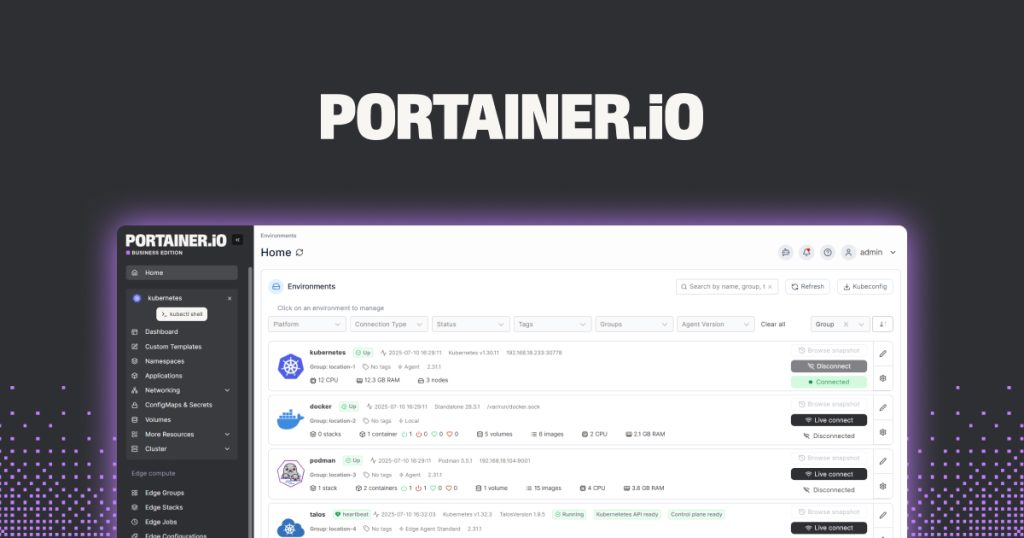
The core of Portainer is its browser-based interface. You can see all running containers, images, volumes, and networks at a glance. Starting, stopping, restarting, or inspecting containers takes a single click. Logs stream in real time, and you can open a console session directly from the browser. For developers who manage a handful of services across a few servers, this eliminates most of the context-switching between terminal windows.
Multi-Environment Management
Portainer lets you connect multiple Docker hosts, Swarm clusters, and Kubernetes endpoints from a single pane. You can switch between environments instantly, which is helpful if you manage staging, production, and development servers separately. The agent-based architecture means you install a lightweight Portainer agent on each node and connect back to your central Portainer instance.
App Templates and Stacks
Deploy common applications (WordPress, PostgreSQL, Redis, and dozens more) from pre-built templates with a few clicks. For custom deployments, you can paste in Docker Compose files or Kubernetes manifests and deploy them as stacks. The stack editor supports version control, so you can track changes over time.
Role-Based Access Control (Business)
The Business Edition adds fine-grained RBAC, letting you define who can access which environments, stacks, and resources. This matters for agencies or consultancies managing client infrastructure, where you need to isolate access without spinning up separate Portainer instances.
GitOps Deployments (Business)
Connect a Git repository and Portainer will automatically pull and deploy updates when you push changes. This turns Portainer into a lightweight CD pipeline for containerized applications, no Jenkins or ArgoCD required for simpler setups.
Kubernetes Support
Portainer’s Kubernetes interface simplifies namespace management, deployments, services, and ingress configuration. It is not as deep as dedicated Kubernetes tools like Lens or Rancher, but it covers the basics well enough for teams running a single cluster or a handful of microservices.
Pricing
Portainer keeps pricing straightforward. The Community Edition is free and open source, supporting up to 5 nodes. The Business Edition starts at $5 per node per month (annual billing), adding RBAC, GitOps, registry management, and priority support. There is no per-user pricing, which is refreshing. Enterprise deals are available for larger deployments with custom SLAs.
The free tier is genuinely useful. Five nodes covers a lot of ground for indie developers, small startups, and homelab enthusiasts. You only hit the paywall when you need governance features or manage more than five nodes.
Pros and Cons
Pros
- Generous free tier that covers most small team needs
- Dead-simple installation (single Docker container)
- Supports Docker, Swarm, and Kubernetes from one UI
- Real-time logs and console access from the browser
- Active open-source community with 31K+ GitHub stars
Cons
- Kubernetes support is surface-level compared to dedicated K8s tools
- RBAC and GitOps locked behind the paid Business tier
- UI can feel sluggish with large numbers of containers (200+)
- Limited monitoring capabilities, you still need Prometheus/Grafana
| Plan | Price | Plan Features | Best For |
|---|---|---|---|
| Community | Free | Up to 5 nodes, Docker/Swarm/K8s, community support | Solo devs and homelab users |
| Business | $5/node/month | Unlimited nodes, RBAC, GitOps, registry management, priority support | Teams needing governance and automation |
| Enterprise | Custom | Custom SLA, dedicated support, deployment assistance | Large organizations with compliance needs |
Who Should Use Portainer?
Portainer is ideal for solo developers, small teams, and DevOps engineers who manage Docker-based infrastructure without a dedicated platform team. It is particularly strong for agencies managing multiple client environments, homelab enthusiasts running self-hosted services, and startups that want container management without the complexity of Kubernetes-native tooling.
If your entire stack runs on Kubernetes at scale with dozens of clusters, you will outgrow Portainer quickly. But for Docker-centric workflows with occasional Kubernetes needs, it hits the sweet spot between CLI-only management and heavy-duty platforms like Rancher.
Alternatives
Rancher
Rancher is a full Kubernetes management platform built for multi-cluster enterprise environments. It is free and open source (backed by SUSE) and offers fleet management, security policies, and monitoring out of the box. Choose Rancher over Portainer if Kubernetes is your primary orchestrator and you need multi-cluster governance.
Lens
Lens is a desktop-based Kubernetes IDE that gives you a visual dashboard for K8s clusters. It is more focused on Kubernetes than Portainer and offers deeper resource inspection, but it runs as a desktop app rather than a web service. Pick Lens if your workflow is purely Kubernetes and you want a local development tool.
Yacht
Yacht is a lightweight Docker management UI similar to Portainer but with a simpler interface and fewer features. It is fully open source and targets homelab users who want basic container management without any enterprise features. Consider Yacht if Portainer feels like overkill for your personal server.
Final Verdict
Portainer earns its reputation as the easiest way to manage Docker containers through a browser. The free Community Edition is legitimately useful, the installation takes under a minute, and the UI is intuitive enough that junior developers can start managing containers without a Docker certification. The Kubernetes support is functional but not its strongest suit. If your world is primarily Docker and Docker Compose, Portainer is hard to beat at this price point. Teams running serious Kubernetes workloads should look at Rancher or Lens for deeper cluster management.
Portainer Pros & Cons
What We Like
- Generous free tier covering most small team needs
- One-minute installation via a single Docker container
- Supports Docker, Swarm, and Kubernetes from one dashboard
- Real-time logs and browser-based console access
- Active open-source community with 31K+ GitHub stars
What Could Be Better
- Kubernetes support is surface-level compared to dedicated K8s tools
- RBAC and GitOps locked behind the paid Business tier
- UI can lag with large container counts (200+)
- Limited built-in monitoring, still need Prometheus/Grafana
Portainer FAQ
Is Portainer really free?
Yes. The Community Edition is free and open source, supporting up to 5 nodes with Docker, Swarm, and Kubernetes management. The Business Edition adds enterprise features starting at $5/node/month.
Can Portainer manage Kubernetes clusters?
Yes, Portainer supports Kubernetes for namespace management, deployments, services, and ingress. However, its K8s support is less deep than dedicated tools like Rancher or Lens.
How do I install Portainer?
Run a single Docker command to deploy the Portainer container. It takes under a minute and exposes a web UI on port 9443. For Kubernetes, you can deploy via Helm chart.
What is Portainer?
Lightweight container management UI for Docker, Swarm, and Kubernetes with a free Community Edition supporting up to 5 nodes.
How much does Portainer cost?
Portainer pricing starts at $5/node/month. A free plan is available.
Is Portainer worth it?
Portainer is the easiest way to manage Docker containers through a browser. The free tier is generous, the UI is clean, and installation takes under a minute. Kubernetes support is functional but shallow compared to dedicated K8s tools. We rate it 7.8/10.






