Site Spy Review (2026): Pricing, Features & Honest Verdict
TLDR
Site Spy is an AI-powered website change monitoring tool that watches webpages and alerts you only when something meaningful changes. The plain-English AI filters are the standout: they kill the noise that makes most monitors useless. Best for: indie makers and small teams. Price: free plan, Pro EUR 8/mo. Rating: 7.9/10.
What is Site Spy?
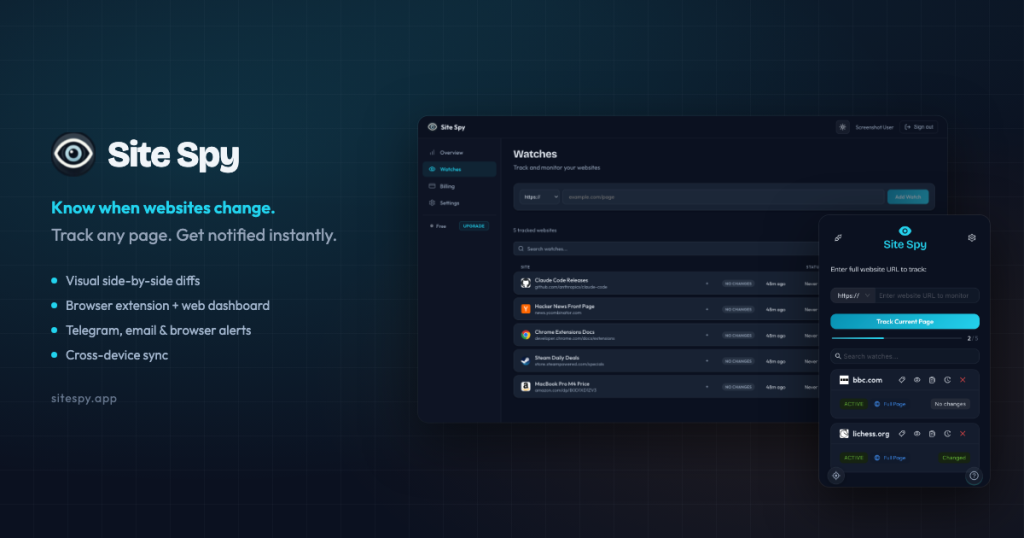
Site Spy is a tool that watches webpages for you and tells you when they change. You point it at a URL, it takes snapshots on a schedule, and when the page updates it sends you an alert. That covers the obvious uses (competitor price drops, new job postings, restocked products, changed terms of service) and a lot of less obvious ones, like watching a regulator’s page for a policy update or a grant program for a new application window. The trick is that most pages change constantly in ways you do not care about, and Site Spy is built around filtering that noise out.
It is an indie product built by developer Vitaly Kuprin, with billing handled through Lemon Squeezy. That solo origin shows up in good ways and bad ways. On the good side, it ships modern features that older incumbents do not have, like an MCP server that lets Claude or Cursor query your monitoring history directly. On the bad side, there is no big company behind it, so you are betting on one maker keeping the lights on. We weighed both when we dug into it, and the product itself holds up well: the dashboard is clean, the extensions work, and the AI filtering is more than a marketing line.
What Are Site Spy’s Key Features?
AI Smart Filters
This is the reason to pick Site Spy over a basic monitor. Instead of writing CSS selectors or regex to define what counts as a change, you describe it in plain English: “alert me on price drops” or “watch for new listings.” The AI then configures the watch and ignores irrelevant churn like rotating ads, timestamps, and session tokens. For people who do not want to learn a query syntax, this turns a fiddly setup into one sentence.
The practical payoff is fewer junk alerts. Most monitoring tools fire every time a single character on the page moves, which trains you to ignore them. By having the AI decide what is meaningful, Site Spy keeps the alert that actually matters near the top of the pile. It is not perfect, and on very dynamic pages you will still tune things, but it is the closest we found to a setup-free experience.
Visual Diff and Element Inspector
When a change fires, Site Spy shows a visual diff with additions in green and removals in red, so you see exactly what moved without re-reading the whole page. This sounds minor until you are checking ten alerts a day and need to know in two seconds whether each one matters. The color-coded diff makes triage fast.
The element inspector lets you scope monitoring to a specific section of a page rather than the entire document. If you only care about the price block on a product page, you point it at that element and ignore the rest. On busy sites where headers, banners, and recommendation widgets change constantly, this is the difference between a useful monitor and a noisy one.
Multi-Channel Alerts
Alerts go out over email, Telegram, browser push, webhooks, and RSS. The webhook and RSS options matter if you want to pipe changes into your own tooling or a feed reader instead of living in another inbox. Telegram is a nice touch for makers who already run bots there.
MCP Server and Browser Extensions
Site Spy exposes an MCP server, so AI assistants like Claude and Cursor can read your monitoring data and history as a tool. Combined with Chrome and Firefox extensions for quickly adding watches as you browse, this is a more modern, developer-friendly setup than most competitors offer. The Business tier allows up to 50,000 API requests per day for heavier automation.
How Much Does Site Spy Cost?
Site Spy starts free and tops out at EUR 99/mo. The free-forever plan gives you 2 watched URLs, a 1-hour minimum check interval, 30-day history, and 100 read-only API requests a day. It is genuinely free, not a countdown trial, which makes it easy to test on a real page before paying.
The paid tiers are where the value shows. Starter is EUR 4/mo for 25 URLs and 10-minute checks. Pro, the popular pick, is EUR 8/mo for 100 URLs, 1-minute checks, 1-year history, and 10,000 API requests a day. Business jumps to EUR 99/mo for 500 URLs, 5 team seats (extra seats are EUR 15 each), and 50,000 API requests a day.
Against the field, this is aggressive. Visualping’s paid plans start at $50/mo for its Personal tier. Distill.io’s paid plans begin at $15/mo. Site Spy gives you 100 monitored URLs with 1-minute resolution for EUR 8, which is the kind of gap that makes the indie-risk tradeoff worth taking for a lot of people.
One thing to watch is the jump from Pro to Business. There is no middle tier, so a small team that outgrows Pro’s single-user setup goes straight to EUR 99/mo. For most solo makers and tiny teams that will not matter, since 100 URLs and a 1-minute check cadence cover a lot of ground. But if you need several seats without 500 URLs of capacity, the pricing ladder has a steep step. All paid tiers are cancel-anytime, and the lack of a card-required trial is offset by the free plan doubling as your test drive.
| Plan | Price | Plan Features | Best For |
|---|---|---|---|
| Free | EUR 0 | 2 watched URLs, 1-hour min checks, 30-day history, 100 API req/day | trying it out on a couple of pages |
| Starter | EUR 4/mo | 25 URLs, 10-min checks, 90-day history, 1,000 API req/day | solo makers tracking a handful of sites |
| Pro | EUR 8/mo | 100 URLs, 1-min checks, 1-year history, 10,000 API req/day | power users and small teams |
| Business | EUR 99/mo | 500 URLs, 5 seats, 50,000 API req/day, 1-year history | agencies monitoring at scale |
Who is Site Spy Best For?
Use Site Spy if you are an indie maker, developer, or small team that wants reliable change monitoring without paying enterprise prices. If you track competitor pricing, watch for new listings, or need to know when a page changes and you want the AI to do the noise filtering for you, this fits cleanly. The MCP server makes it especially appealing if you already work inside Claude or Cursor.
Skip Site Spy if you need an enterprise SLA, dedicated support, or a vendor with a long track record and SOC 2 paperwork. The solo-maker model that makes it cheap also makes it riskier for mission-critical monitoring. US buyers who hate EUR billing or want a 30-day money-back guarantee on paid plans may also prefer a larger competitor.
Best Site Spy Alternatives
Visualping
Visualping is the established leader in website change detection, with a free tier (5 pages) and a Personal plan starting at $50/mo. It is more polished and has years of track record, but it costs much more than Site Spy for comparable monitoring volume. Pick Visualping if you want a proven vendor and are willing to pay for it; pick Site Spy if price and AI filtering matter more.
Distill.io
Distill.io offers a strong free tier (25 pages, 5 in the cloud) and paid plans from $15/mo, with both local browser monitoring and cloud monitoring. It is more configurable than Site Spy for technical users who like fine-grained control, but it lacks the plain-English AI filtering and the MCP integration. A good choice if you want power-user control over a simple AI layer.
Wachete
Wachete is the budget incumbent, starting around $5.40/mo and scaling up to $329/mo for high-volume needs. It is functional and cheap but feels dated next to Site Spy’s interface and AI filters. Consider Wachete if you want a long-standing low-cost option and do not care about the modern touches.
Final Verdict: Is Site Spy Worth It?
Site Spy gets the fundamentals right and prices them to undercut everyone. The AI Smart Filters solve the real problem with change monitoring, which is not detecting changes but ignoring the ones you do not care about. At EUR 8/mo for 100 URLs with 1-minute checks, plus an MCP server and browser extensions, it is one of the better-value tools we found in this space. The free tier lets you confirm it works for your pages before you spend anything.
The honest caveats are the indie-maker risk, EUR-only billing, and a thin public track record. If you need enterprise guarantees, look at Visualping instead. But for indie makers, developers, and small teams who want smart, affordable monitoring and like the AI-assistant integration, Site Spy earns a 7.9 and a clear recommendation. The rating reflects a product that does its core job better than tools costing five times as much, held back from a higher score only by the single-maker risk and the EUR-only checkout. Start on the free plan, confirm it catches the changes you care about on your real pages, and move to Pro once you have more than two pages to watch.
Site Spy Pros & Cons
What We Like
- AI Smart Filters let you describe what matters in plain English and ignore noise like timestamps and ads
- Pro plan is just EUR 8/mo with 100 URLs and 1-minute checks, far cheaper than Visualping
- Genuine free-forever tier (2 URLs) plus an MCP server so Claude and Cursor can query your monitoring history
- Multi-channel alerts: email, Telegram, browser push, webhooks, and RSS
What Could Be Better
- It is a solo indie product, so there is no enterprise SLA and longevity is a fair concern
- Billing is EUR-only through Lemon Squeezy, which adds friction for US buyers
- The free tier is tight: only 2 URLs and a 1-hour minimum check interval
Site Spy FAQ
What is Site Spy?
Site Spy is an AI-powered website change monitoring tool. It watches webpages you choose and alerts you when something meaningful changes, using plain-English AI filters to ignore noise like ads and timestamps.
How much does Site Spy cost?
Site Spy has a free-forever plan with 2 watched URLs. Paid tiers are Starter at EUR 4/mo (25 URLs), Pro at EUR 8/mo (100 URLs, 1-minute checks), and Business at EUR 99/mo (500 URLs, 5 seats).
Is Site Spy worth it?
For indie makers and small teams, yes. At EUR 8/mo the Pro plan delivers 100 URLs and 1-minute checks for a fraction of what Visualping charges, and the AI filters genuinely cut down false alerts.
What are the best Site Spy alternatives?
Visualping is the established leader with a free tier and paid plans from $50/mo. Distill.io adds powerful local/cloud monitoring from $15/mo. Wachete is a budget option starting at $5.40/mo.
Does Site Spy offer a free plan?
Yes. Site Spy has a genuine free-forever plan with 2 watched URLs, 1-hour minimum checks, 30-day history, and 100 read-only API requests per day. It is not a time-limited trial.
Who is Site Spy best for?
Indie makers, developers, and small teams who want affordable website change monitoring with AI noise filtering, especially anyone who wants to query monitoring data through Claude or Cursor via its MCP server.






