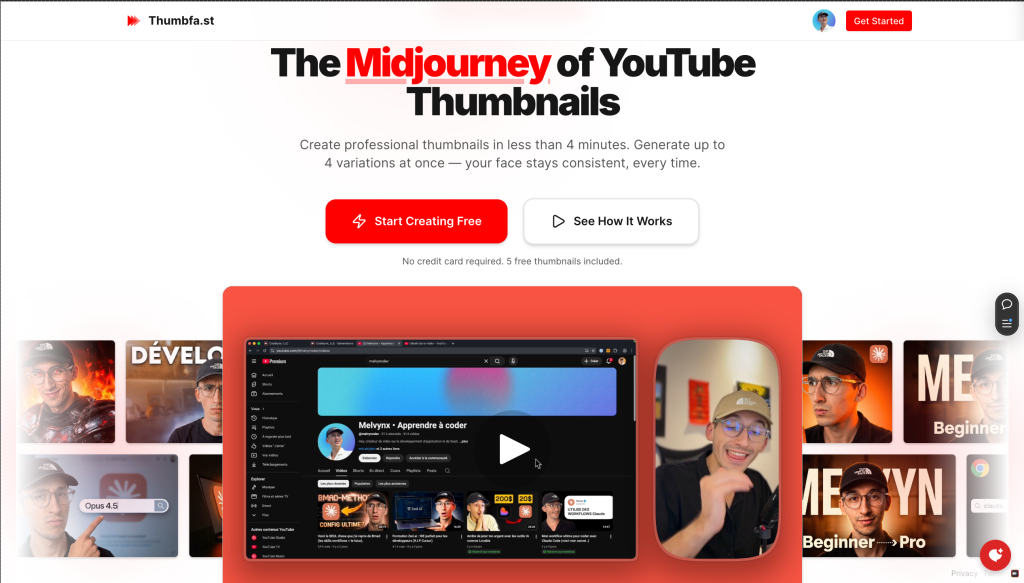
Thumbfa.st Review (2026): Pricing, Features & Honest Verdict
TLDR
Thumbfa.st is an AI YouTube thumbnail generator that creates click-worthy thumbnails with your actual face in them. Built by a YouTuber who got tired of spending 30+ minutes per thumbnail in Canva. Best for YouTube creators who want to test thumbnails fast without design skills. Free tier uses Google Gemini, paid plans start at $19/mo with OpenAI models. Still early with only 1,000+ thumbnails generated, but the concept is solid. Rating: 6.1/10.
What is Thumbfa.st?
Thumbfa.st is an AI tool that generates YouTube thumbnails featuring your real face. The founder, Melvyn, runs a 40,000+ subscriber YouTube channel and built the tool after realizing his AI-generated thumbnails outperformed handmade ones by 2x in watch time during A/B tests. The key metric: AI thumbnails captured 51.5% of watch time share versus 24.8% and 23.7% for two human-made variants.
The product launched on January 25, 2026, earned 428 upvotes on Product Hunt, and was named Product of the Day. It hit #4 for the week. The tagline says it all: “Midjourney for YouTube Thumbnails, your face, every time.” It currently has 100+ creators and has generated 1,000+ thumbnails.
What Are Thumbfa.st’s Key Features?
Face-Consistent AI Generation
The biggest problem with AI-generated thumbnails is that they cannot put your actual face in them convincingly. Thumbfa.st trains on your face photos and generates thumbnails where you look like yourself with consistent features across every image. You pick a scene, add your context, and the AI places you in it naturally. This is the core differentiator from generic AI image generators.
Style Cloning from Existing Thumbnails
Paste a YouTube URL and Thumbfa.st analyzes that video’s thumbnail style, composition, colors, and mood. The AI then replicates that aesthetic for your thumbnail. This is useful for studying what works in your niche and producing similar-quality thumbnails without reverse-engineering the design yourself.
Podcast Guest Mode
For interview and podcast channels, Thumbfa.st can swap in different guest faces while maintaining consistent branding and lighting. This solves a real pain point for podcasters who need unique thumbnails for every episode but want visual consistency across their channel.
Version History and Iteration
All generated thumbnails are saved automatically for comparison. You can iterate on concepts quickly without losing previous versions. The tool includes a built-in pixelation feature and outputs at YouTube’s standard 1280×720 resolution. Simple but necessary for creators who A/B test thumbnail variants.
How Much Does Thumbfa.st Cost?
Thumbfa.st has a free tier powered by Google Gemini with limited generation. Paid plans start at $19 per month and use OpenAI models for higher quality output. The founder references a “Nano Banana” model that reportedly works best for 99% of use cases. Compared to competitors like Pikzels (credit-based pricing) and Thumbmagic (URL-based generation), Thumbfa.st’s $19/mo flat rate is straightforward. But $19/mo is steep for a single-purpose tool, especially for smaller creators.
| Plan | Price | Plan Features | Best For |
|---|---|---|---|
| Free | Free | 3 credits/month, 2 variations, 10 inspirations, Gemini model | Testing quality |
| Pro | $19/mo | 100 credits/month, 4 variations, unlimited inspirations, Gemini + OpenAI | Active YouTube creators |
| Ultra | $49/mo | 300 credits/month, all features | High-volume creators |
| Power User | $199 lifetime | Unlimited with your own API keys, all features | Long-term investment |
Who is Thumbfa.st Best For?
Use Thumbfa.st if you are a YouTube creator who publishes frequently and wants to reduce thumbnail creation time from 30+ minutes to under a minute. It is especially useful for facecam channels, podcasters, and creators who want to A/B test multiple thumbnail concepts quickly.
Skip Thumbfa.st if you are an experienced designer who already has a thumbnail workflow. Skip it if your channel does not feature your face (gaming channels, animation channels, stock footage channels). And skip it if you are on a tight budget: at $19/mo, that is $228/year for a tool that only does one thing.
Best Thumbfa.st Alternatives
Pikzels
Considered the current best-in-class AI thumbnail generator. Pikzels uses a prompt-based system with FaceSwap technology and a credit-based pricing model. Higher quality output than most competitors but the credit system means costs are less predictable. Popular among mid-size YouTubers.
Thumbmagic
Takes a video-first approach: paste a YouTube URL and it auto-generates thumbnails without prompting. No design input required. Good for creators who want maximum speed with minimum effort. Less customizable than Thumbfa.st but faster for basic thumbnails.
Canva
The general-purpose design tool that most creators already use. Canva’s YouTube thumbnail templates are good enough for many creators. Free tier available, Pro at $12.99/mo. Not AI-powered for thumbnail generation specifically, but the template library and drag-and-drop editor are proven. Most creators start here before looking for specialized tools.
Final Verdict: Is Thumbfa.st Worth It?
Thumbfa.st solves a real problem. YouTube thumbnails matter enormously for click-through rates, and most creators either spend too long making them or settle for mediocre designs. The face-consistency feature is the key differentiator. If the AI can reliably put your face in professional-looking scenes, that alone justifies the price for active creators.
The concerns: 1,000 thumbnails and 100 creators is very early. The tool is essentially one person’s side project, which raises questions about reliability, uptime, and feature development. At $19/mo, you are paying a premium for an unproven tool when free alternatives like Canva templates exist. We would recommend the free tier to test quality, but hold off on the paid plan until Thumbfa.st proves it can deliver consistent, channel-worthy results over time.
Thumbfa.st Pros & Cons
What We Like
- Face-consistent AI generation with your actual face
- Style cloning from existing YouTube thumbnails
- Podcast guest mode for interview channels
- Free tier available for testing
What Could Be Better
- $19/mo is steep for a single-purpose tool
- Very early with only 1,000+ thumbnails generated
- Solo founder operation raises reliability questions
Thumbfa.st FAQ
What is Thumbfa.st?
Thumbfa.st is an AI YouTube thumbnail generator that creates professional thumbnails featuring your actual face with consistent quality across every image.
How much does Thumbfa.st cost?
Thumbfa.st has a free tier with Google Gemini. The Pro plan costs $19 per month with OpenAI models and unlimited generation.
Is Thumbfa.st worth it?
Worth testing via the free tier if you are a YouTube creator who struggles with thumbnail design. The $19/mo Pro plan is steep for an early product. Wait for it to mature before committing.
What are the best Thumbfa.st alternatives?
Alternatives include Pikzels (credit-based, best quality), Thumbmagic (URL-based auto-generation), and Canva (general-purpose design with YouTube templates).
Does Thumbfa.st offer a free plan?
Yes, Thumbfa.st offers a free tier powered by Google Gemini with limited thumbnail generation.
Who is Thumbfa.st best for?
Best for YouTube creators who publish frequently, use their face in thumbnails, and want to reduce design time from 30+ minutes to under a minute.






