Zulip Review (2026): Pricing, Features & Honest Verdict
TLDR
Zulip is an open source team chat platform with a unique topic-based threading model that makes asynchronous communication genuinely productive. Best for: distributed teams that value organized, async-friendly discussions. Price: free (self-hosted) or from $8/user/mo cloud. Rating: 7.9/10
What is Zulip?
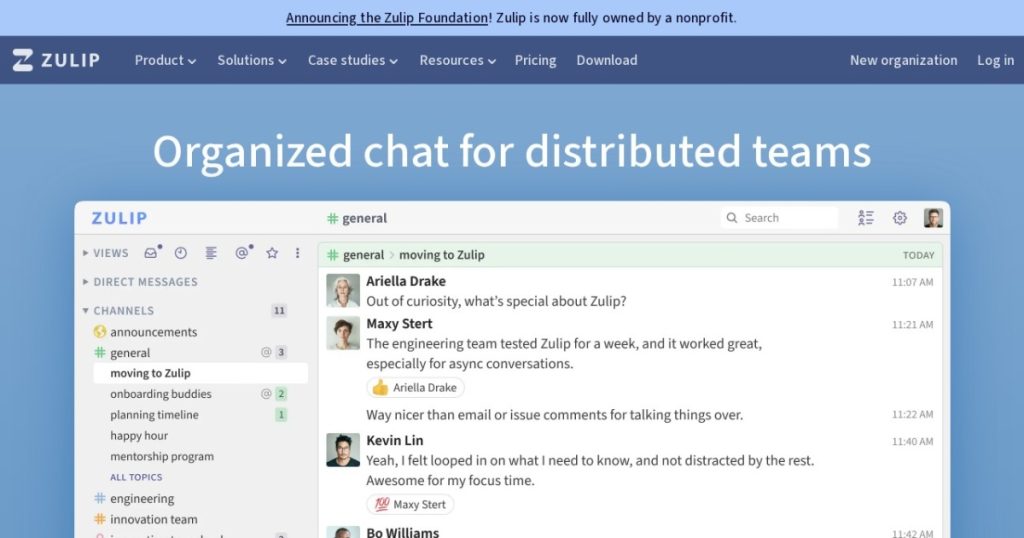
Zulip solves the single biggest problem with every Slack-style chat tool: important conversations get buried. Instead of dumping everything into a timeline that scrolls away, Zulip organizes every message under a specific topic within a stream (their term for channels). The result is that you can catch up on exactly the discussions that matter to you, even days later, without scrolling through hundreds of unrelated messages.
Originally built at Dropbox, then open-sourced and maintained by a dedicated team, Zulip has grown to 21,000+ GitHub stars. The project is backed by a combination of grants, sponsorships, and revenue from their cloud hosting service. It runs on Python/Django with a PostgreSQL backend, making self-hosting straightforward for teams with basic infrastructure knowledge.
Key Features
Topic-Based Threading
This is the feature that defines Zulip and the reason people switch to it. Every message belongs to a stream and a topic. When someone starts a new discussion in #engineering, they give it a topic like “API rate limiting decision.” Everyone who responds stays in that topic thread. You can read, catch up on, or mute individual topics without touching anything else in the stream. It sounds like a small change, but it fundamentally transforms how async teams communicate.
Full-Text Search
Search in Zulip is genuinely useful because topics give it structure. You can search within a stream, by topic, by sender, by date, and combine filters. Finding “that conversation about database migration from two months ago” takes seconds instead of the scroll-and-pray approach most chat tools offer.
Email Gateway
Zulip lets you send messages to streams via email, and you can reply to Zulip notifications from your email client. This bridges the gap for team members who are not permanently logged into chat. It also makes it easy to forward relevant emails into the right stream and topic for team discussion.
Markdown and Code Support
Messages support full markdown with LaTeX math rendering, syntax-highlighted code blocks, spoiler tags, and embedded media. For technical teams, this means code reviews, documentation discussions, and architecture decisions all render properly inline without needing to paste links to external documents.
Integrations
Zulip ships with over 100 native integrations for GitHub, GitLab, Jira, Sentry, PagerDuty, and most developer tools. Incoming webhooks and a well-documented API cover custom use cases. The integration messages land in their own topics, keeping automated notifications organized instead of cluttering human conversations.
Pricing
Self-hosted is completely free with all features included. Zulip Cloud offers a free tier with 10,000 messages of searchable history, then $8/user/month for Standard which removes all limits. There is no “Enterprise” tier with artificial feature gates. The Standard plan includes everything: LDAP/SAML, custom emoji, unlimited history, and priority support.
The pricing is refreshingly simple. You either self-host for free or pay $8/user/month for the full cloud experience. No feature matrix to decode, no sales calls required.
Pros and Cons
Pros
- Topic-based threading makes async communication genuinely productive
- Full-text search with topic structure finds conversations fast
- Self-hosted version includes all features with no artificial limits
- Email gateway bridges chat and email workflows seamlessly
- Simple, transparent pricing with no enterprise feature gates
Cons
- Learning curve for the topic-based model takes a week or two
- UI is functional but lacks the visual polish of Slack
- Smaller community means fewer third-party resources and tutorials
- No built-in video calling (relies on integrations)
- Topic discipline requires team buy-in to work well
| Plan | Price | Plan Features | Best For |
|---|---|---|---|
| Self-Hosted | Free | All features included, unlimited users, unlimited history, LDAP/SAML | Teams with infrastructure to self-host wanting full features free |
| Cloud Free | Free | 10K message searchable history, limited file storage | Small teams testing Zulip without self-hosting |
| Standard | $8/user/mo | Unlimited history, LDAP/SAML, custom emoji, priority support, all features | Teams wanting full cloud experience without self-hosting |
Who Should Use Zulip?
Zulip is built for teams where async communication is not a nice-to-have but a requirement. Remote-first companies spanning multiple time zones, open source projects with global contributors, academic research groups, and any team that has felt the pain of “I know we discussed this somewhere in Slack but I cannot find it.” The topic model rewards teams that care about organized, searchable knowledge.
If your team communicates primarily in real-time and values quick, informal chat over structured discussion, Zulip might feel like overhead. The topic discipline is a feature, not a bug, but it does require everyone to buy in.
Alternatives
Slack
Slack prioritizes real-time chat with a polished interface and massive app ecosystem. Threads exist but are optional and easy to ignore. If your team lives in the same timezone and communicates synchronously, Slack is smoother. If you need to catch up on discussions after being offline for hours or days, Zulip wins.
Mattermost
Mattermost is the closest competitor for self-hosted team chat. It adds integrated boards, playbooks, and compliance features that Zulip lacks. But Mattermost uses Slack-style threading, so you lose the topic-based organization that makes Zulip special for async teams.
Twist
Twist from the Todoist team also focuses on async communication with thread-first design. It is a commercial product with no self-hosting option, but the async philosophy is similar. Twist is simpler and more opinionated, while Zulip offers more power and customization.
Verdict
Zulip is the most thoughtfully designed team chat tool for asynchronous communication. The topic-based threading model is not just a feature, it is a fundamentally different approach to team messaging that solves real problems other tools ignore. The trade-off is a learning curve and less visual polish. At 7.9/10, Zulip earns a strong recommendation for any team that has outgrown the Slack-style firehose and wants conversations they can actually find later.
FAQ
What makes Zulip different from Slack?
The core difference is topic-based threading. In Slack, messages flow into channels chronologically and threads are optional. In Zulip, every message has a topic, creating organized, searchable conversations that you can read and catch up on independently. This makes async communication significantly more productive.
Is Zulip good for small teams?
Yes, though the benefits of topic-based threading become more apparent as team size and async communication increase. Teams of 5-10 who communicate in real-time might not notice the difference. Teams of 20+ across time zones will feel it immediately.
Can I migrate from Slack to Zulip?
Zulip provides official import tools for Slack, Mattermost, Rocket.Chat, and several other platforms. The Slack importer preserves channels, messages, and files. Topics are automatically generated from message clusters during import.
Does Zulip support video calls?
Not natively. Zulip integrates with Jitsi, Zoom, and BigBlueButton for video calling. You can start a call from any conversation with a single click through these integrations.
Zulip Pros & Cons
What We Like
- Topic-based threading makes async communication genuinely productive
- Full-text search with topic structure finds conversations fast
- Self-hosted version includes all features with no artificial limits
- Email gateway bridges chat and email workflows seamlessly
- Simple, transparent pricing with no enterprise feature gates
What Could Be Better
- Learning curve for the topic-based model takes a week or two
- UI is functional but lacks the visual polish of Slack
- Smaller community means fewer third-party resources and tutorials
- No built-in video calling, relies on integrations
- Topic discipline requires team buy-in to work well
Zulip FAQ
What makes Zulip different from Slack?
The core difference is topic-based threading. In Slack, messages flow into channels chronologically and threads are optional. In Zulip, every message has a topic, creating organized, searchable conversations that you can read and catch up on independently.
Is Zulip good for small teams?
Yes, though the benefits of topic-based threading become more apparent as team size and async communication increase. Teams of 5-10 who communicate in real-time might not notice the difference. Teams of 20+ across time zones will feel it immediately.
Can I migrate from Slack to Zulip?
Zulip provides official import tools for Slack, Mattermost, Rocket.Chat, and several other platforms. The Slack importer preserves channels, messages, and files. Topics are automatically generated from message clusters during import.
Does Zulip support video calls?
Not natively. Zulip integrates with Jitsi, Zoom, and BigBlueButton for video calling. You can start a call from any conversation with a single click through these integrations.
What is Zulip?
Open source team chat with unique topic-based threading for organized, async-friendly communication. Self-hostable with full-text search and email gateway.
How much does Zulip cost?
Zulip pricing starts at Free (self-hosted) / $8/user/mo cloud. A free plan is available.






