Cal.com Review (2026): Pricing, Features & Honest Verdict
TLDR
Cal.com is the open-source scheduling platform that gives you full control over your booking infrastructure. With 40,500+ GitHub stars and a self-hosted option, it is the developer-friendly alternative to Calendly. Best for: developers and teams wanting customizable, self-hostable scheduling. Price: free (self-hosted), from $12/seat/month (cloud). Rating: 7.4/10
What is Cal.com?
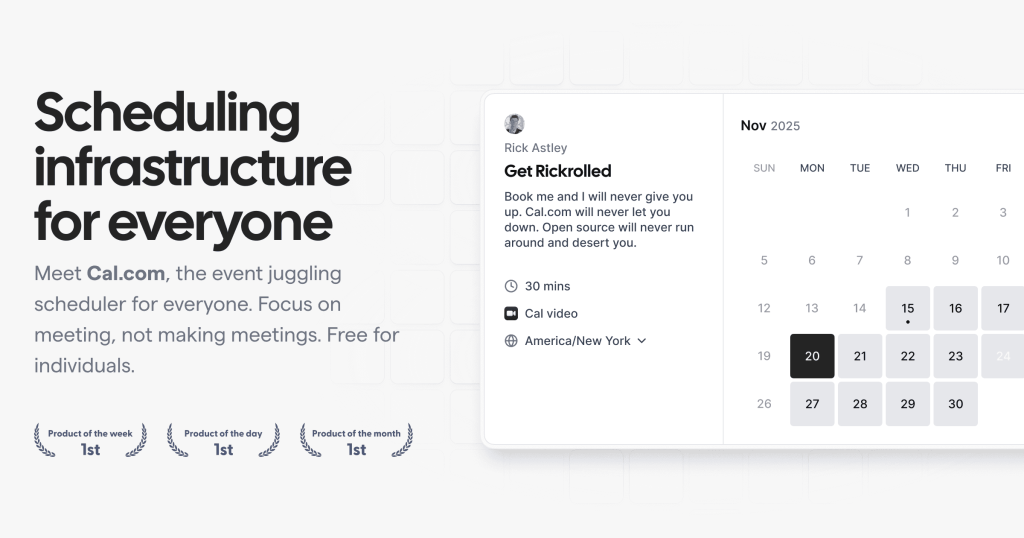
We found Cal.com while evaluating scheduling tools for teams that want more control than Calendly offers. Founded in 2021 by Peer Richelsen and Bailey Pumfleet, Cal.com has raised $32.4 million and built an active open-source community with over 40,500 GitHub stars. The platform handles everything from simple meeting bookings to complex multi-person scheduling with round-robin assignment.
Cal.com’s core pitch is simple: Calendly’s features, but open source and self-hostable. You own your data, customize everything, and avoid per-seat SaaS pricing if you self-host. The cloud-hosted version competes directly with Calendly and SavvyCal for teams that want a managed solution.
Key Features
Open Source and Self-Hosted Option
The entire codebase is on GitHub under an AGPLv3 license. You can self-host on your own infrastructure, customize the code, and avoid monthly SaaS fees. This matters for companies with strict data requirements or teams that want to embed scheduling deeply into their product. The self-hosted version is genuinely free with no feature restrictions.
Event Types and Booking Flows
Cal.com supports one-on-one meetings, group events, round-robin assignment, and collective scheduling (where multiple hosts must all be available). You can create custom booking pages with questions, payment collection via Stripe, and redirect URLs after booking. The routing forms feature lets you qualify leads before they book by asking screening questions and routing them to the right person.
Calendar Integrations
Connects to Google Calendar, Outlook, Apple Calendar, and CalDAV. The availability engine checks conflicts across multiple calendars and time zones accurately. You can set buffer times between meetings, limit daily booking slots, and create recurring availability schedules. Integration setup is straightforward for Google and Outlook, though CalDAV can require manual configuration.
Platform and API
Cal.com offers a full API and webhook system for building scheduling into your own applications. The Cal Atoms library provides embeddable React components for placing booking flows directly in your product. This makes Cal.com attractive for SaaS companies that want to offer scheduling to their own users without building it from scratch.
Pricing
Self-hosted Cal.com is free forever with all features. The cloud-hosted platform has three paid tiers: Team at $12 per user per month includes round-robin, routing forms, and team workflows. Organization at $37 per user per month adds admin controls, domain-wide booking pages, and priority support. Enterprise has custom pricing with SLA, dedicated infrastructure, and custom integrations.
Compared to Calendly ($8-16/seat/month), Cal.com’s cloud pricing is slightly higher at the team level but includes features that Calendly locks behind higher tiers. The self-hosted option makes Cal.com unbeatable on price for technical teams willing to manage infrastructure.
| Plan | Price | Plan Features | Best For |
|---|---|---|---|
| Self-Hosted | $0 | All features, unlimited users, own infrastructure | Technical teams wanting full control |
| Team | $12/user/month | Round-robin, routing forms, team workflows | Small to mid-size teams |
| Organization | $37/user/month | Admin controls, domain booking pages, priority support | Growing organizations |
| Enterprise | Custom | SLA, dedicated infrastructure, custom integrations | Large enterprises with compliance needs |
Who Should Use Cal.com
Cal.com is ideal for developer-led teams, SaaS companies embedding scheduling into their products, and organizations with strict data sovereignty requirements. If you want Calendly-level functionality with the ability to self-host and customize, Cal.com is the clear choice. Non-technical teams that just want simple booking should probably stick with Calendly for its polished UX and easier setup.
Where Cal.com Falls Short
The cloud platform’s UI, while functional, is not as polished as Calendly. Some users report occasional sync delays with calendar integrations. The self-hosted option requires technical knowledge to deploy and maintain. And the ecosystem of native integrations (CRMs, payment processors, video conferencing) is smaller than Calendly’s, though growing. Documentation has gaps, especially for advanced self-hosted configurations.
Alternatives
Calendly
The market leader in scheduling. More polished interface, broader integrations, and easier setup. But closed-source, no self-hosting option, and per-seat pricing adds up. Starts at $8/seat/month.
SavvyCal
A scheduling tool focused on personalized booking experiences. SavvyCal lets invitees overlay their own calendar on the booking page. More opinionated design choices than Cal.com. From $12/user/month.
TidyCal
A simple, affordable scheduling tool by AppSumo. One-time purchase of $29 for lifetime access. Much simpler than Cal.com but covers basic scheduling needs for solopreneurs.
FAQ
Is Cal.com really free?
The self-hosted version is genuinely free with no feature limits. The cloud-hosted version requires a paid plan starting at $12/user/month. There is no free cloud tier for teams.
How does Cal.com compare to Calendly?
Cal.com offers similar core features plus open-source flexibility and self-hosting. Calendly has a more polished interface, broader integrations, and requires no technical setup. Cal.com wins on control and customization; Calendly wins on ease of use.
Can I embed Cal.com in my SaaS product?
Yes. Cal.com provides Cal Atoms (React components) and a full API for embedding scheduling flows into your product. This is one of Cal.com’s strongest differentiators from Calendly.
Is self-hosting Cal.com difficult?
It requires Docker or a Node.js server, a PostgreSQL database, and basic DevOps knowledge. The documentation covers the basics but advanced configurations (custom SMTP, SSO) require more effort. Plan on a few hours for initial setup.
Cal.com Pros & Cons
What We Like
- Fully open source with free self-hosted option and no feature limits
- Cal Atoms and API enable deep embedding into SaaS products
- Active community with 40,500+ GitHub stars and regular updates
- Routing forms and round-robin for qualifying and distributing leads
What Could Be Better
- Cloud UI is less polished than Calendly
- Self-hosting requires DevOps knowledge and ongoing maintenance
- Smaller ecosystem of native integrations than Calendly
- Documentation has gaps for advanced self-hosted configurations
Cal.com FAQ
Is Cal.com really free?
The self-hosted version is genuinely free with no feature limits. The cloud-hosted version requires a paid plan starting at $12/user/month.
How does Cal.com compare to Calendly?
Cal.com offers similar features plus open-source flexibility and self-hosting. Calendly has a more polished interface and easier setup. Cal.com wins on control; Calendly wins on ease of use.
Can I embed Cal.com in my SaaS product?
Yes. Cal Atoms provides React components and a full API for embedding scheduling into your product. This is one of Cal.com's strongest differentiators.
Is self-hosting Cal.com difficult?
It requires Docker or Node.js, PostgreSQL, and basic DevOps knowledge. Plan on a few hours for initial setup. Advanced configs need more effort.
What is Cal.com?
Open-source scheduling platform with self-hosting option, 40.5K GitHub stars, and embeddable booking components for SaaS products.
How much does Cal.com cost?
Cal.com pricing starts at Free (self-hosted), $12/seat/month (cloud). A free plan is available.






