DiffUI Review (2026): Pricing, Features & Honest Verdict
TLDR
DiffUI is an AI interface design tool that uses diffusion models, trained on real web screenshots, to turn text prompts into on-brand UI mockups and production code. It skips the repetitive look most LLM design tools produce. Best for: engineers and designers who want fast, brand-consistent screens. Price: from $0.17 per image, no subscription. Rating: 8.2/10.
What is DiffUI?
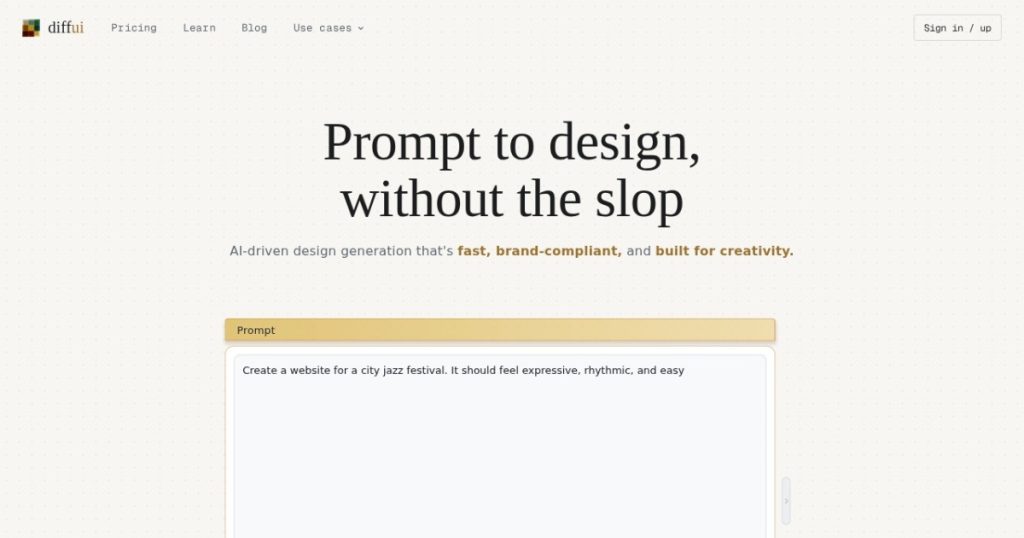
DiffUI is a browser-based design tool that generates user interface layouts from a written prompt, then converts them into responsive code. The twist is the model behind it. Most AI design tools bolt a large language model onto a canvas. DiffUI uses image diffusion models trained on real website screenshots, the same family of tech that powers image generators. The pitch is right there in the tagline: prompt to design, without the slop. Instead of the same rounded-card, gradient-hero pattern that LLM tools tend to repeat, DiffUI aims to produce layouts that look like they came from a real product.
The tool was built by Jacob Miller, a former design systems lead at Figma who left to work on it full time. He launched it with a Show HN post explaining the diffusion approach and shared a detail that says a lot about who actually uses it: roughly 60 percent of DiffUI users are engineers, not designers. That tracks with the product. It is aimed at people who need a decent-looking interface fast and would rather describe it in words than push pixels around a canvas for an hour. We dug into the live product and the pricing page to see whether the diffusion angle is a gimmick or a genuine edge.
What Are DiffUI’s Key Features?
Diffusion-based generation
This is the core. You type a prompt and DiffUI returns nine design options in about 50 seconds. The company claims this is roughly 5x faster than LLM-based competitors, which often take three to five minutes to render a single page. Because the model learned from real screenshots rather than reasoning its way through markup, the results tend to avoid the generic AI template feel. Nine variations per run also gives you something to react to rather than a single take you have to argue with.
Brands: learning your design system
The Brands feature is what makes DiffUI more than a novelty. You upload existing screenshots of your product and it extracts your colors, fonts, spacing, components, and design tokens into a reusable profile. You can save multiple brand profiles and generate new screens that match an existing product instead of a blank-slate look. For teams that already ship a real app, this is the difference between throwaway concepts and mockups you can actually hand to a developer.
Design-to-code export
DiffUI converts designs into responsive Web Components, which the founder frames as zero framework lock-in since Web Components run anywhere. There is also a copy agent prompt flow: instead of a built-in code editor, DiffUI hands you a structured prompt you can paste into your own coding agent, like Cursor or Claude, to generate the implementation against your codebase. Worth knowing: design-to-code is free while the product is in beta, which means it will likely become a paid feature later.
Node canvas and semantic layer
Designs live on a node-based canvas backed by a semantic JSON layer. That JSON layer is what keeps components consistent across pages, so a button generated on one screen matches the button on the next. It also means the output is structured data rather than a flat image, which is what makes the code export and brand consistency possible in the first place. In practice, that structure is the quiet feature that holds the rest together: without it, you would get pretty pictures that fall apart the moment you try to turn them into a real product. With it, a set of generated screens behaves like a small design system instead of a pile of disconnected mockups.
How Much Does DiffUI Cost?
DiffUI starts at $0.17 per generated image on the Individual plan, with no subscription and no minimum spend. You pay only for what you generate. The Team plan runs $0.22 per image with a $50 per month minimum credited to a shared team wallet, and Enterprise is $0.26 per image with a $300 per month minimum and negotiable terms. There is no monthly free tier, though design-to-code is currently free during beta. Note one wrinkle: earlier press coverage quoted $0.13 per image, but the live pricing page shows $0.17, so budget against the higher current number.
Per-image pricing is unusual in this category, where most tools charge a flat monthly fee. Uizard starts at $12 per month per seat, Galileo AI, now folded into Google Stitch, runs from $19 per month, and Figma’s AI features sit inside a $20 per month full seat. Against those, DiffUI can be cheaper or pricier depending on volume. The founder cites a full multi-page site at around 30 images, which lands under $5 on the Individual plan. If you generate a handful of screens a month, DiffUI is very cheap. If you iterate constantly and burn hundreds of images, a flat subscription elsewhere may cost less and be easier to predict.
The pay-as-you-go model is a genuine strength for occasional users who hate paying $20 a month for a tool they open twice. It is a weakness for heavy users who want a predictable bill. Track your usage for a week before you assume it is the cheap option.
| Plan | Price | Plan Features | Best For |
|---|---|---|---|
| Individual | $0.17/image | No minimum, no subscription, pay as you go | Solo designers and engineers |
| Team | $0.22/image | $50/mo minimum credited to shared wallet | Small product teams |
| Enterprise | $0.26/image | $300/mo minimum, negotiable terms | Larger orgs needing volume |
| Design-to-code | Free (beta) | Export designs to responsive Web Components | Anyone shipping to code |
Who is DiffUI Best For?
Use DiffUI if you are an engineer who needs presentable interface designs without learning Figma, and you want to move from prompt to code in one sitting. It is a strong fit for solo founders and small product teams who already have a running app and want new screens that match their existing brand rather than generic concepts. The Brands feature and the copy agent prompt flow make it especially useful if you already work with a coding assistant.
Skip DiffUI if you are a designer who wants fine pixel control and mature collaboration features, because a diffusion model gives you variations to pick from, not a precise canvas to sculpt. Skip it too if you generate designs at high volume every day, since per-image billing can add up faster than a flat plan, and if you need a proven tool with years of reviews behind it, because DiffUI is early and independent feedback is still thin.
Best DiffUI Alternatives
Uizard
Uizard is the accessible category option. It offers a free tier with two projects and three AI generations a month, and paid plans start at $12 per month per seat with 500 generations. It is broader than DiffUI, covering wireframes, mockups, and prototypes, but it uses a more conventional AI approach, so the output can feel more templated. Choose Uizard if you want a flat monthly fee and a gentler learning curve.
v0 by Vercel
v0 is the closest prompt-to-code competitor. It generates React and Tailwind components from a prompt and is built for engineers who ship directly to a codebase. It has a free tier and Premium starts at $20 per month. v0 leans harder into code output while DiffUI leans harder into the visual design step and brand matching. If your priority is working React over polished mockups, v0 is the better pick.
Galileo AI (Google Stitch)
Galileo AI has been absorbed into Google Stitch, which turns prompts into UI designs and exports to Figma. It has a free plan with three Figma exports and paid tiers from $19 per month. Stitch benefits from Google’s backing and Figma export, which DiffUI does not offer natively. Pick Stitch if a clean handoff into Figma matters more than the diffusion-based look.
Final Verdict: Is DiffUI Worth It?
DiffUI earns its 8.2 rating on a genuinely different idea executed well. The diffusion approach is not marketing fluff. It produces faster, more varied, and less generic layouts than the LLM tools it competes with, and the Brands feature turns it from a toy into something that respects your existing design system. Coming from a former Figma design systems lead, the fundamentals are sound, and the pay-as-you-go pricing makes it almost free to try. For engineers who want good-looking screens without a design background, it is one of the more compelling tools we have tested this year.
The reasons it is not higher are all about maturity. It is early, there are no independent reviews to lean on, the design-to-code feature is free only during beta, which signals a coming price change, and per-image billing gets unpredictable at volume. None of those are dealbreakers for the target user. If you are an engineer or a small team that ships real products and wants brand-consistent interfaces fast, DiffUI is worth trying today. Just watch your image count and expect the pricing to shift as it leaves beta.
DiffUI Pros & Cons
What We Like
- Diffusion model produces nine varied, non-generic designs in about 50 seconds
- Brands feature learns your colors, fonts, and tokens for on-brand output
- Pay-as-you-go pricing means no monthly commitment for light users
- Built by a former Figma design systems lead, with strong fundamentals
What Could Be Better
- Early stage with almost no independent reviews yet
- Per-image billing gets unpredictable and can beat a flat plan at high volume
- Design-to-code is free only during beta, so expect a future price change
DiffUI FAQ
What is DiffUI?
DiffUI is an AI interface design tool that uses diffusion models trained on real web screenshots to turn text prompts into UI mockups. It also exports designs to responsive Web Components code.
How much does DiffUI cost?
It is pay-as-you-go: $0.17 per image on Individual with no minimum, $0.22 per image on Team with a $50/mo minimum, and $0.26 per image on Enterprise with a $300/mo minimum. Design-to-code is free during beta.
Is DiffUI worth it?
Yes for engineers and small teams who want fast, brand-consistent UI without learning Figma. The diffusion approach is genuinely faster and less generic, though it is early and lightly reviewed.
What are the best DiffUI alternatives?
Uizard (broader AI design from $12/mo), v0 by Vercel (prompt-to-React code, free and $20/mo), and Galileo AI now in Google Stitch (UI to Figma from $19/mo).
Does DiffUI offer a free plan?
There is no monthly free tier. You pay per image on the Individual plan with no minimum, and design-to-code export is currently free while the product is in beta.
Who is DiffUI best for?
Engineers and solo founders who want good-looking, on-brand interfaces fast and prefer describing screens in words over pushing pixels in a design canvas.






