ExpenseMonkey Review (2026): Pricing, Features & Honest Verdict
TLDR
ExpenseMonkey is an AI receipt scanner and expense tracker built for small teams and freelancers. Setup takes under five minutes and the Pro plan is genuinely cheap. It does the basics well but skips corporate cards and reimbursement. Best for: small teams and freelancers. Price: Free; Pro $4.99/seat/mo. Rating: 7.9/10.
What is ExpenseMonkey?
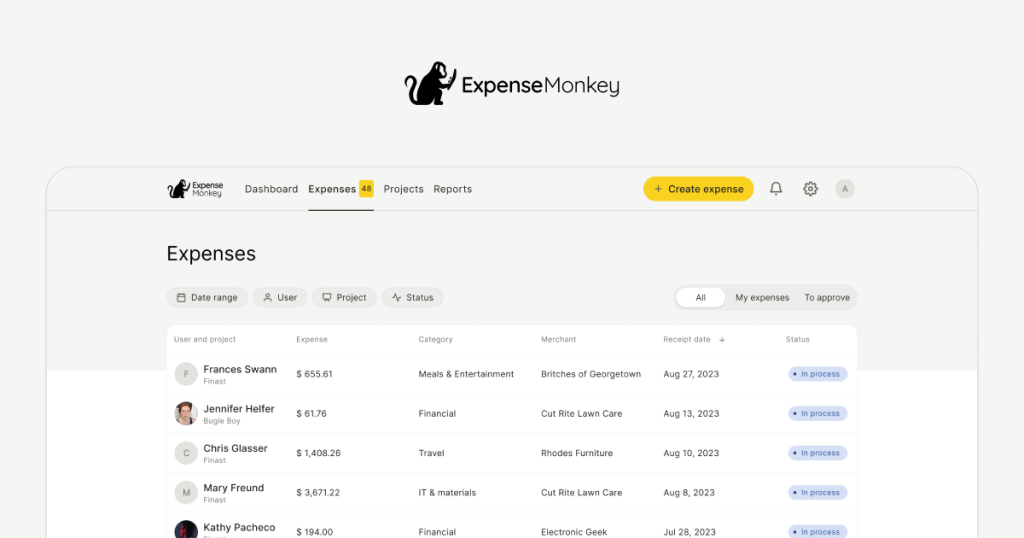
ExpenseMonkey is an expense management app aimed at small teams and independent professionals. You snap a photo of a receipt or forward an invoice by email, the AI pulls out the amount, vendor, and date, and it categorizes the expense and tags it to a project or client. From there you can route expenses through approvals, track multiple currencies, and export tax-ready reports.
The product is built around speed and simplicity. We tested the signup flow and it lives up to the claim of getting you running in under five minutes, which is notably faster than the incumbents. ExpenseMonkey is positioned as a leaner, cheaper alternative to Expensify and Zoho Expense, trading enterprise depth for a clean interface and a flat, affordable price. It is the kind of tool a freelancer or a five-person agency can adopt without a finance team to run it.
That positioning is deliberate. The expense management category is dominated by tools that grew to serve large finance teams, which means they carry policy engines, approval hierarchies, and configuration screens that a small team neither needs nor wants to learn. ExpenseMonkey strips that back to the parts a small team actually uses: scan, categorize, approve, export, sync to your accounting software. The risk of that approach is that you can outgrow it, but for the freelancers and small businesses it targets, the focus is the selling point rather than a limitation.
What Are ExpenseMonkey’s Key Features?
AI receipt scanning
The core feature is AI-driven receipt capture. You scan via the mobile or web app, or forward invoices by email, and the AI extracts the data automatically. On the free Light plan this is capped at 5 scans per team per month; on Pro it is unlimited. Accuracy on standard receipts is solid, which is the whole point of paying for this category.
Categorization and project tagging
Expenses get sorted automatically and can be tagged by project or client. For agencies and freelancers billing multiple clients, this is the feature that earns its keep, because it turns a pile of receipts into something you can actually invoice against or hand to an accountant.
Approval workflows
Pro includes a team approval flow so expenses can be submitted to a manager for sign-off. It is straightforward rather than deeply configurable, which fits the small-team audience. You will not find the granular policy rules that enterprise platforms ship, but for most small teams that is a feature, not a gap.
Accounting integrations and multi-currency
Pro connects to Xero and QuickBooks, so categorized expenses flow into your books without manual re-entry. Multi-currency support is available across plans, which matters for remote teams and anyone billing internationally. These two together are what make ExpenseMonkey viable as a real workflow rather than a glorified scanner.
Email forwarding and tax-ready reports
Beyond the camera, you can forward invoices and receipts by email and let ExpenseMonkey ingest them automatically, which is how most digital expenses actually arrive these days. At the end of a period it generates tax-ready reports you can hand to an accountant or use directly. For a freelancer, that turns a year of forwarded PDFs and snapped receipts into a clean summary without a manual reconciliation marathon. It is unglamorous, but it is the output that justifies using any expense tool at all.
How Much Does ExpenseMonkey Cost?
ExpenseMonkey starts free. The Light plan gives you 5 AI receipt scans per team per month, multi-currency support, the mobile app, and standard support, with no time limit. It is a real free tier, not a trial, though the 5-scan cap is tight if you are scanning regularly.
The Pro plan is $4.99 per seat per month billed annually, which works out to $59.88 per year, and unlocks unlimited scans, the approval flow, Xero and QuickBooks integration, unlimited reports, and priority support. That undercuts Expensify, whose Collect plan is $5 per user per month and Control is $9, and it matches Zoho Expense’s Standard tier at $4 per user per month while being simpler to set up.
For teams of 50 or more, pricing moves to custom, with concierge onboarding, advanced workflows, 24/7 support, and a dedicated success manager. For the small teams this product targets, the math is easy: a few dollars per seat for unlimited AI scanning and accounting sync is hard to argue with. A five-person agency on Pro pays under $25 a month total when billed annually, which is less than a single billable hour for most freelancers, so the tool pays for itself the moment it saves anyone a bit of admin time.
The one thing to weigh is the gap between free and Pro. The free Light plan’s 5-scan-per-team cap is genuinely tight, so in practice most active teams will need Pro almost immediately. That is fine given how cheap Pro is, but treat Light as a trial rather than a long-term free plan. Compared with Zoho Expense’s free tier, which is more generous, ExpenseMonkey’s free offering is more of a taster, and the real value lives on the paid plan.
| Plan | Price | Plan Features | Best For |
|---|---|---|---|
| Light | Free | 5 AI receipt scans/team/mo, multi-currency, mobile app, standard support | Solo users and tiny teams testing it out |
| Pro | $4.99/seat/mo | Unlimited AI scans, approval flow, Xero and QuickBooks, unlimited reports, priority support | Small teams and freelancers |
| 50+ Seats | Custom | Unlimited scans, advanced workflows, concierge onboarding, 24/7 support, dedicated manager | Larger organizations |
Who is ExpenseMonkey Best For?
Use ExpenseMonkey if you are a freelancer, agency, or small team that wants cheap, fast expense tracking with AI scanning and accounting integrations. The under-five-minute setup and $4.99 Pro price make it ideal for people who want the job done without learning enterprise software. Project tagging makes it especially useful if you bill multiple clients.
Skip ExpenseMonkey if you need corporate card feeds, automated ACH reimbursement, or deep policy controls. It does not do those, and a scaling company with a finance team will outgrow it. In that case Expensify or Brex are the better fit, even if they cost more and take longer to configure.
It is also worth being honest about the vendor itself. ExpenseMonkey is newer and smaller than the incumbents, so it has a thinner integration list and less of a track record. For most small teams that is an acceptable trade for the price and simplicity, but if you are picking software you expect to grow into over five years, the maturity gap is a fair thing to factor in. The product is good at what it does today; just go in clear-eyed about what it does not yet do.
Best ExpenseMonkey Alternatives
Expensify
Expensify is the feature-rich incumbent, with SmartScan receipt capture, approval workflows, corporate card integration, and ACH reimbursement. Collect is $5 per user per month and Control is $9. It suits scaling teams that need cards and reimbursement, but setup and pricing tiers add complexity that ExpenseMonkey deliberately avoids.
Zoho Expense
Zoho Expense has a free tier and a Standard plan at $4 per user per month, with Premium at $6. It integrates tightly with the rest of the Zoho suite and includes mileage tracking and policy rules. If you already live in Zoho it is the obvious choice, though it can feel bulky if all you want is simple receipt tracking.
Rydoo
Rydoo targets mid-market travel and expense management with custom pricing and stronger compliance and travel features. It is more than a small team needs and costs accordingly, but if your expense problem is really a travel-and-policy problem, Rydoo handles that better than ExpenseMonkey.
Final Verdict: Is ExpenseMonkey Worth It?
ExpenseMonkey does exactly what it sets out to do. The setup is fast, the AI scanning is reliable, the Xero and QuickBooks integrations make it a real workflow, and at $4.99 per seat per month the Pro plan is cheaper than Expensify and on par with Zoho. For freelancers and small teams, it is one of the easiest expense tools to recommend.
The limits are honest ones: the free tier’s 5-scan cap is stingy, and there are no corporate cards or reimbursement, so growing teams will eventually outgrow it. But within its lane, ExpenseMonkey is a strong, affordable pick. If you are a small team that just wants receipts handled cleanly and cheaply, it is worth it, and that is why it earns a 7.9.
Our recommendation: start on the free Light plan to confirm the scanning accuracy on your own receipts, then move straight to Pro, because the 5-scan limit will not last you long. At under five dollars per seat with Xero and QuickBooks sync, it is one of the best value expense tools for freelancers and small teams in 2026. Just plan to migrate to Expensify or Brex if and when you need cards and reimbursement at scale.
ExpenseMonkey Pros & Cons
What We Like
- Pro plan is cheap at $4.99/seat/mo billed annually, undercutting Expensify
- Under 5 minute setup, one of the fastest in the category
- AI receipt scanning with automatic categorization and project tagging
- Xero and QuickBooks integration plus multi-currency support on Pro
What Could Be Better
- Free Light plan caps AI processing at just 5 receipts per team per month
- No corporate card feeds or ACH reimbursement like Expensify offers
- Smaller, newer vendor without the integration depth or track record of incumbents
ExpenseMonkey FAQ
What is ExpenseMonkey?
ExpenseMonkey is an AI-powered expense tracking app for small teams and freelancers. You scan receipts, the AI extracts and categorizes the data, and you generate tax-ready reports and route expenses through approval flows.
How much does ExpenseMonkey cost?
There is a free Light plan with 5 AI scans per team per month. The Pro plan is $4.99 per seat per month billed annually ($59.88/year) with unlimited scans. Teams of 50+ get custom pricing.
Is ExpenseMonkey worth it?
For small teams and freelancers who just need clean, cheap receipt tracking, yes. It is fast to set up and undercuts Expensify on price. Larger teams that need corporate cards and reimbursement should look at Expensify or Brex instead.
What are the best ExpenseMonkey alternatives?
Expensify is the feature-rich incumbent (Collect $5/user/mo), Zoho Expense is the suite play with a free tier (Standard $4/user/mo), and Rydoo targets mid-market travel and expense with custom pricing.
Does ExpenseMonkey offer a free plan?
Yes. The free Light plan includes 5 AI receipt scans per team per month, multi-currency support, the mobile app, and standard support, with no time limit.
Who is ExpenseMonkey best for?
ExpenseMonkey is best for freelancers, agencies, and small teams that want fast, affordable AI receipt tracking and accounting integrations without the complexity and cost of enterprise expense platforms.






