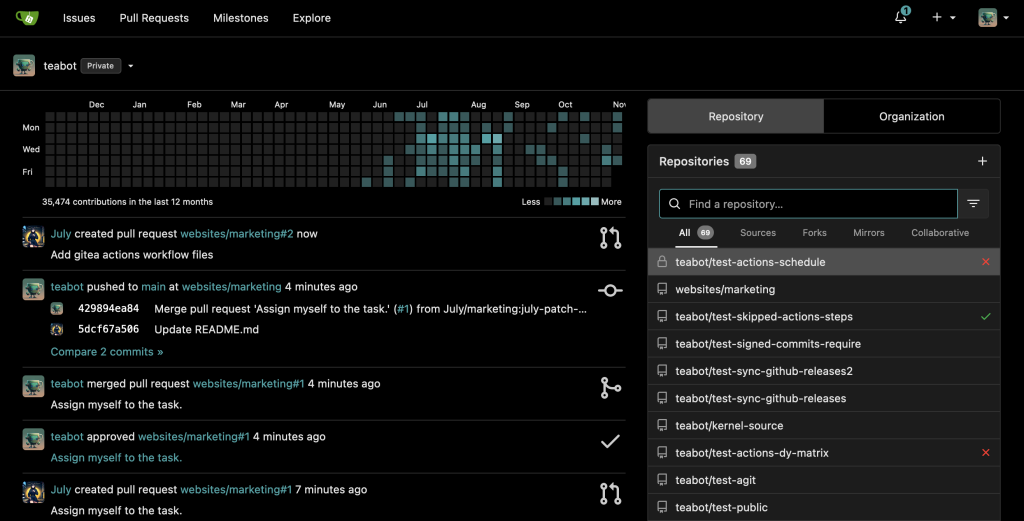
Gitea Review (2026): Pricing, Features & Honest Verdict
TLDR
Gitea is a lightweight, self-hosted Git service that delivers most of GitHub’s core features without the complexity or cost. Best for: small-to-medium dev teams wanting full control over their code hosting. Price: free and open source (cloud plans from $0). Rating: 7.9/10
What is Gitea?
Gitea started as a fork of Gogs back in 2016, built with one clear goal: give developers a self-hosted Git platform that doesn’t require a DevOps team just to keep running. Written in Go, the entire application ships as a single binary. You can have it up in minutes on almost any server, including a Raspberry Pi.
With over 45,000 GitHub stars and a growing community, Gitea has carved out a real niche among developers who want the convenience of GitHub-style workflows (pull requests, issues, CI/CD) but prefer to keep everything on their own infrastructure. Since 2022, they’ve also offered Gitea Cloud for teams that want hosted convenience.
Key Features
Git Repository Management
The core experience is solid. You get repository browsing with syntax highlighting, branch management, commit history, blame views, and file editing right in the browser. Fork and mirror support works well for teams pulling from upstream projects. The web editor is basic but functional for quick config changes.
Pull Requests and Code Review
Pull requests support inline comments, review approvals, merge strategies (merge, rebase, squash), and protected branches. The review workflow feels familiar if you’re coming from GitHub. Branch protection rules let you require approvals and status checks before merging, which is essential for any serious team workflow.
Gitea Actions (CI/CD)
This is where Gitea got interesting in recent versions. Gitea Actions is compatible with GitHub Actions syntax, so you can often reuse existing workflow YAML files with minimal changes. It runs on self-hosted runners, giving you full control over your build environment. The compatibility isn’t 100%, but it covers the majority of common use cases.
Issue Tracking and Project Boards
Issues come with labels, milestones, assignees, and due dates. There’s a kanban-style project board for visual task management. It handles the basics well, though it lacks the polish of dedicated project management tools. For most development teams, it’s more than enough to track bugs and plan sprints.
Package Registry
Gitea includes a built-in package registry supporting npm, PyPI, Maven, NuGet, Cargo, Docker containers, and more. Having packages live alongside your code simplifies dependency management for teams running private packages. Setup is straightforward compared to running a separate Nexus or Artifactory instance.
Wiki and Documentation
Each repository gets its own wiki backed by a Git repo. Markdown rendering is clean, and you can clone the wiki locally for bulk edits. It’s not a replacement for dedicated documentation platforms, but it works well for project-level docs and runbooks.
Pricing
Gitea is completely free and open source under the MIT license for self-hosted deployments. You can run it on your own hardware with zero licensing costs, no user limits, and no feature restrictions.
Gitea Cloud offers a free tier for basic use, with paid plans starting around $4.95/month for additional features, storage, and CI minutes. The cloud option is relatively new but removes the operational overhead of self-hosting.
Pros
- Extremely lightweight, runs on minimal hardware including ARM devices
- Single binary deployment makes installation and updates trivial
- GitHub Actions compatible CI/CD reduces migration friction
- Built-in package registry eliminates the need for separate artifact servers
- Active development with regular releases and growing ecosystem
- MIT license with no feature gating or enterprise paywalls
Cons
- Gitea Actions compatibility with GitHub Actions is not complete, some workflows need adjustments
- UI design feels dated compared to GitHub or GitLab’s polished interfaces
- Plugin ecosystem is limited, fewer integrations than established competitors
- Documentation can be sparse for advanced configuration scenarios
- Governance concerns after the Gitea Ltd company formation caused a community split
| Plan | Price | Plan Features | Best For |
|---|---|---|---|
| Self-Hosted | Free | Unlimited users, repos, CI runners | Teams wanting full control |
| Cloud Free | $0/mo | Limited storage and CI minutes | Individual developers |
| Cloud Pro | $4.95/mo | More storage, CI minutes, priority support | Small teams on cloud |
Who Should Use Gitea?
Gitea fits best for small-to-medium development teams who want self-hosted source control without the resource demands of GitLab. It’s particularly good for homelab enthusiasts, privacy-conscious organizations, and teams operating on tight budgets. If you need enterprise-grade features like advanced RBAC, built-in security scanning, or extensive compliance tooling, GitLab is probably the better choice. But if you want something that “just works” on modest hardware, Gitea delivers.
Alternatives
GitLab
The full-featured DevOps platform with built-in CI/CD, security scanning, and container registry. Much heavier on resources but offers significantly more enterprise features. Free self-hosted Community Edition available, with paid tiers starting at $29/user/month.
Forgejo
A community fork of Gitea created after governance disagreements. Nearly identical features with a focus on community-driven development. Backed by Codeberg and fully compatible with Gitea’s ecosystem. Also free and open source.
Gogs
Gitea’s ancestor. Even more minimalist but development has slowed considerably. Suitable if you want the absolute simplest self-hosted Git server, but lacks CI/CD, packages, and many modern features that Gitea has added since forking.
FAQ
Can I migrate from GitHub to Gitea?
Yes. Gitea has built-in migration tools that can import repositories, issues, pull requests, labels, milestones, and releases from GitHub, GitLab, Bitbucket, and other platforms. The process is straightforward through the web UI.
How does Gitea compare to GitLab for small teams?
Gitea uses a fraction of the resources. A Gitea instance runs comfortably on 512MB RAM, while GitLab’s recommended minimum is 4GB+. For teams that don’t need GitLab’s extensive DevSecOps pipeline, Gitea covers the essentials at a much lower operational cost.
Is Gitea Actions production-ready?
It’s stable for most common CI/CD workflows. Complex GitHub Actions with marketplace actions may need adaptation, but standard build, test, and deploy pipelines work well. The runner infrastructure is straightforward to set up and maintain.
Verdict
Gitea proves that a self-hosted Git platform doesn’t have to be complicated or resource-hungry. It covers the core development workflow (code hosting, reviews, CI/CD, packages) in a package that’s genuinely easy to deploy and maintain. The GitHub Actions compatibility is a smart move that lowers the migration barrier considerably. Where it falls short is in polish and ecosystem depth. The UI works but won’t win design awards, and you’ll occasionally hit edges where a feature exists but feels half-baked compared to GitHub or GitLab. The governance situation also gives some users pause, though development continues at a healthy pace. For teams that prioritize simplicity, self-hosting, and value for money over having every possible feature, Gitea is one of the best options available.
Gitea Pros & Cons
What We Like
- Extremely lightweight, runs on minimal hardware including ARM devices
- Single binary deployment makes installation trivial
- GitHub Actions compatible CI/CD
- Built-in package registry for multiple formats
- Active development with regular releases
- MIT license with no feature gating
What Could Be Better
- Gitea Actions compatibility with GitHub Actions is incomplete
- UI feels dated compared to GitHub or GitLab
- Limited plugin ecosystem
- Documentation sparse for advanced scenarios
- Governance concerns after Gitea Ltd formation
Gitea FAQ
Can I migrate from GitHub to Gitea?
Yes. Gitea has built-in migration tools for repos, issues, PRs, labels, milestones, and releases from GitHub, GitLab, and Bitbucket.
How does Gitea compare to GitLab for small teams?
Gitea runs on 512MB RAM vs GitLab's 4GB+ minimum. It covers essentials at a fraction of the operational cost.
Is Gitea Actions production-ready?
Yes for most common CI/CD workflows. Complex GitHub Actions may need adaptation but standard pipelines work well.
What is Gitea?
Lightweight self-hosted Git service with pull requests, CI/CD, packages, and wiki. Go-based GitHub alternative with 45K+ stars.
How much does Gitea cost?
Gitea pricing starts at Free (Cloud from $4.95/mo). A free plan is available.
Is Gitea worth it?
Gitea delivers a lightweight, self-hosted Git platform that covers code hosting, reviews, CI/CD, and packages without the resource demands of GitLab. Ideal for teams prioritizing simplicity and value over enterprise polish. We rate it 7.9/10.






