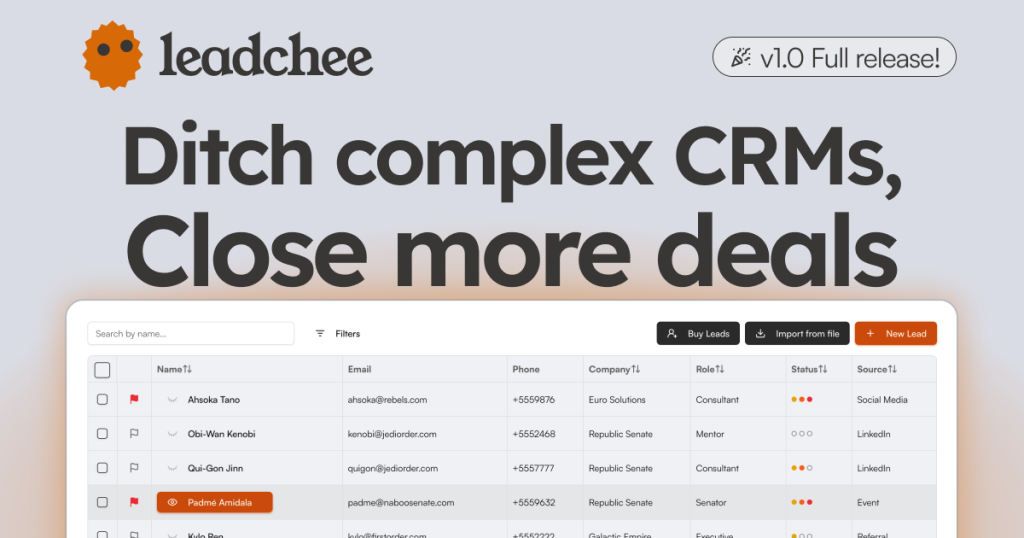
Leadchee Review (2026): Pricing, Features & Honest Verdict
TLDR
Leadchee is a simple CRM for startups that captures leads from Gmail, runs your deals on a kanban pipeline, and bundles in calling and proposals. We found it refreshingly easy to set up and fairly priced. Best for: early-stage startups and consultants. Price: from $29/user/mo, no free plan. Rating: 8.1/10.
What is Leadchee?
Leadchee is a customer relationship management tool built for startups and small sales teams who are tired of either juggling spreadsheets or fighting with a CRM built for 200-person enterprises. It connects to your Gmail, automatically creates leads from incoming emails, and uses AI to tag each lead hot, warm or cold so you know where to spend your time. Deals live on a drag-and-drop kanban board with stages you can customize, and the whole thing is meant to be running within an afternoon rather than a multi-week implementation.
It is built by Ceres Broker and aims squarely at the gap between a Notion table and Salesforce. The pitch is that a founder or a two-person sales team should not need to glue together a CRM, a dialer, and a proposal tool. Leadchee folds calling and proposal generation into the same app, so the whole sales motion from first email to signed proposal happens in one place. We dug into the product expecting another thin CRM clone, and came away thinking the bundling is the actual point: the value is in not paying for three separate subscriptions.
What Are Leadchee’s Key Features?
Gmail-to-lead capture
Leadchee watches your connected Gmail inbox and creates a lead the moment a new contact emails you. This is the feature that earns its keep. For founders who live in their inbox, it means no more forgetting to log a promising reply, and no copy-pasting names and email addresses into a contact form. The AI then tags the lead by temperature and surfaces a daily follow-up digest so warm deals do not go cold. In practice this turns your inbox into a pipeline without you doing any manual data entry, which is exactly where most small teams lose deals.
Kanban pipeline
Your deals sit on a visual board where each stage is a column. You drag a deal from one stage to the next as it progresses, and you can rename or add stages to match how you actually sell rather than how a software vendor thinks you should. Pipelines can be shared with clients, which is handy for consultants who want to show a prospect exactly where things stand. The board is the heart of the app, and it is fast and uncluttered, with none of the field-heavy data entry that makes bigger CRMs feel like a chore.
Built-in calling and proposals
Leadchee includes VOIP calling so you can dial leads from inside the CRM without paying for a separate tool like Aircall, and it supports international calling for teams that sell across borders. It also has a proposals generator, so once a lead is warm you can build and send a proposal in the same app. Combining these two functions is unusual at this price and is a big part of the value story. Most CRMs at this tier make you bolt on a dialer and a proposal tool separately, which is where your monthly cost quietly doubles.
AI tagging and follow-up digest
The AI layer does two practical jobs. It tags each lead hot, warm or cold based on signals from the conversation, and it sends a daily digest reminding you which leads need a follow-up. This is not deep sales intelligence, and you should not expect lead scoring on par with an enterprise platform, but it is enough to keep a small team focused on the right deals each morning.
Objectives and KPIs
You can set sales targets and track KPIs against them. This is lightweight reporting, not a full analytics suite, but it covers the basics a small team needs: how many deals are in each stage, what is closing, and who needs a follow-up today. There are no custom report builders or dashboards to configure, which keeps it simple but also means power users will find it limited.
How Much Does Leadchee Cost?
Leadchee costs $29 per user per month, billed as a promotional rate against a regular price of $35. That single price unlocks everything: unlimited leads, companies and deals, Gmail capture, the kanban pipeline, VOIP calling and proposals. There is a 14-day free trial and no credit card is required to start, so you can pressure-test it against your real inbox before paying.
Compared to the field, that is competitive given how much is bundled. Pipedrive starts at $14 per user per month but charges extra for calling and proposals as add-ons or higher tiers. Folk starts around $20 per user per month and is leaner on built-in calling. When you add a dialer and a proposal tool to a cheaper CRM, you often land north of $29 per user anyway, which is the argument Leadchee is making. We think it holds up: for a small team, the all-in price is the headline.
The catch is the lack of tiers. There is no enterprise plan with advanced permissions, no premium analytics add-on, and no cheaper starter tier for a one-person shop. You pay the same $29 whether you are a solo consultant or a five-person team, and there is no free forever plan to fall back on once the trial ends. For a single founder that flat rate is fine, but it means Leadchee has no obvious upgrade path if your needs grow.
| Plan | Price | Plan Features | Best For |
|---|---|---|---|
| Pro | $29/user/mo | Unlimited leads, companies and deals, Gmail capture, kanban pipeline, VOIP calling, proposals | Startups and small sales teams |
Who is Leadchee Best For?
Use Leadchee if you are an early-stage startup, a solo consultant, or a small sales team that has outgrown a spreadsheet but finds HubSpot or Salesforce overkill. If most of your leads arrive by email and you want calling and proposals in one tab, it fits like a glove. It is especially good for consultants and agencies who want to share a clean pipeline view with clients and bill their time selling rather than configuring software.
Skip Leadchee if you need deep, customizable reporting, complex multi-team permissions, marketing automation, or a long list of native integrations. Larger or more process-heavy sales orgs will outgrow the single plan quickly. It is also not the right pick if you run an outbound-heavy motion that depends on sequences and cadence tools, which Leadchee does not deeply support yet. If you already live inside a tool like HubSpot for marketing, the lack of integrations will frustrate you.
Best Leadchee Alternatives
Pipedrive
Pipedrive is the proven visual-pipeline CRM and starts at $14 per user per month. It is more mature than Leadchee, with a huge integration marketplace and deeper automation, but calling and some features sit in higher tiers or paid add-ons. Choose Pipedrive if you want a battle-tested tool with room to grow and do not mind assembling a few add-ons to match what Leadchee bundles by default.
Folk
Folk starts around $20 per user per month and is built for agencies, consultants and network-driven businesses. It shines at relationship management and fast contact capture, including from LinkedIn. It is lighter on built-in calling than Leadchee, so it suits teams that sell through relationships and warm intros more than cold dials. If your pipeline is people-first rather than process-first, Folk is the more natural fit.
Attio
Attio is a modern, highly customizable CRM aimed at scaling startups that need a flexible data model. It has a free tier and paid plans that grow with you. Attio is the better long-term home if you expect your CRM needs to get complex, where Leadchee deliberately stays simple. The tradeoff is setup time: Attio rewards configuration, while Leadchee works out of the box.
Final Verdict: Is Leadchee Worth It?
Leadchee earns its 8.1 by doing a small number of things well and pricing them fairly. The Gmail-to-lead capture, the clean kanban board, and the bundled calling and proposals make it a genuinely useful all-in-one for the founder or consultant who just wants to sell. At $29 per user with unlimited records, it is a sensible upgrade from a spreadsheet, and the lack of setup friction means you are productive on day one.
It loses points for being young and thin. One plan, a short integration list, and basic reporting mean it will not scale with a growing or process-heavy sales team, and there is no free tier once the trial ends. But if you are small and email-driven, Leadchee is an easy recommendation and a strong value. Start the 14-day trial and you will know within a week whether it fits your motion. For the right small team, it is one of the better-value CRMs we have looked at this year.
Leadchee Pros & Cons
What We Like
- Automatically turns incoming Gmail emails into leads, so nothing slips through the cracks
- Built-in VOIP calling and proposal generation mean you do not need separate tools
- Flat $29 per user with unlimited leads, companies and deals is easy to budget
- Drag-and-drop kanban pipeline is clean and takes minutes to learn
What Could Be Better
- Only one plan, so larger teams that need advanced reporting or permissions hit a ceiling fast
- Very young product with a thin integration list compared to Pipedrive or HubSpot
- AI lead tagging is helpful but basic, not a substitute for real sales intelligence
Leadchee FAQ
What is Leadchee?
Leadchee is a CRM built for startups and small teams. It captures leads from Gmail automatically, manages deals on a kanban pipeline, and includes built-in calling and proposal generation.
How much does Leadchee cost?
Leadchee has a single plan at $29 per user per month (a promo rate; the regular price is $35). It includes unlimited leads, companies and deals. There is a 14-day free trial with no credit card required.
Is Leadchee worth it?
Yes, if you are a startup or consultant who wants pipeline tracking, calling and proposals in one cheap tool. It is not worth it if you need deep analytics, complex automation, or enterprise permissions.
What are the best Leadchee alternatives?
Pipedrive (from $14/user/mo) for a proven visual pipeline, Folk (from $20/user/mo) for relationship-led agencies, and Attio for scaling startups that need a customizable data model.
Does Leadchee offer a free plan?
No. Leadchee does not have a permanent free plan, but it offers a 14-day free trial that does not require a credit card.
Who is Leadchee best for?
Leadchee is best for early-stage startups, solo consultants and small sales teams that have outgrown spreadsheets but find tools like Salesforce or HubSpot too heavy and expensive.






