Nextcloud Review (2026): Pricing, Features & Honest Verdict
TLDR
Nextcloud is a self-hosted cloud platform covering files, calendar, contacts, video calls, and office collaboration. Best for: teams and individuals wanting a private Google Workspace alternative. Price: Free / Enterprise from $36/user/yr. Rating: 7.6/10
What is Nextcloud?
Nextcloud is an open-source, self-hosted productivity platform that bundles file storage, calendar, contacts, email, video conferencing, an office suite, tasks, and notes into a single package. Think of it as a privacy-first Google Workspace that runs on your own server. Founded in 2016 as a fork of ownCloud, Nextcloud has grown into the most popular self-hosted cloud solution with over 30,000 GitHub stars and deployment across governments, universities, and enterprises worldwide.
The platform takes a modular approach. The core handles file sync and sharing, while an app store with 300+ extensions lets you add functionality like Nextcloud Talk (video calls), Nextcloud Office (document editing), Deck (kanban boards), and Mail. This flexibility means you can build a collaboration stack tailored to your needs, or keep it simple as just a file sync solution.
Key Features
File Sync and Sharing. The core of Nextcloud handles file storage with desktop sync clients (Windows, Mac, Linux) and mobile apps (iOS, Android). Sharing supports public links, password protection, expiration dates, and granular permissions. Versioning keeps file history, and the trash bin allows recovery of deleted files. WebDAV access means compatibility with most file managers.
Nextcloud Office. Built on Collabora Online, Nextcloud Office provides real-time collaborative editing for documents, spreadsheets, and presentations directly in the browser. Compatibility with Microsoft Office formats is decent, though complex spreadsheets may lose some formatting. It is good enough for most business documents and eliminates the need for a separate office suite subscription.
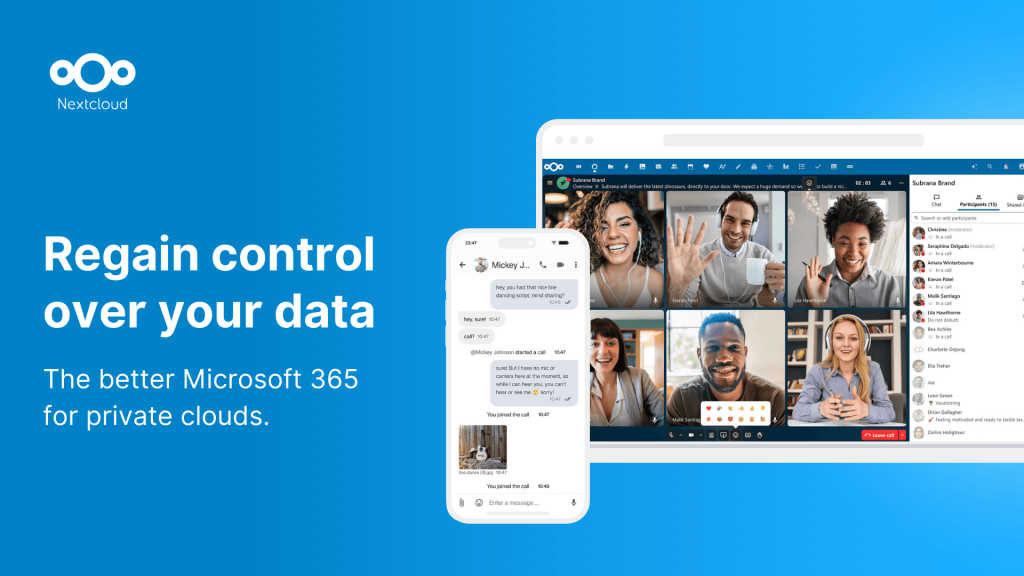
Nextcloud Talk. The integrated video conferencing solution supports group calls, screen sharing, chat, and file sharing within conversations. Quality is reasonable for small to medium groups, though it does not match Zoom or Google Meet for large meetings. The advantage is that all communication stays on your infrastructure.
Calendar, Contacts, and Mail. CalDAV and CardDAV support means your calendar and contacts sync with standard apps on any device. The built-in Mail client connects to external email accounts via IMAP. These tools are functional and reliable, covering the basics that most people need without extra subscriptions.
App Ecosystem. The Nextcloud App Store offers 300+ extensions covering project management (Deck), note-taking, bookmarks, password management, RSS readers, and more. Quality varies, as some apps are polished while others feel experimental. But the breadth means Nextcloud can replace many standalone SaaS tools.
Security and Compliance. End-to-end encryption (optional), two-factor authentication, brute force protection, and extensive audit logging make Nextcloud suitable for regulated industries. GDPR compliance tools are built in, and server-side encryption can be enabled for data at rest. The German Federal Government runs Nextcloud for 300,000+ users, which speaks to its security credentials.
Pricing
Nextcloud’s software is free and open source under the AGPL license. You can download and run it on your own hardware at no cost. For organizations wanting professional support, Nextcloud offers enterprise plans starting at $36/user/year (Basic), $65/user/year (Standard), and $99/user/year (Premium). Enterprise plans include SLA-backed support, compliance features, clustering guidance, and Outlook integration. Managed hosting through partners like Hetzner or IONOS is also available if you prefer not to self-host.
Pros and Cons
Pros
- All-in-one platform replacing multiple SaaS subscriptions
- Strong privacy and compliance credentials (GDPR, government adoption)
- Extensive app ecosystem with 300+ extensions
- Desktop and mobile sync clients for all major platforms
- Active development with strong institutional backing
Cons
- Performance can degrade with large user counts without careful tuning
- Individual apps often lag behind dedicated standalone tools in polish
- Admin interface is complex with many settings to configure
- Video calling quality does not match dedicated solutions like Zoom
- PHP-based architecture can be resource-hungry under heavy load
| Plan | Price | Plan Features | Best For |
|---|---|---|---|
| Community | Free | All features, unlimited users, community support, full app store access | Individuals and small teams |
| Basic Enterprise | $36/user/yr | SLA support, compliance features, branding, Outlook integration | Small businesses |
| Standard Enterprise | $65/user/yr | Priority support, clustering guidance, advanced security | Mid-size organizations |
| Premium Enterprise | $99/user/yr | Dedicated support engineer, custom SLA, full compliance suite | Large enterprises and government |
Who Should Use Nextcloud?
Nextcloud works best for privacy-conscious teams and individuals who want to consolidate multiple tools into one self-hosted platform. Small businesses and freelancers can replace Google Workspace or Microsoft 365 entirely, saving on subscription costs while maintaining control over their data. It is also popular with organizations in regulated industries (healthcare, legal, government) where data sovereignty is non-negotiable. Solo users who just want file sync might find Nextcloud overkill, as simpler tools like Syncthing handle that use case with less overhead.
Alternatives
ownCloud
ownCloud is Nextcloud’s predecessor and still actively developed. It focuses more on enterprise file sync and sharing, with less emphasis on the collaboration suite. ownCloud Infinite Scale (the newer Go-based rewrite) is faster and more efficient than the legacy PHP version. Choose ownCloud if you need pure file management with enterprise support and do not care about integrated video calls or office editing.
Seafile
Seafile is a lightweight, performance-focused file sync and sharing platform. Written in C and Python, it is significantly faster than Nextcloud for pure file operations, especially with large files. Seafile lacks the collaboration features (no office suite, no video calls, no calendar), but if file sync speed is your priority, it is the better tool.
Google Workspace
Google Workspace starts at $7/user/month and provides email, Drive, Docs, Meet, Calendar, and more with zero maintenance. The AI features (Gemini integration) and reliability are unmatched. Choose Google Workspace if convenience and collaboration features matter more than data sovereignty. The trade-off is your data lives on Google’s servers.
FAQ
Can Nextcloud really replace Google Workspace?
For basic needs, yes. Files, calendar, contacts, video calls, and document editing are all covered. However, individual features are not as polished as Google’s equivalents. Gmail, Google Docs, and Google Meet are each best-in-class, while Nextcloud’s versions are functional but not as refined. The value proposition is privacy and cost savings, not feature parity.
What server specs does Nextcloud need?
For a small team (5-10 users), 2 CPU cores, 4GB RAM, and SSD storage works well. Larger deployments benefit from dedicated database servers (MySQL/PostgreSQL), Redis for caching, and reverse proxy setup. The official documentation provides scaling guidelines for up to thousands of users.
Is Nextcloud difficult to maintain?
Initial setup requires Linux administration skills (web server, database, PHP configuration). Ongoing maintenance includes regular updates, which can occasionally break apps. The built-in updater simplifies the process, but you should always back up before upgrading. For teams without sysadmin skills, managed Nextcloud hosting eliminates maintenance entirely.
Nextcloud Pros & Cons
What We Like
- All-in-one platform replacing multiple SaaS subscriptions
- Strong privacy and compliance credentials with government adoption
- Extensive app ecosystem with 300+ extensions
- Desktop and mobile sync clients for all major platforms
- Active development with strong institutional backing
What Could Be Better
- Performance can degrade with large user counts without careful tuning
- Individual apps lag behind dedicated standalone tools in polish
- Admin interface is complex with many settings to configure
- Video calling quality does not match dedicated solutions like Zoom
- PHP-based architecture can be resource-hungry under heavy load
Nextcloud FAQ
Can Nextcloud really replace Google Workspace?
For basic needs, yes. Files, calendar, contacts, video calls, and document editing are all covered. Individual features are not as polished as Google equivalents, but the value proposition is privacy and cost savings.
What server specs does Nextcloud need?
For 5-10 users: 2 CPU cores, 4GB RAM, and SSD storage. Larger deployments benefit from dedicated database servers, Redis caching, and reverse proxy setup.
Is Nextcloud difficult to maintain?
Initial setup requires Linux admin skills. Ongoing maintenance includes regular updates which can occasionally break apps. The built-in updater simplifies this, but always back up before upgrading. Managed hosting eliminates maintenance entirely.
What is Nextcloud?
Self-hosted cloud platform with files, calendar, contacts, video calls, office suite, and 300+ apps. A privacy-first Google Workspace alternative used by governments and enterprises worldwide.
How much does Nextcloud cost?
Nextcloud pricing starts at Free / Enterprise from $36/user/yr. A free plan is available.
Is Nextcloud worth it?
Nextcloud is the most comprehensive self-hosted cloud platform available, covering everything from files to video calls. Individual features are not best-in-class, but the all-in-one value proposition is strong for privacy-conscious teams. Expect some maintenance overhead in exchange for complete data sovereignty. We rate it 7.6/10.






