Publer Review (2026): Pricing, Features & Honest Verdict
TLDR
Publer is a budget-friendly social media scheduler with a usable free plan, bulk scheduling, and a built-in AI assistant. Best for: freelancers and creators who want capable scheduling without paying much. Price: free or from $12/mo. Rating: 7.3/10
What is Publer?
Publer is a social media scheduling and management platform that covers the major networks: Facebook, Instagram, Twitter/X, LinkedIn, Pinterest, TikTok, Google Business Profile, YouTube, and Telegram. Based in North Macedonia, the company has focused on offering a generous feature set at prices that undercut most competitors.
The free plan gives you 3 social accounts and limited scheduling, which is enough for a solo creator testing the waters. Paid plans start at just $12/mo, making it one of the cheapest full-featured schedulers on the market. Publer includes an AI assistant, auto-scheduling, bulk upload, link-in-bio pages, watermarking, and built-in access to Canva and Unsplash media libraries.
Key Features
Bulk Scheduling
Upload a CSV or connect an RSS feed and Publer will create dozens of posts in minutes. The bulk creator lets you map columns to post fields (text, image URL, publish date) and preview everything before queuing. For anyone managing a high-volume content calendar, this is a significant time saver.
AI Assistant
Publer’s AI can generate captions, suggest hashtags, and create post variations for different platforms. You type a brief prompt and get several options to choose from. The quality is decent for social copy, though longer-form content needs manual editing. You also get auto-complete suggestions as you type.
Auto-Scheduling
Set your preferred posting windows and Publer distributes queued content across those time slots automatically. It analyzes your audience engagement patterns to suggest optimal times. A nice hands-off approach if you batch-create content weekly and want even distribution.
Link in Bio
Create a simple landing page with links to your latest content, products, or whatever you want followers to find. It is basic compared to dedicated link-in-bio tools like Linktree, but having it bundled in your scheduler eliminates one more subscription.
Built-in Media Tools
Publer integrates Canva and Unsplash directly into the post composer. Design graphics or browse stock photos without leaving the app. You can also add watermarks to images automatically before publishing, which is useful for protecting original visual content.
Analytics
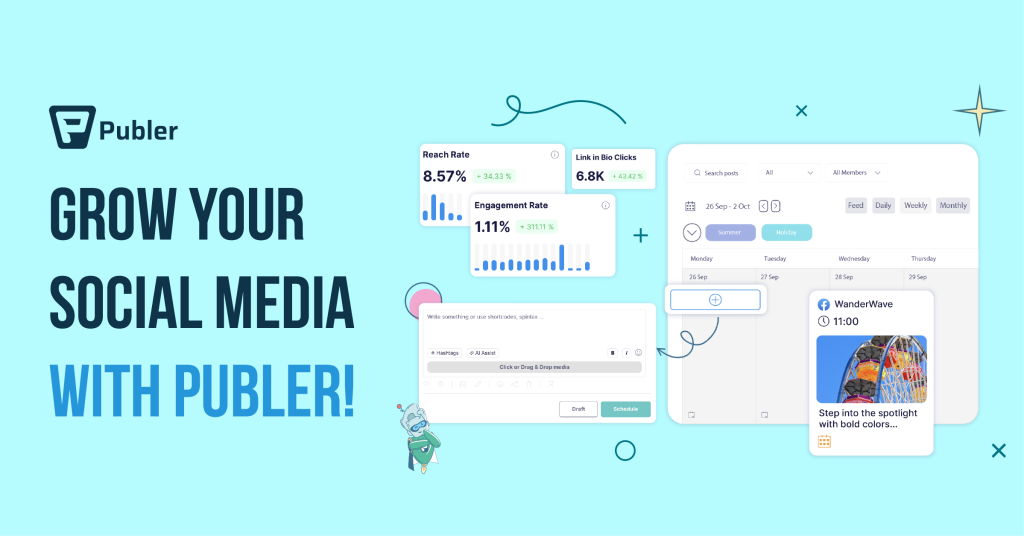
The analytics dashboard shows engagement metrics, follower growth, and top-performing posts for each connected profile. It covers the basics but does not offer the depth of tools like Metricool or Iconosquare. Adequate for tracking trends, not ideal for deep-dive reporting.
Pricing
Publer keeps pricing simple and accessible:
- Free ($0) – 3 social accounts, limited scheduling, basic features
- Pro ($12/mo) – 10 social accounts, analytics, AI assistant, bulk scheduling, auto-scheduling
- Business ($21/mo) – 25 social accounts, team collaboration, white-label, priority support
Annual billing cuts costs by about 20%. At $12/mo for the Pro plan, Publer is among the most affordable schedulers with meaningful features. The free plan is genuinely usable, not just a teaser, making it easy to try before committing.
| Plan | Price | Plan Features | Best For |
|---|---|---|---|
| Free | $0 | 3 social accounts, limited scheduling, basic features | Solo creators trying out scheduling |
| Pro | $12/mo | 10 social accounts, analytics, AI assistant, bulk scheduling | Freelancers managing multiple profiles |
| Business | $21/mo | 25 social accounts, team collaboration, white-label, priority support | Small teams needing collaboration |
Who is Publer Best For?
Budget-conscious freelancers and content creators who need solid scheduling without premium pricing. Publer is a great fit if you manage a handful of social profiles and want features like bulk scheduling and AI assistance without the $49+ monthly bills of competitors. It is less suited for agencies needing advanced team workflows or enterprise-grade reporting.
Pros and Cons
Pros
- Genuinely usable free plan with 3 social accounts
- Extremely affordable paid plans starting at $12/mo
- Bulk scheduling via CSV saves significant time
- Built-in Canva and Unsplash integration
- Covers a wide range of platforms including Telegram
Cons
- Analytics are shallow compared to specialized tools
- UI feels cluttered in spots, especially the calendar view
- Auto-scheduling time suggestions are not always accurate
- Link-in-bio feature is very basic
- Customer support response times can be slow
Alternatives
Buffer
Buffer is the closest competitor in the affordable scheduling space. It has a cleaner interface and a free plan (3 channels), but lacks Publer’s bulk scheduling depth and watermarking. Choose Buffer if simplicity matters more than feature count.
Later
Later specializes in visual-first scheduling, particularly for Instagram and Pinterest. It offers better visual planning tools (like a drag-and-drop grid preview) but costs more and focuses narrower than Publer. Pick Later if Instagram is your primary channel.
SocialBee
SocialBee costs more ($29/mo starting) but adds category-based posting and evergreen recycling that Publer lacks. It is the better choice if you want a more structured content strategy, though you lose the free tier and budget pricing.
FAQ
Is Publer’s free plan actually useful?
Yes. You get 3 social accounts with basic scheduling. It is limited in analytics and some features, but for a solo creator posting to a few platforms, it covers the essentials.
Does Publer support Instagram Reels and Stories?
Yes, Publer supports scheduling Instagram Reels and Stories with direct publishing on paid plans.
Can I schedule to YouTube with Publer?
Yes, YouTube video scheduling is supported. You can upload videos, set titles and descriptions, and schedule publish times directly from Publer.
Does Publer offer team collaboration?
The Business plan ($21/mo) includes team features with role-based permissions and approval workflows. The free and Pro plans are single-user only.
Publer Pros & Cons
What We Like
- Genuinely usable free plan with 3 social accounts
- Extremely affordable paid plans starting at $12/mo
- Bulk scheduling via CSV saves significant time
- Built-in Canva and Unsplash integration
- Covers a wide range of platforms including Telegram
What Could Be Better
- Analytics are shallow compared to specialized tools
- UI feels cluttered in spots, especially the calendar view
- Auto-scheduling time suggestions are not always accurate
- Link-in-bio feature is very basic
- Customer support response times can be slow
Publer FAQ
Is Publer's free plan actually useful?
Yes. You get 3 social accounts with basic scheduling, which covers the essentials for a solo creator.
Does Publer support Instagram Reels and Stories?
Yes, Publer supports scheduling Instagram Reels and Stories with direct publishing on paid plans.
Can I schedule to YouTube with Publer?
Yes, YouTube video scheduling is supported with full title and description control.
Does Publer offer team collaboration?
The Business plan ($21/mo) includes team features with role-based permissions and approval workflows.
What is Publer?
Affordable social media scheduler with a free plan, bulk scheduling, AI assistant, and built-in Canva and Unsplash integration.
How much does Publer cost?
Publer pricing starts at $12/mo. A free plan is available.






