SoWork Review (2026): Pricing, Features & Honest Verdict
TLDR
SoWork is an AI-powered virtual office where remote and hybrid teams hang out as avatars, drop into instant meetings, and let AI remember every call. Best for distributed teams of 5-100 who want a persistent HQ. From $5.40/user/mo, free plan for up to 10 people. Rating: 7.4/10.
What is SoWork?
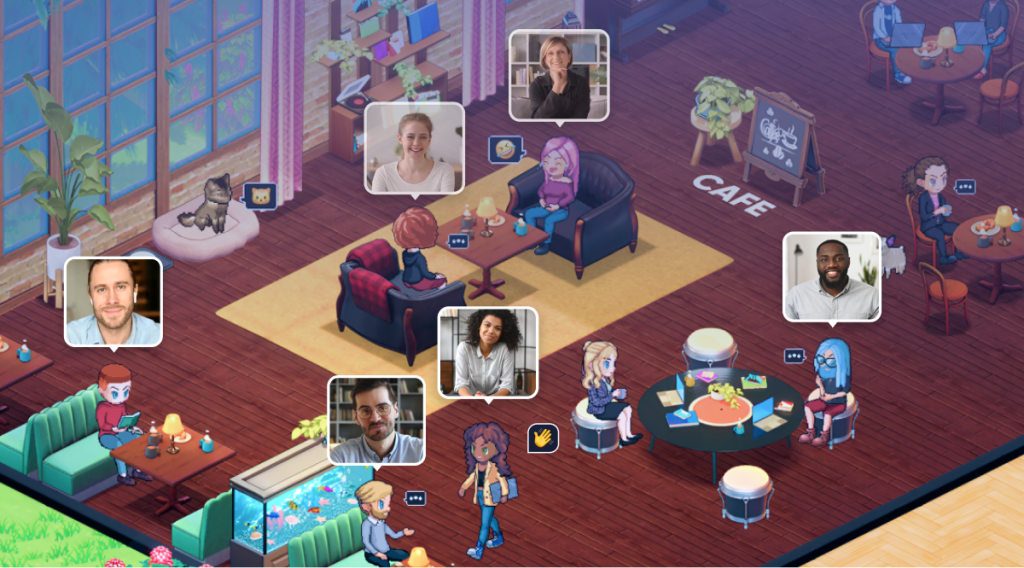
SoWork is a virtual office platform that replaces the scattered mess of Slack, Zoom, and calendar invites with a single customizable digital space. Your team appears as avatars walking around a 2D office, and you can see at a glance who is available, heads-down focusing, or already in a meeting. Walk up to a colleague and you are instantly on a video call, no scheduling link required.
The company was founded by Vishal Punwani and a team that originally met playing online games, and it pivoted into virtual offices during the remote-work surge. SoWork raised venture funding (TechCrunch covered an early round, with Tinder among its customers) and has built a steady following, earning a 4.8 out of 5 rating on G2. It matters because it tackles the real problem remote teams face: not a lack of meetings, but the loss of spontaneous, low-friction presence.
What Are SoWork’s Key Features?
Avatar-based presence
You and your teammates appear as avatars in a shared office map, so availability is obvious without anyone typing a status update. The platform also syncs with your calendar to update your status automatically when a meeting starts.
Instant click-to-join meetings
Walking your avatar next to someone starts a video call immediately, and rooms can hold groups for standups or all-hands. This removes the friction of generating links and waiting in lobbies that makes scheduled video so draining.
AI meeting memory
On the Premium plan, SoWork records, transcribes, and summarizes meetings, then generates action items automatically. It means no one has to be the designated note-taker, and people who missed a call can catch up in seconds.
Focus modes and customization
Simple Mode and Mini Mode let you stay connected while doing deep work, and offices and avatars are fully customizable so the space feels like your own. Topic-based chat keeps written conversation organized alongside the live presence layer.
How Much Does SoWork Cost?
SoWork starts free for up to 10 members, with paid Basic at $5.40 per user per month and Premium at $12 per user per month (both with up to 20% off when billed annually). Enterprise is custom-priced for teams over 100. That undercuts Kumospace, which starts around $16 per user per month, and is competitive with Gather’s paid tiers. The catch is the free plan’s 30-minute meeting cap and the fact that AI features and recording are gated behind Premium.
| Plan | Price | Plan Features | Best For |
|---|---|---|---|
| Free | Free | Up to 10 members, 30-minute meeting cap, limited chat and customization, no analytics, recording, or AI | Small teams testing the virtual office concept |
| Basic | $5.40/user/mo | Unlimited video/audio calls, full team chat, calendar integration, unlimited chat history, 2 recording uses | Growing teams that want unlimited meetings without AI extras |
| Premium | $12/user/mo | Unlimited recordings, AI summaries/transcripts/action items, advanced analytics, integrations, noise cancellation, priority support | Teams that rely on meeting memory and analytics |
| Enterprise | Custom | Unlimited users, SSO/SCIM, secure AI, assisted onboarding, 99.99% uptime SLA | Companies over 100 members with procurement requirements |
Who Is SoWork Best For?
Use SoWork if you run a fully remote or hybrid team of roughly 5 to 100 people and miss the spontaneous interactions of a physical office. It shines when presence and quick hallway-style conversations matter more than formal scheduled calls, and the free guest access makes it handy for client or candidate sessions too.
Skip SoWork if your team only needs occasional, scheduled video calls, or if always-on avatar presence feels like surveillance rather than connection. Solo founders and teams that already live happily in Slack plus Zoom will not get enough extra value to justify another tool.
What Are the Best SoWork Alternatives?
Gather
Gather offers a more game-like, highly customizable map-based virtual office with a free tier and paid plans by reserved space. It is the most flexible option for building elaborate virtual environments, but the customization can be more setup work than SoWork’s polished defaults.
Kumospace
Kumospace delivers a sleek spatial-video experience starting around $16 per user per month. It is strong for events and social gatherings, though it costs more than SoWork and leans more toward hosting than everyday team presence.
Teamflow
Teamflow focuses on a shared virtual office canvas with embedded apps and whiteboards. It is a solid pick for teams that want collaborative tools baked into the space, but SoWork’s AI meeting memory and pricing are more compelling for most.
Final Verdict: Is SoWork Worth It?
SoWork gets the fundamentals right: it makes remote presence feel natural, kills the friction of scheduled calls, and layers on genuinely useful AI meeting memory. The free plan for up to 10 people and aggressive Basic pricing make it easy to try without commitment, and free guest access is a thoughtful touch.
It is not for everyone. If your team is happy with Slack and Zoom or finds always-on avatars unsettling, this will feel like overkill. But for distributed teams that genuinely want a virtual HQ where collaboration happens spontaneously, SoWork is one of the best-value options in the category and well worth a trial.
SoWork Pros & Cons
What We Like
- Generous free plan covers up to 10 members with unlimited members on paid tiers
- Instant click-to-join meetings remove the friction of scheduling links and calendar invites
- AI meeting memory records, transcribes, and summarizes calls with action items on Premium
- Avatar-based presence makes it obvious who is available, focused, or in a meeting
- External guests join the office for free without paying for a seat
What Could Be Better
- Free plan caps meetings at 30 minutes and strips out recording, analytics, and AI features
- The gamified virtual-office metaphor is divisive and some people find always-on presence stressful
- Niche category competing with well-funded rivals like Gather and Kumospace
SoWork FAQ
What is SoWork?
SoWork is an AI-powered virtual office platform for remote and hybrid teams. It gives your team a persistent, customizable digital workspace with avatar-based presence, instant click-to-join video meetings, topic-based chat, and AI meeting memory that records, transcribes, and summarizes calls.
How much does SoWork cost?
SoWork has a free plan for up to 10 members. Paid plans start at $5.40 per user per month for Basic and $12 per user per month for Premium (with up to 20% off annual billing). Enterprise pricing is custom for teams over 100 members.
Is SoWork worth it?
For distributed teams that want a persistent virtual HQ and spontaneous collaboration, yes. The free plan lets you trial it risk-free for up to 10 people, and Premium's AI meeting memory is genuinely useful. It is less worth it for teams that only need occasional scheduled calls.
What are the best SoWork alternatives?
The strongest alternatives are Gather (highly customizable map-based virtual office with a free tier), Kumospace (polished spatial video starting around $16/user/mo), and Teamflow. Each offers the same spatial-presence concept with different design and pricing tradeoffs.
Does SoWork offer a free plan?
Yes. SoWork's free plan supports up to 10 members but caps meetings at 30 minutes and excludes recording, analytics, and AI features. Those unlock on the paid Basic and Premium plans.
Who is SoWork best for?
SoWork is best for fully remote and hybrid teams of roughly 5 to 100 people who want an always-on virtual office that replaces scattered tools and scheduled calls with persistent presence and instant collaboration.






