Truetask Review (2026): Pricing, Features & Honest Verdict
TLDR
Truetask is a private cloud workspace that bundles project management, notes, automations, billing, and AI access into one tool. We found it surprisingly complete for its age, with real time tracking and a deep MCP integration. Best for: small agencies and back-office teams. Price: Free plan; Pro from $5/user/mo. Rating: 6.6/10.
What is Truetask?
Truetask is a workspace for tasks, notes, automations, and AI that you either let the company host for you or run on your own servers. It gives you the usual project views, Kanban boards, lists, calendars, and timelines, then layers on notes with backlinks, intake forms, and an automation builder. The pitch is a single back-office tool instead of stitching together a project manager, a wiki, and a time tracker, and that consolidation is its core argument.
What sets it apart is the AI angle and the lock-in promise. Truetask ships an MCP server with 173 workspace tools, so assistants like Claude can read and act on your boards directly. At the same time, you can export everything to JSON whenever you want or self-host the whole thing. It is a newer entrant aimed at teams burned by tools that hold their data hostage, and it leans hard into portability as its main selling point.
What Are Truetask’s Key Features?
Multiple project views in one workspace
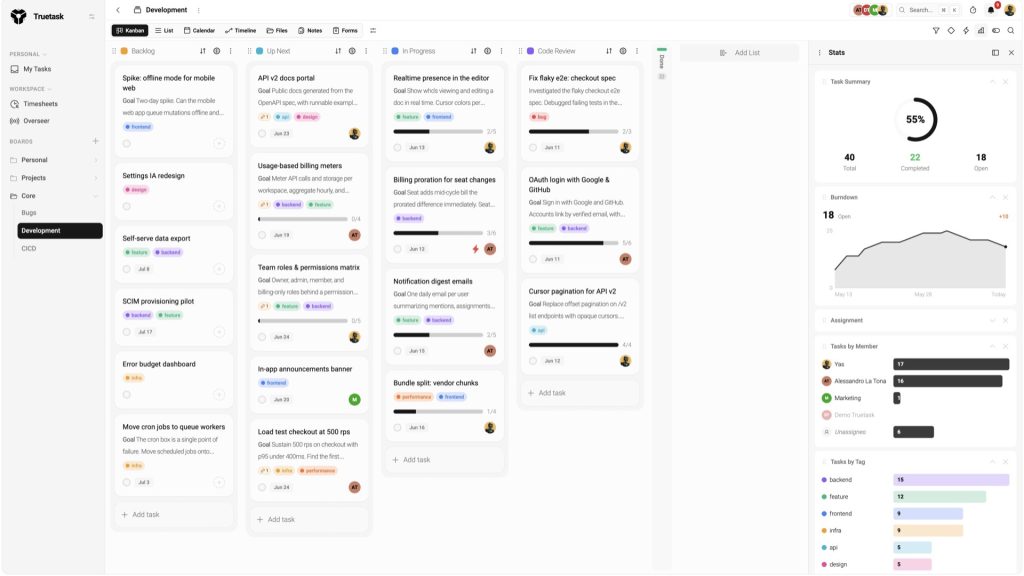
You get Kanban boards, lists, calendars, timelines, files, notes, and forms in a single workspace. Tasks live on cards that carry timers, estimates, and budget bars. The notes system supports real-time co-editing, wiki links, backlinks, and web publishing, so it doubles as a lightweight internal wiki. It is not as deep as Notion for documents, but it covers the common cases, and having boards and notes in one place reduces context switching during a busy day.
Built-in time tracking and invoicing
This is the standout. Every card has one-click timers and manual entries, with estimate-versus-actual budget bars. Timesheets roll up by member, board, and week for managers to approve in one view. Per-user billing rates turn approved hours into invoice-ready numbers. Timesheets and approvals require the Team plan or higher, but having billing baked in is rare at this price.
Visual automation builder
The automation builder supports conditions, schedules, HTTP and email actions, and agent loops. The free plan allows 5 active automations, Pro allows 25, and Team allows 100. HTTP and email actions are gated behind Pro. This is enough to handle status changes, reminders, and basic integrations with outside services through webhooks. Because it speaks HTTP, you can connect Truetask to tools it does not natively integrate with, which partly offsets the thin out-of-the-box integration list. Teams on higher tiers also get autonomous agent loops, where an AI agent can run a multi-step automation on its own.
MCP server for AI assistants
Truetask exposes an MCP server with 173 tools, letting AI assistants query and modify your workspace. You manage access with scoped MCP credentials: 1 on Free, 3 on Pro, up to 20 on Team. In-app AI and autonomous agent loops are reserved for Enterprise. If you already work alongside Claude or another assistant, this is one of the more direct integrations we have seen in a project tool. In practice it means you can ask an assistant to create cards, move tasks across columns, or pull a status summary without leaving your chat window, and the scoped credentials keep each connection limited to what you allow.
Intake forms and data portability
Shareable intake forms let clients or teammates submit requests that land straight on a board as tasks, which is handy for agencies fielding work from outside the team. On the portability side, Truetask offers full JSON export at any time and a self-hosting option, so your data is never trapped behind a paywall. Combined, these two features make Truetask feel built for teams that have been burned before by tools that made leaving painful. The export is comprehensive rather than a token gesture, covering tasks, notes, and structure.
How Much Does Truetask Cost?
Truetask starts free and paid plans begin at $5 per user per month. The Free plan covers 5 users, 512 MB storage, 5 automations, and 1 MCP credential. Pro is $6/user/month monthly or $5/user/month annual, with a 3-seat minimum, 20 GB storage, SSO, and advanced automations. Team is $10 monthly or $8 annual per user, with a 5-seat minimum, timesheets, audit logs, and governance controls.
Enterprise runs $20 monthly or $16 annual per user with a 10-seat minimum, and it unlocks autonomous agent loops, in-app AI, and dedicated infrastructure. There is also a self-hosted perpetual license at a flat $5,000 one time, which can pay off for larger teams that want full data ownership and offline operation.
Against the field, this is aggressive. ClickUp starts at $7/user/month and Notion at $10/user/month, and neither includes time tracking and invoicing at the base tier the way Truetask’s higher plans do. The catch is the seat minimums, which mean a two-person shop still pays for 3 Pro seats. Read the minimums before you commit.
| Plan | Price | Plan Features | Best For |
|---|---|---|---|
| Free | $0 | 5 users, 512 MB storage, 5 automations, 1 MCP credential | Solo users and tiny teams testing it out |
| Pro | $5/user/mo | 25 users, 20 GB, 25 automations, SSO, advanced automations | Small teams that need SSO and more automation |
| Team | $8/user/mo | 100 users, 100 GB, timesheets, audit log, governance | Agencies billing clients and approving hours |
| Enterprise | $16/user/mo | Unlimited users and storage, agent loops, in-app AI, LDAP | Larger orgs needing AI agents and dedicated infra |
Who is Truetask Best For?
Use Truetask if you run a small agency or back-office team that bills clients and wants time tracking, timesheet approvals, and invoicing in the same tool as your tasks. Use it if data portability matters to you and you want the option to self-host. And use it if you already work with AI assistants and want them wired into your workspace through MCP.
Skip Truetask if you need a mature ecosystem of native integrations, a large template library, or the reassurance of thousands of public reviews. Skip it if you are a tiny team that will resent the 3-seat minimum on paid plans. Larger enterprises that want polish and proven scale will be better served by an established platform for now.
A good test is whether your workflow is built around billing. If you log hours, send invoices, and want AI assistants wired into the same place your tasks live, Truetask is doing something genuinely useful that most rivals split across two or three tools. If your work is pure planning with no billing, the case is weaker, and a more established free tier elsewhere may serve you just as well without the seat minimums.
Best Truetask Alternatives
ClickUp
ClickUp is the all-in-one category leader, with docs, goals, time tracking, and dozens of views. It starts at $7/user/month and has a free tier. It is far more mature than Truetask with a huge integration library, but it is also famously feature-heavy and can feel bloated. Choose ClickUp if you want breadth and a proven track record over portability.
Notion
Notion pairs flexible documents with databases and starts at $10/user/month with a free personal tier. It is stronger than Truetask for wikis and knowledge bases but weaker for native time tracking and billing. Pick Notion if your team lives in documents and you do not need invoicing baked in.
Plane
Plane is an open-source project management tool you can self-host for free or use as a hosted service with a free plan. It is the closest match to Truetask’s no-lock-in promise and costs nothing to run yourself. It lacks the built-in billing and the MCP integration, so choose Plane if open source and zero cost matter more than the billing features.
Final Verdict: Is Truetask Worth It?
Truetask earns a 6.6. It is doing a lot right: a genuinely useful free plan, built-in time tracking and invoicing that most rivals charge extra for, a serious AI integration through MCP, and a clear escape hatch through export and self-hosting. For a small agency that bills hours, the value is real and the lock-in risk is low.
The rating sits where it does because the product is young. The integration ecosystem is thin, public reviews are scarce, and the seat minimums quietly raise the real cost for the smallest teams. There is also execution risk with any newer tool: you are betting that the team keeps shipping and the product matures. The self-hosting option and full export soften that bet, since you can always take your data and leave, but it is still a factor to weigh.
If you are comfortable being an early adopter and the billing features fit your workflow, Truetask is worth testing on the free plan today. The free tier is generous enough to run a real project, so you can evaluate it properly before paying anything. If you need maturity and polish right now, or you depend on a wide set of native integrations, wait a release or two or stick with an established tool like ClickUp or Notion. For the right small agency, though, this is a smart, portable, AI-friendly bet.
Truetask Pros & Cons
What We Like
- Genuine free plan with 5 users, MCP access, and automations, not a crippled trial
- Built-in time tracking, timesheets, and invoice-ready billing rates in the same tool
- Deep AI integration via an MCP server with 173 workspace tools for Claude and other assistants
- Self-hosting and full JSON export mean zero vendor lock-in
What Could Be Better
- Young product with a small ecosystem, few third-party integrations, and limited public reviews
- Paid plans have seat minimums (3 for Pro, 5 for Team, 10 for Enterprise) that inflate the real cost
- Self-hosted license is a steep $5,000 one-time fee
Truetask FAQ
What is Truetask?
Truetask is a private cloud workspace that combines project management, notes, automations, billing, and AI access in one tool. It offers Kanban boards, lists, calendars, timesheets, and an MCP server so AI assistants can act on your workspace. You can use the hosted version or self-host it.
How much does Truetask cost?
Truetask has a free plan for up to 5 users. Pro is $5/user/month annually (3-seat minimum), Team is $8/user/month annually (5-seat minimum), and Enterprise is $16/user/month annually (10-seat minimum). A self-hosted perpetual license costs $5,000 one time.
Is Truetask worth it?
For small agencies and back-office teams that want time tracking, invoicing, and AI access without lock-in, Truetask is worth a look, and the free plan makes testing risk-free. It is still young, so expect fewer integrations and less polish than ClickUp or Notion.
What are the best Truetask alternatives?
The main alternatives are ClickUp (the all-in-one category leader from $7/user/month), Notion (flexible docs plus databases from $10/user/month), and Plane (an open-source, self-hostable option with a free tier).
Does Truetask offer a free plan?
Yes. The free plan is a full hosted workspace with 5 users, unlimited boards and tasks, 512 MB storage, 5 active automations, intake forms, and 1 scoped MCP credential, with no credit card required.
Who is Truetask best for?
Truetask is best for small agencies, freelancers, and back-office teams that bill clients and want time tracking, invoicing, and AI access in one private workspace they can export or self-host at any time.






