Vectary Review (2026): Pricing, Features & Honest Verdict
TLDR
Vectary is a browser-based 3D and AR design platform for product teams who need interactive 3D on the web without hiring a 3D artist. Sharing is one link and AR needs no app. Best for: product and marketing teams shipping web 3D. Price: from $15/mo annual. Free plan: yes. Rating: 8.4/10
What is Vectary?
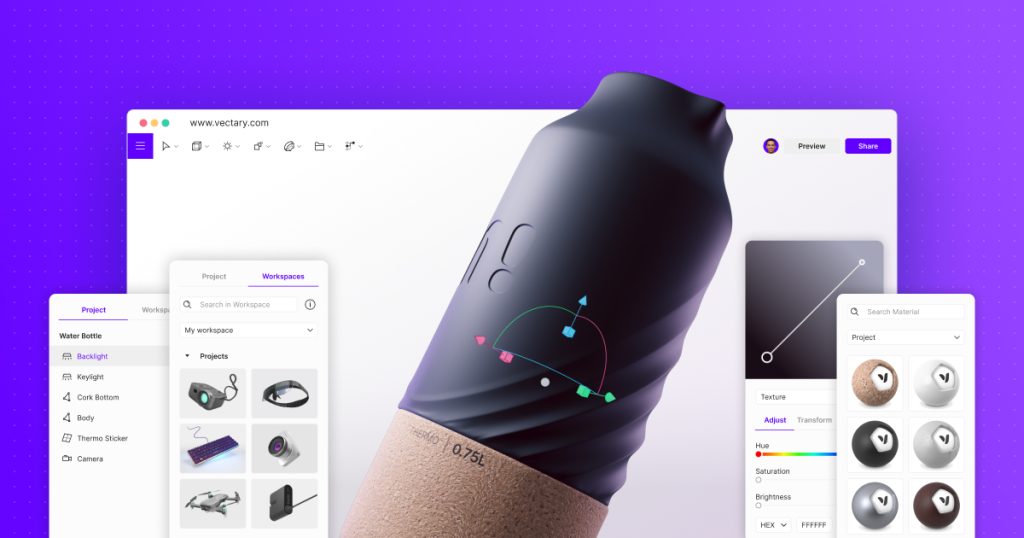
Vectary is an online 3D design tool that runs entirely in a browser tab. You import a CAD file or model something from scratch, set materials and lighting, add animation and clickable interactions, then publish it as a link. That link works as an embedded viewer on a website, inside a presentation, or in a chat message, and on a phone it opens straight into augmented reality with no app download. That last part is the reason most teams find Vectary in the first place. Web 3D has been technically possible for a decade, but the pipeline usually required a specialist. Vectary compresses it into an afternoon.
The company was founded in 2014 by Michal Koor, an industrial designer who runs it as CEO, and Pavol Sovis as CTO, split between Bratislava and San Francisco. It raised a round of about 7.3 million dollars in 2020 with EQT Ventures and BlueYard backing it. The positioning has shifted over the years from a general web 3D modeller towards product configurators, assembly manuals and trade show experiences, and Vectary lists customers including Panasonic, Sharp, KTM and Steelcase. We tested it against the usual friction points of web 3D and the difference is real: no install, no render farm, no exported video file to host somewhere.
What Are Vectary’s Key Features?
Browser-native modelling and CAD import
The Studio editor handles modelling, materials, lighting and scene assembly without a download. More importantly for most users, it imports from over 20 design and CAD platforms including Autodesk, SolidWorks, Rhino, Blender, Adobe and Figma. That matters because in real product teams the model already exists, it is just trapped in a file format nobody outside engineering can open. Vectary’s job is to make that model shareable, not to replace the CAD tool that made it. Export covers glb, gltf and usdz, the formats web and mobile AR actually need. There are also generative tools on the paid tier that will build a 3D object from a single image, useful for filling out a scene with props you do not want to model by hand.
App-free augmented reality
Vectary publishes AR straight to the browser. A customer scans a code or taps a link and the product appears in their room, on iOS and Android, without installing anything. For furniture, consumer electronics and equipment sales this removes the entire reason most AR pilots die, which is asking a customer to download an app. It also means your AR asset is a URL you can put in an email, a product page or a QR code on a trade show banner. We found the setup genuinely quick: once a model is in the editor, AR is a publish setting rather than a separate build.
Interactive viewers and configurators
Scenes are not just spinnable models. You can attach animations, hotspots and configurable UI controls so a viewer can change a colourway, open a panel, or step through an assembly sequence. This is what turns Vectary from a rendering tool into a sales and support tool. Assembly manuals and product configurators are the two use cases the company leans on hardest, and the interaction layer is what makes them possible without a developer building a Three.js scene by hand. A support team can hand a customer a link that walks through a repair step by step, in 3D, with no software on either end.
Collaboration and embedding
Multiple people can work in the same scene, and comments live inside the design rather than in a separate thread. Sharing is a single private link, which makes review cycles much shorter than exporting stills and mailing them around. There is a Figma plugin for dropping 3D into interface work. On the Business tier you get a Viewer API, an unbranded viewer, domain masking, SSO and an offline mobile viewer app for sales teams working a show floor with bad wifi. The unbranded viewer is the one that catches people out, because agencies delivering client work usually want it and it is not available on Pro.
How Much Does Vectary Cost?
Paid access starts at $15 a month billed annually, which works out at $180 a year, for the Pro AI plan. Paying monthly instead costs $25. That plan covers 25 projects, 3,000 AI credits a month, generative tools for creating 3D from an image and generating textures and images, full import and export of usdz, glb and gltf, app-free AR and the Figma plugin. There is a condition worth reading: Pro AI carries a revenue cap, and companies above 1 million dollars in annual revenue are expected on the Business plan.
The Free plan gives you 5 projects, the Studio editor, 3D import, private share links and the Figma plugin. It is a genuinely usable tier for one person evaluating whether web 3D fits their workflow, and it is more generous than most free 3D tiers because it does not cripple the editor. What it does not include is the app-free AR publishing or the AI credits, which are the two things most people are there for.
Business is quote-only. That tier unlocks unlimited projects, custom roles and user management, the Viewer API, an unbranded viewer, CAD import with an offline converter, the offline mobile viewer, ISO 27001 and SOC 2 certification, SSO, CDN delivery and a dedicated account manager. Compared with the field, $15 a month is competitive. Spline’s Hobby plan is $12 a month annually and $15 monthly, with Pro at $25 annually. Sketchfab charges $15 a month for Pro. The catch with Vectary is not the entry price, it is that the features enterprises actually need, the API and the white-label viewer, sit behind a call with sales. Budget for a Business quote if you are embedding 3D across a live storefront.
| Plan | Price | Plan Features | Best For |
|---|---|---|---|
| Free | $0 | 5 projects, Studio editor, 3D import, private share links, Figma plugin | Solo users evaluating web 3D |
| Pro AI | $15/mo annual ($25 monthly) | 25 projects, 3,000 AI credits/mo, app-free AR, usdz/glb/gltf export, under $1M revenue | Freelancers and small product teams |
| Business | Custom pricing | Unlimited projects, Viewer API, unbranded viewer, CAD offline converter, SSO, ISO 27001 and SOC 2 | Enterprises embedding 3D at scale |
Who is Vectary Best For?
Use Vectary if you have CAD files and no way to show them to customers. Manufacturers, furniture brands, electronics companies and equipment sellers get the most out of it, because the model already exists and the missing piece is distribution.
Use Vectary if you want AR on a product page and cannot justify a native app. This is the strongest single argument for the tool.
Use Vectary if you are a designer or marketer who needs decent 3D visuals and does not want to learn Blender. The learning curve is a fraction of a desktop package, and the Figma plugin means 3D assets land in interface work without a round trip through another tool.
Skip Vectary if you need heavy modelling power. Users regularly note that the feature set is thinner than desktop tools and the editor can lag on complex scenes. Sculpting, simulation, advanced UV work and offline photorealistic rendering are not what this is. Skip it if you are a solo creator on a tight budget who only needs pretty renders, because Blender is free and stronger at that job. And skip the Pro AI plan entirely if your company is over the revenue threshold, since you will end up in a Business conversation regardless.
Best Vectary Alternatives
Spline
The closest competitor and the more design-led of the two. Spline starts at $15 a month on monthly billing, or $12 annually, with Pro at $30 monthly. It is aimed at interactive 3D for websites and interfaces, with strong AI generation and code export for developers. Its free tier watermarks web exports. Spline is better if your output is a website hero scene. Vectary is better if your input is a CAD file and your output is AR.
Sketchfab
Sketchfab is the publishing and hosting platform rather than an editor, with Pro at $15 a month and Premium at $79. It has the largest library of 3D models on the web and excellent viewer embedding, but you bring the model, because there is no real modelling tool. Pair it with Blender if you want a cheap web 3D pipeline. Choose Vectary if you want to edit and publish in one place.
Blender
Free and open source, and vastly more capable at modelling, sculpting, simulation and rendering than anything in this list. The cost is your time. Blender has a famously steep learning curve, no browser access, no built-in collaboration and no one-link AR publishing. If you have a 3D specialist on staff, Blender plus a hosting service beats Vectary on quality and price. If you do not, Vectary exists precisely because Blender is too much. The comparison is really staff time against subscription cost, and for most non-specialist teams the subscription wins.
Final Verdict: Is Vectary Worth It?
Vectary earns its 8.4 by solving a narrow problem properly. Getting a 3D model out of an engineer’s file format and in front of a customer, interactively, on any device, with no install, is harder than it sounds and Vectary makes it close to trivial. The app-free AR is the standout, the CAD import list is broad, and $15 a month billed annually is a fair price for what you get on Pro AI. The free tier is honest too, which is rarer than it should be in this category.
Be clear-eyed about the ceiling. This is not a modelling powerhouse and it will frustrate anyone expecting Blender-grade control. The interesting enterprise features sit behind custom pricing, and the revenue cap on the Pro plan means growing companies get pushed into that conversation whether they want it or not. If you are a product, marketing or e-commerce team that needs interactive 3D and AR shipped this quarter, buy it. If you are a 3D artist looking for a primary creation tool, look elsewhere.
Vectary Pros & Cons
What We Like
- App-free augmented reality that opens from a link on iOS and Android with nothing to install
- Imports from over 20 CAD and design platforms including SolidWorks, Rhino, Autodesk, Blender and Figma
- Interactive viewers with hotspots, animations and configurator controls, no developer required
- Free plan includes the full Studio editor and 5 projects rather than a crippled demo
What Could Be Better
- Modelling depth is thin next to desktop tools and the editor can lag on complex scenes
- Viewer API, unbranded viewer and SSO are locked to quote-only Business pricing
- The Pro AI plan carries a $1M annual revenue cap that pushes growing companies to sales
Vectary FAQ
What is Vectary?
Vectary is a browser-based 3D and AR design platform. You import or build a 3D model, add materials, animation and interactions, then publish it as a single link that embeds anywhere and opens in augmented reality on a phone with no app. It was founded in 2014 and operates from Bratislava and San Francisco.
How much does Vectary cost?
There is a free plan with 5 projects. The Pro AI plan is $15 a month billed annually, which is $180 a year, or $25 a month billed monthly, and includes 25 projects and 3,000 AI credits a month. Business pricing is custom and quote-only.
Is Vectary worth it?
Yes for product and marketing teams that need interactive 3D and AR shipped quickly. At $15 a month annually it costs less than hiring anyone to build a web 3D scene. It is not worth it if you need deep modelling, sculpting or offline photorealistic rendering.
What are the best Vectary alternatives?
Spline from $12 a month annually is the design-led rival for interactive web 3D. Sketchfab at $15 a month is the hosting and publishing platform for models you make elsewhere. Blender is free and far more powerful, but has a steep learning curve and no browser or AR publishing.
Does Vectary offer a free plan?
Yes. The free tier gives you 5 projects with the full Studio editor, 3D import, private share links and the Figma plugin. It is a real working tier rather than a time-limited trial, though AR and the generative AI credits sit on the paid Pro AI plan.
Who is Vectary best for?
Manufacturers, furniture and consumer electronics brands, e-commerce teams and agencies that already have CAD files and need to show products interactively or in AR without building a custom 3D pipeline.






