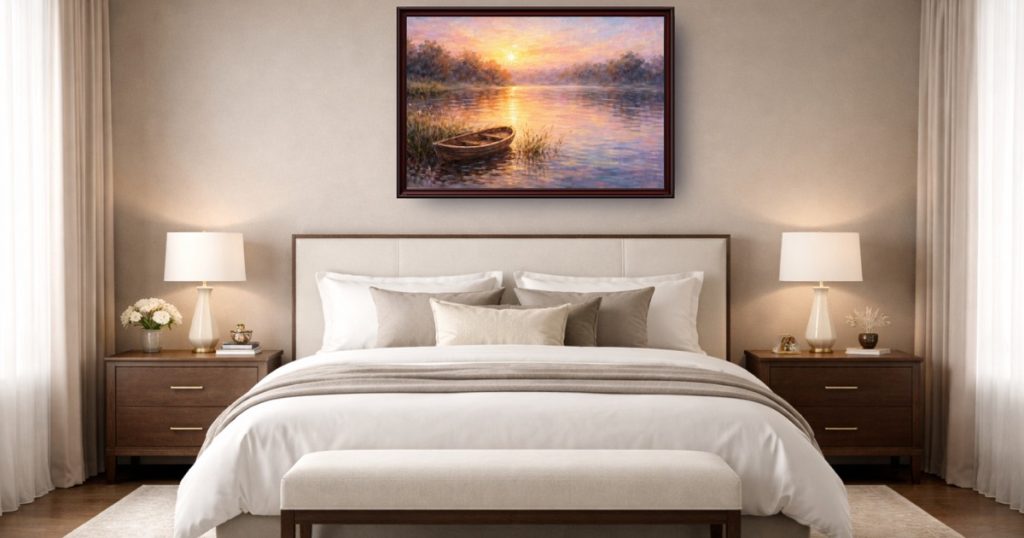
WallMockup Review (2026): Pricing, Features & Honest Verdict
TLDR
WallMockup is a browser-based wall art mockup generator that drops your artwork into true-scale room scenes in under a minute. For Etsy and print-on-demand sellers, it is the best value tool we found. Best for: solo art sellers who need fast, realistic mockups. Price: 7-day trial, then $4.99/mo. Rating: 8.1/10.
What is WallMockup?
WallMockup is a web tool that turns a flat artwork file into a believable photo of that art hanging on a wall. You upload your design, pick a room and a frame, adjust the size, and it composites the piece into the scene with correct scaling, shadows, and lighting. The whole thing takes well under a minute and needs zero design skills. The output is a listing-ready image you can drop straight onto Etsy or Shopify. There is no software to install and no Photoshop knowledge required, which is the entire point for the audience it serves.
The product is built for one job and does it cleanly: making prints look real in a room before a buyer commits. We tested it against the usual complaint with cheap mockups, which is artwork that looks the wrong size or floats unconvincingly on the wall. WallMockup’s true-to-scale placement is the fix. A 16×20 print actually reads as a 16×20 print, which matters when shoppers are judging proportions from a thumbnail. When a mockup gets scale wrong, buyers either return the item or never buy it, so this is not a cosmetic detail. It directly affects conversion and refund rates.
It is a focused tool from a small team rather than a sprawling marketplace platform, and that focus shows in the pricing and the workflow. WallMockup is not trying to be everything for every creative. It is trying to be the fastest, cheapest path from a finished print design to a convincing room photo, and on that narrow goal it is one of the better options we have seen.
What Are WallMockup’s Key Features?
True-scale room scenes
WallMockup ships 230 room scenes with true-scale placement, so artwork sits at the correct physical size relative to the furniture. This is the core selling point. Tools that skip scaling produce mockups where a small print looks like a poster or a large canvas looks tiny, and that confuses buyers who then return items or leave bad reviews. Here the proportions are honest. The rooms themselves are clean and neutral, which is the right call for art listings, because a busy or trendy interior can distract from the piece you are actually selling. Neutral scenes let the artwork be the hero.
Frames, mats, and shadow control
You get 31 frame styles across modern, classic, wood, black, and gold looks, with adjustable thickness and mat support. A shadow depth control lets you tune how the piece sits against the wall so it does not look pasted on. These small touches are what separate a convincing mockup from an obvious composite.
Gallery wall mode
You can place up to 5 pieces in a single room to build a gallery wall. For sellers who list print sets or want to show how multiple pieces work together, this saves a lot of manual editing. It is a feature plenty of cheaper tools skip entirely. If you sell bundles, a single gallery wall image often sells the set better than five separate single-print mockups, because the buyer can picture the whole arrangement at once. That kind of visual upsell is hard to fake without true-scale placement behind it.
Flexible exports
WallMockup exports in PNG, JPG, and WEBP at full resolution, with custom sizing beyond standard dimensions. Etsy wants images at least 2000px on the long edge for sharp zoom, and full-resolution exports clear that bar comfortably. The format choice also helps if you are optimizing file size for fast-loading listings, since WEBP keeps quality high at smaller sizes. Custom sizing matters too, because not every print fits a standard frame ratio, and being able to mock up an odd dimension means your listing photo matches what you actually sell.
How Much Does WallMockup Cost?
WallMockup starts at $4.99, which is the headline. There is a 7-day free trial with full access, but exports during the trial are preview-quality, so you can test the workflow before paying for clean files. After that you choose between a Creator Pack at $4.99 one-time for 100 HD export credits, or Pro Monthly at $4.99/mo for unlimited HD exports in every format.
That pricing is aggressive. Placeit, the most common comparison, runs $14.95/mo, and ArtPlacer ranges from $9 up to $144/mo for its professional tiers with AR and gallery tools. Even the lighter competitors like Canvy at $15/mo Pro cost three times WallMockup’s unlimited plan. For the specific job of producing Etsy-ready art mockups, WallMockup is the cheapest credible option we found.
The trade-off is scope. You are paying for a focused mockup generator, not a full design platform. If you need AR viewing, video mockups, a collector CRM, or thousands of scenes, you will pay more elsewhere. But if your need is plain wall mockups for listings, $4.99/mo is hard to beat.
| Plan | Price | Plan Features | Best For |
|---|---|---|---|
| Free Trial | $0 | 7-day full access, preview-quality exports | Testing the tool |
| Creator Pack | $4.99 one-time | 100 HD export credits, all formats | Occasional sellers |
| Pro Monthly | $4.99/mo | Unlimited HD exports, all formats, all rooms | Active Etsy and POD sellers |
Who is WallMockup Best For?
Use WallMockup if you sell prints on Etsy, Shopify, or a print-on-demand store and you want professional mockups without a design background or a big bill. It is ideal for solo sellers and small shops churning out listings, especially anyone who lists multiple sizes and wants true-scale accuracy. The gallery wall mode is a bonus for print sets.
Skip WallMockup if you are a gallery or professional artist who needs AR previews, virtual exhibitions, or a CRM to manage collectors. Those workflows belong to ArtPlacer. Also skip it if you want a massive library of thousands of unique scenes, since 230 rooms, while plenty for most sellers, is modest next to the biggest platforms. And if you need video mockups for Instagram or TikTok, this is not the tool, because WallMockup is a still-image generator. A creator who lives on short-form video will want something like Mocklio alongside it.
One more thing to weigh: the trial. WallMockup’s free trial gives full access for 7 days but exports come out at preview quality. That is fine for evaluating whether the rooms and frames suit your art, but it means you cannot quietly produce a few free listing images and walk away. You will need to pay before you publish anything. Given that the paid plan is $4.99, that is a low bar, but it is worth knowing the trial is for testing, not free output.
Best WallMockup Alternatives
Placeit
Placeit, owned by Envato, has a huge template library with hundreds of wall art mockups and broad variety beyond art into apparel and branding. It costs around $14.95/mo. The catch is that it lacks WallMockup’s true-scale sizing controls, so proportions are less reliable. Choose Placeit if you want range and do not mind paying three times as much.
ArtPlacer
ArtPlacer is the professional-grade option with roughly 2,800 scenes, AR viewing so buyers can preview art on their own walls, a collector CRM, and virtual exhibitions. Pricing runs from $9 to $144/mo. It is overkill for a casual Etsy seller but the right tool for galleries and full-time artists who sell high-value originals.
Smartmockups
Smartmockups, now owned by Canva, is fast and clean and integrates directly with Canva, so you can export a design straight into a mockup. It is a good pick if you already live in Canva. It is less specialized for true-scale wall art than WallMockup, but the Canva tie-in makes it convenient for people who design there.
Final Verdict: Is WallMockup Worth It?
WallMockup earns an 8.1 out of 10 because it does the one job Etsy art sellers care about, cheaply and well. True-scale placement, decent frame and room variety, gallery wall mode, and full-resolution exports add up to listing-ready mockups in seconds. At $4.99/mo unlimited, the value is the standout. The only real knock is that trial exports are preview-quality, so you cannot ship anything usable until you pay.
If you sell prints and want clean, accurate mockups without learning design software or paying Placeit prices, WallMockup is an easy recommendation. The true-scale accuracy alone justifies it for anyone whose listings live or die on how the art looks in a room. If you need AR, video, or a sprawling scene library for a gallery business, look at ArtPlacer instead, and budget accordingly because the gap in price is large. But for the solo Etsy or print-on-demand seller who just wants professional mockups fast and cheap, this is the value pick, and the 7-day trial means you can confirm it suits your art before spending a cent.
WallMockup Pros & Cons
What We Like
- True-to-scale placement, so a 16x20 print looks correctly sized on the wall
- 230 room scenes and 31 frame styles cover most listing aesthetics
- Gallery wall mode places up to 5 pieces in one room for multi-print listings
- At $4.99/mo unlimited, it is dramatically cheaper than Placeit or ArtPlacer
What Could Be Better
- Free trial exports are preview-quality, so you must pay before publishing anything usable
- Fewer rooms than ArtPlacer's 2,800 scenes if you need huge variety
- No AR viewing, video mockups, or CRM features that pricier platforms include
WallMockup FAQ
What is WallMockup?
WallMockup is a browser-based tool that places digital artwork into realistic room photos with accurate scaling, frames, and shadows. It generates professional wall art mockups in under a minute without design software, aimed at artists and print sellers.
How much does WallMockup cost?
WallMockup offers a 7-day free trial with preview-quality exports. The Creator Pack is a $4.99 one-time purchase for 100 HD export credits, and Pro Monthly is $4.99/mo for unlimited HD exports in PNG, JPG, and WEBP.
Is WallMockup worth it?
For Etsy and print-on-demand sellers, yes. At $4.99/mo for unlimited true-scale mockups, it undercuts Placeit at $14.95/mo and ArtPlacer at up to $144/mo while covering the core job well. It is not worth it if you need AR, video, or thousands of scenes.
What are the best WallMockup alternatives?
Placeit ($14.95/mo) has a far bigger template library, ArtPlacer ($9 to $144/mo) adds AR and gallery tools for professional artists, and Smartmockups (via Canva) integrates mockups straight into Canva designs.
Does WallMockup offer a free plan?
WallMockup offers a 7-day free trial with full access, but exports during the trial are preview-quality with a watermark or reduced resolution. To download clean HD images you need the Creator Pack or Pro Monthly plan.
Who is WallMockup best for?
WallMockup is best for solo Etsy sellers, print-on-demand creators, and artists who need cheap, fast, true-to-size wall art mockups. It is a strong fit for anyone listing prints who does not want to pay for a heavy design suite.






