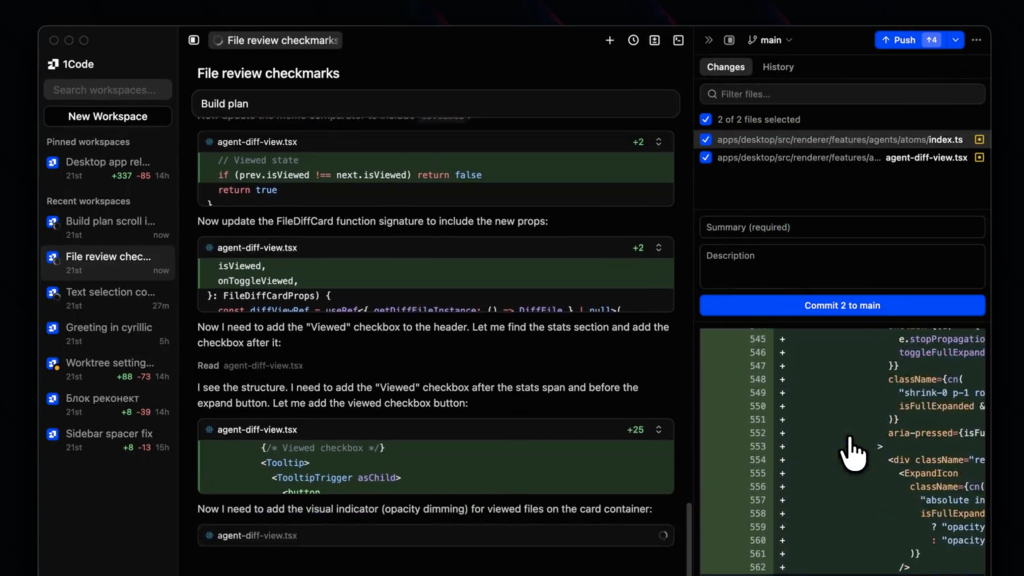
1Code Review (2026): Pricing, Features & Honest Verdict
TLDR
1Code is an open-source desktop app by 21st.dev that wraps Claude Code and OpenAI Codex in a Cursor-like visual interface with parallel agents, live browser previews, and git worktree isolation. We found it the best way to use Claude Code if you want a GUI without sacrificing the agentic power of the terminal tool. Best for: developers who want Claude Code with a visual interface. Price: From $20/mo (free plan: yes, open-source). Rating: 7.7/10
What is 1Code?
1Code is a desktop app that gives Claude Code a visual interface. Instead of typing prompts in your terminal and reading diffs in the shell, 1Code provides a proper GUI with file trees, visual diffs, live browser previews, and a kanban board for managing multiple agent sessions. It uses the official Claude Code SDK under the hood, meaning your code goes directly to Anthropic, not through 1Code’s servers.
The app was built by Serafim and Sergey from 21st.dev, a YC-backed team that has shipped 9 products in 10 months with over 1 million total users and $200K in revenue. 1Code launched in January 2026 and quickly hit #3 Product of the Week on Product Hunt with 490 upvotes. It is fully open-source on GitHub with an active community. The app runs on Mac (Apple Silicon and Intel), Windows, and Linux, with a web version for remote sandboxed environments.
What Are 1Code’s Key Features?
Parallel Agent Sessions with Worktree Isolation
This is 1Code’s killer feature. You can run multiple Claude Code agents simultaneously, each in its own git worktree. One agent implements a new feature while another fixes a bug and a third writes tests. Each works in an isolated branch without conflicts. The kanban board view lets you monitor all running agents at a glance. For developers who work on multiple tasks per sprint, this multiplies your effective output without context-switching.
Visual Diff Previews
Instead of reading raw terminal output, 1Code shows file changes as visual diffs with syntax highlighting. You can review what Claude Code changed, accept or reject individual hunks, and see the full context of each modification. This is the single biggest friction reducer over using Claude Code directly in the terminal. Reading a 200-line diff in a visual interface is dramatically faster than parsing it in shell output.
Live Browser Previews
When building web apps, 1Code can show a live preview of your dev server directly in the app. Make a change via Claude Code and see the result immediately without switching to your browser. The web version of 1Code runs in remote sandboxes with live previews including mobile device frames, so you can check agent work from your phone. This tight feedback loop between code changes and visual results speeds up frontend development significantly.
Built-in Git Client
1Code includes a visual git client for staging changes, viewing diffs, creating branches, and pushing to GitHub. You can create pull requests directly from the app without switching to the terminal or GitHub. Combined with the worktree isolation, this makes the full development workflow (branch, code, review, PR) happen entirely within 1Code. The Cmd+P file search and integrated terminal round out the IDE experience.
How Much Does 1Code Cost?
1Code has three tiers. The open-source tier is free: download the source from GitHub, self-host it, and use it with your own Claude API key. Pro at $20/month adds the web version, background agents (that run when your laptop sleeps), and live browser previews. Max at $100/month adds automations, priority feature requests, and personal support. You still need a Claude Pro ($20/mo) or Max ($100-200/mo) subscription separately for the AI usage.
The total cost for a full setup is $40/month minimum ($20 for 1Code Pro + $20 for Claude Pro). That is the same price as Cursor Pro ($20/mo) but with more powerful agentic capabilities. The free open-source tier is genuinely usable for local development, which is rare. Most “open-source” developer tools gate essential features behind paid plans. 1Code’s free tier includes the full desktop client, file viewer, terminal, and git client.
| Plan | Price | Plan Features | Best For |
|---|---|---|---|
| Open Source | $0/mo | Full desktop client, self-hosted, community support | Developers who want to self-host |
| Pro | $20/mo | Desktop + web + mobile, background agents, live browser previews | Individual developers using Claude Code daily |
| Max | $100/mo | Everything in Pro plus automations, priority features, personal support | Power users and small teams |
Who is 1Code Best For?
Use 1Code if you already use or want to use Claude Code but prefer a visual interface over raw terminal output. Developers who work on multiple tasks simultaneously will love the parallel agent sessions with worktree isolation. Frontend developers benefit from the live browser previews. Anyone who finds Cursor too limited in its agentic capabilities but wants more than a terminal will find 1Code hits the sweet spot.
Skip 1Code if you are happy with Claude Code in the terminal (you do not need a GUI wrapper), if you prefer Cursor’s integrated autocomplete and inline suggestions, or if you work on single tasks sequentially without needing parallel agents. 1Code adds value through its visual layer and parallel execution, but if you do not need those features, it is an unnecessary abstraction over tools that already work well.
Best 1Code Alternatives
Cursor
Cursor is a VS Code fork with deep AI integration including inline completions, chat, and agentic editing. At $20/month for Pro, it is the same price as 1Code Pro but takes a different approach: Cursor optimizes for the traditional IDE workflow with AI enhancements, while 1Code optimizes for managing AI agents visually. Cursor is better for developers who want AI-assisted coding within a familiar editor. 1Code is better for developers who want to delegate entire tasks to agents.
Claude Code (Terminal)
Claude Code in the terminal is what 1Code wraps. It is included with your Claude subscription at no additional cost. For developers comfortable with terminal output and git diff, the raw CLI is faster to start and has zero overhead. 1Code’s value is the visual layer, parallel sessions, and live previews. If you do not need those, the terminal version is the simpler choice.
Windsurf
Windsurf (formerly Codeium) is another AI-powered IDE with agent capabilities. It offers a free tier with basic features and paid plans for more advanced AI assistance. Windsurf focuses on being a complete IDE replacement rather than an agent orchestration layer. It is a good middle ground between Cursor’s autocomplete focus and 1Code’s agent management approach.
Final Verdict: Is 1Code Worth It?
1Code solves a real problem: Claude Code is incredibly powerful but the terminal interface limits adoption and usability. By wrapping it in a visual interface with parallel sessions, live previews, and a git client, 1Code makes Claude Code accessible to developers who are not terminal purists. The worktree isolation for parallel agents is genuinely innovative and not available in any competing product.
The open-source foundation is a strong signal. You can inspect the code, verify it is not doing anything with your data, and contribute improvements. The 21st.dev team ships fast and the product is evolving rapidly. At $20/month for Pro (on top of your Claude subscription), it is a reasonable premium for the visual layer and background agents. If you use Claude Code daily and wish it had a better interface, 1Code is the answer. If you are choosing between 1Code and Cursor, the question is whether you want an AI-enhanced IDE (Cursor) or an agent orchestration tool (1Code).
1Code Pros & Cons
What We Like
- Parallel agent sessions with git worktree isolation is genuinely innovative
- Visual diffs and live browser previews make Claude Code dramatically more usable
- Fully open-source with transparent code you can inspect and contribute to
- Free tier includes the full desktop client, not just a demo
What Could Be Better
- Requires a separate Claude subscription ($20+/mo) on top of 1Code pricing
- Still early-stage with rapid changes that may break workflows between updates
- Less polished IDE experience compared to Cursor for traditional coding workflows
1Code FAQ
What is 1Code?
1Code is an open-source desktop app that provides a visual interface for Claude Code and OpenAI Codex. It includes parallel agent sessions, visual diffs, live browser previews, a built-in git client, and kanban board for managing multiple coding agents simultaneously.
How much does 1Code cost?
1Code has a free open-source tier, Pro at $20/month (adds web version and background agents), and Max at $100/month (adds automations and personal support). You also need a Claude subscription ($20+/mo) separately for AI usage.
Is 1Code worth it?
Yes, for developers who use Claude Code daily and want a visual interface with parallel agent management. The free open-source tier is genuinely usable. Pro at $20/mo is worth it for background agents and live previews.
What are the best 1Code alternatives?
Top alternatives are Cursor ($20/mo, AI-enhanced VS Code fork), Claude Code terminal (free with Claude subscription), and Windsurf (AI-powered IDE with agent capabilities).
Does 1Code offer a free plan?
Yes. The open-source tier is fully free and includes the complete desktop client with file viewer, terminal, git client, and visual diffs. You self-host and use your own Claude API key.
Who is 1Code best for?
1Code is best for developers who already use or want to use Claude Code but prefer a visual interface over raw terminal output. Developers who work on multiple tasks simultaneously benefit most from the parallel agent sessions.






