Axure RP Review (2026): Pricing, Features & Honest Verdict
TLDR
Axure RP is a desktop UX prototyping tool for building high-fidelity, logic-driven prototypes with conditional interactions, variables, and dynamic panels, no code needed. Best for: UX designers building complex prototypes. Price: From $29/mo, no free plan (30-day trial). Rating: 7.7/10.
What is Axure RP?
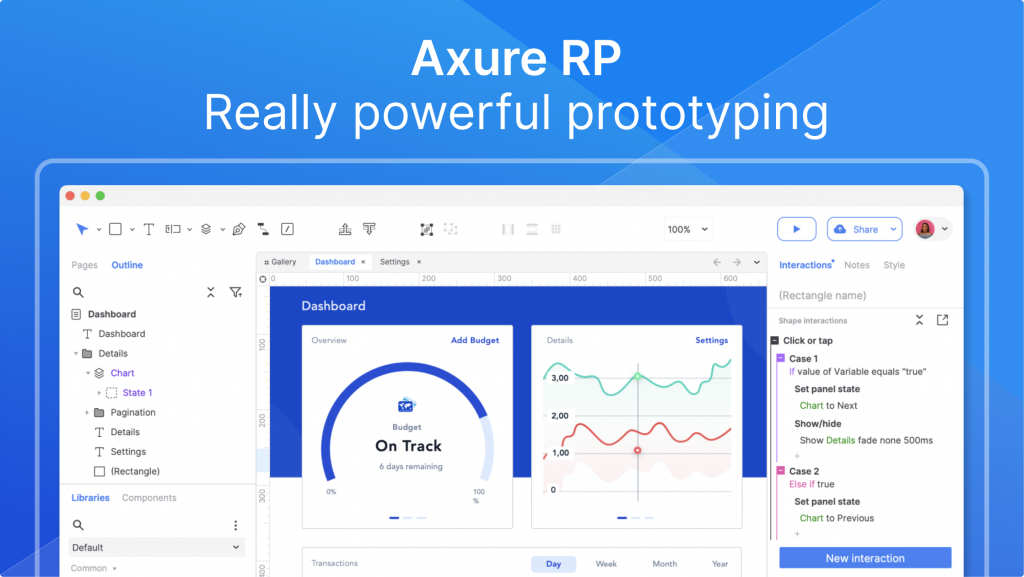
Axure RP is an all-in-one UX design tool that lets you build realistic, functional prototypes alongside wireframes, diagrams, and specifications. Its standout is depth: you wire up event triggers, conditions, and variables to create working forms, multi-state containers, and data-driven interfaces that behave like the real product, all without writing a line of code.
It is made by Axure Software Solutions, Inc., founded in 2002, which makes it one of the oldest dedicated prototyping tools still in active use. While Figma reshaped the design world around real-time collaboration, Axure RP kept its niche among UX professionals who need interactions far more complex than a basic click-through, especially in enterprise and consulting work where detailed documentation matters.
What Are Axure RP’s Key Features?
Conditional Logic and Variables
This is the reason teams reach for Axure RP. You can define if-then rules so an interaction only fires when conditions are met, like submitting a form only when every field validates, or updating a cart total when items change. Combined with variables, it lets you prototype genuine application logic instead of faking it with linked screens.
Dynamic Panels and Multi-State Content
Dynamic panels let you build sliders, tabs, popups, accordions, and swipeable mobile screens by switching between states, no extra code required. This is what makes Axure prototypes feel like working software rather than a slideshow of static frames.
Adaptive Views and Documentation
You can design adaptive views for desktop, tablet, and mobile within a single project, and the tool generates wireframes, diagrams, and specifications alongside the prototype. That combination of interactive prototype plus living documentation is rare and a big reason enterprise UX teams stick with it.
Axure Cloud and Developer Handoff
Axure Cloud publishes prototypes for sharing, commenting, and review, and includes a developer inspect mode for handoff. Integrations cover Figma, Adobe XD, Sketch, Jira, Confluence, Slack, and Microsoft Teams, so it slots into existing design and delivery workflows.
How Much Does Axure RP Cost?
Axure RP Pro starts at $29 per user per month with unlimited prototypes, projects, and reviewers plus the full advanced prototyping toolkit. The Team plan is $49 per user per month (or $42 billed annually) and adds co-authoring, revision history, and team project hosting on Axure Cloud, while Enterprise pricing is custom and adds SSO, user management, and private or on-premises hosting. There is no permanent free plan, but a 30-day fully-functional free trial and a free Team license for qualified students and educators are available.
Compared with the competition, Figma’s paid Professional plan runs around $15 per editor per month and ProtoPie sits near $13 to $39 per seat depending on tier, so Axure RP is not the cheapest option. You are paying for prototyping depth rather than collaboration polish.
| Plan | Price | Plan Features | Best For |
|---|---|---|---|
| Pro | $29/user/mo | Unlimited prototypes, projects, and reviewers; full advanced prototyping; 30-day free trial | Solo designers and freelancers |
| Team | $49/user/mo | Everything in Pro plus co-authoring, revision history, and team project hosting on Cloud ($42/mo billed annually) | Design teams collaborating on shared projects |
| Enterprise | Custom | User management, SSO, company domain access, and private/on-premises hosting options | Large organizations with security requirements |
Who Is Axure RP Best For?
Use Axure RP if you are a UX designer, consultant, or enterprise team building prototypes with real conditional logic, form validation, and data-driven behavior, and you need detailed specifications for developer handoff. If your prototypes regularly outgrow what Figma’s interactions can express, this is the tool that handles it.
Skip Axure RP if you mostly create static mockups or simple click-through flows, want real-time multiplayer collaboration as the core workflow, or are on a tight budget. The learning curve is steep and the desktop-app model feels dated, so casual users will get more value from a lighter, browser-first tool.
What Are the Best Axure RP Alternatives?
Figma
Figma is the default for collaborative interface design and has steadily improved its prototyping and variables. It is cheaper (around $15/editor/mo) and far easier to learn, but it still cannot match Axure’s depth for heavy conditional logic.
ProtoPie
ProtoPie is the closest rival for advanced, logic-driven interactions, with strong support for sensors and conditional behavior. Pricing runs roughly $13 to $39 per seat per month, and it is more modern but less focused on documentation.
Justinmind
Justinmind targets the same high-fidelity, enterprise prototyping space with conditional logic and specifications. It is a direct Axure competitor with a free tier and paid plans, often chosen by teams wanting a more modern interface.
Final Verdict: Is Axure RP Worth It?
Axure RP remains the most capable tool for high-fidelity prototypes when interactions get genuinely complex. If you need working logic, validated forms, variables, and data-driven screens plus the documentation to hand off to developers, nothing mainstream does it better, and the $29 to $49 per month price is reasonable for that power.
The trade-offs are real: a steep learning curve, a desktop-first workflow that feels dated next to Figma, and no free plan beyond a 30-day trial. If you live in conditional-logic prototyping, Axure RP is worth every dollar. If you mostly do static design or want frictionless collaboration, choose Figma instead.
Axure RP Pros & Cons
What We Like
- Unmatched depth for conditional logic, variables, and data-driven interactions without writing code
- Builds working forms, multi-state panels, and adaptive desktop/tablet/mobile views in one project
- Combines prototypes, wireframes, diagrams, and developer-handoff documentation in a single tool
What Could Be Better
- Steep learning curve compared to Figma or Adobe XD
- No free plan and a desktop-app workflow that feels dated next to browser-first competitors
Axure RP FAQ
What is Axure RP?
Axure RP is a desktop UX design tool from Axure Software Solutions for building high-fidelity, interactive prototypes with conditional logic, variables, and dynamic content, plus wireframes, diagrams, and specifications, all without writing code.
How much does Axure RP cost?
Axure RP Pro is $29 per user per month, Team is $49 per user per month (or $42 billed annually), and Enterprise is custom-priced. There is a 30-day free trial but no permanent free plan.
Is Axure RP worth it?
For UX designers who need conditional logic, working forms, and data-driven interactions, Axure RP is worth it because no other mainstream tool matches its prototyping depth. For simple click-through mockups, Figma is cheaper and easier.
What are the best Axure RP alternatives?
The strongest alternatives are Figma (collaborative design with growing prototyping), Adobe XD (now largely sunset), and ProtoPie or Justinmind for advanced, logic-driven interactive prototypes.
Does Axure RP offer a free plan?
Axure RP has no free freemium tier, but it offers a 30-day fully-functional free trial and a free Team-edition license for qualified students and educators at accredited schools.
Who is Axure RP best for?
Axure RP is best for experienced UX designers, enterprise design teams, and consultants who build complex, conditional-logic prototypes and detailed specifications that simpler tools cannot handle.






