Capso Review (2026): Pricing, Features & Honest Verdict
TLDR
Capso is a free, open-source screenshot and screen recording app for Mac that rivals paid tools like CleanShot X. It nails the basics and adds OCR, annotation, and beautification. Best for: Mac users who refuse to pay $29+ for screenshots. Price: Free forever. Rating: 8.1/10.
What Is Capso?
Capso is a native macOS app that handles screenshots, screen recordings, and GIF capture. Built entirely in Swift 6.0 and SwiftUI, it uses Apple’s ScreenCaptureKit for capture and the Vision framework for OCR. The app is signed and notarized by Apple, so you can install it without fighting Gatekeeper.
We found Capso through its Product Hunt launch in April 2026. It was built by Kevin, the founder of Capital Sound, and released under the BSL 1.1 license. The source code lives on GitHub. What caught our attention is the feature set: this is not a barebones open-source project. It competes directly with CleanShot X ($29), Shottr ($8), and Cap ($58), and it costs nothing.
What Are Capso’s Key Features?
Full Capture Modes with Recording
Capso supports area, window, and fullscreen screenshots. It also records screen video as MP4 and GIF, with system audio and microphone input. You get a webcam overlay in four shapes (circle, square, portrait, landscape) for loom-style recordings. Dimension overlays show pixel measurements during area selection, which is useful for design work.
Built-In Annotation Editor
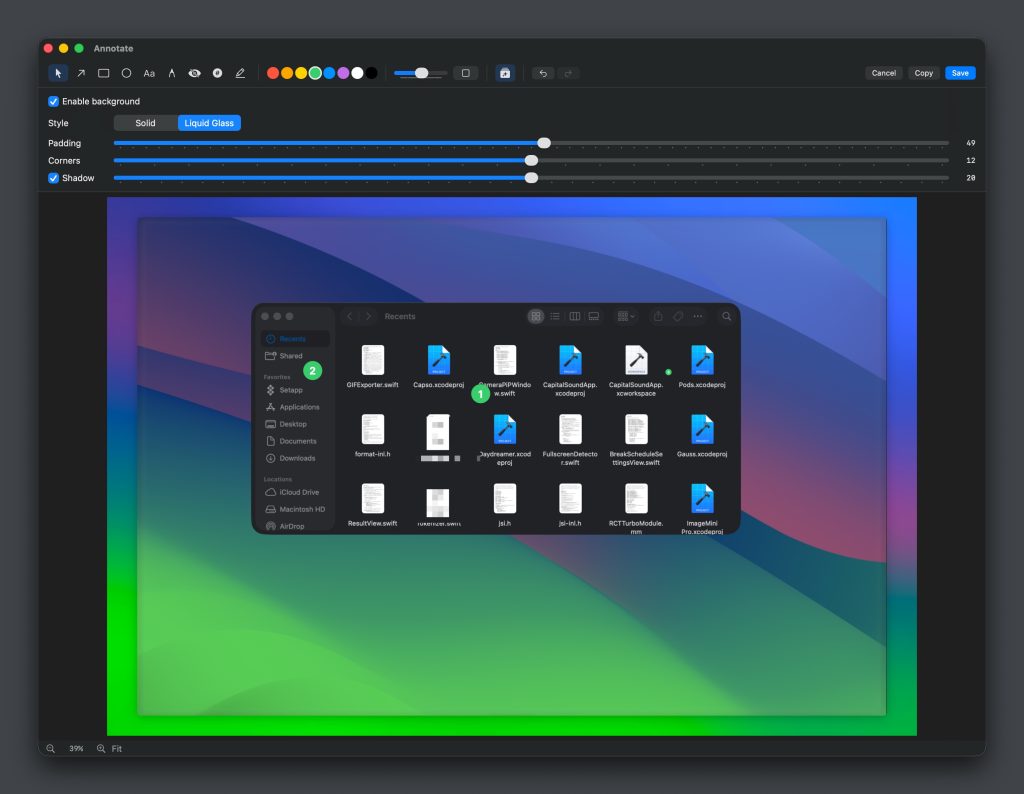
After capturing, you can annotate directly inside Capso. The editor includes arrows, shapes, text, freehand drawing, pixelation for hiding sensitive info, numbered counters, and highlighters. Full undo/redo support is included. It is not Figma, but it covers 90% of what you need for bug reports, documentation, and tutorials.
Image Beautification
Capso wraps your screenshots in styled backgrounds with gradients, padding, rounded corners, and drop shadows. It supports both solid backgrounds and a “Liquid Glass” style. This is the feature that makes your screenshots look polished for blog posts, social media, or product pages without opening a separate design tool.
OCR Text Extraction
Using Apple’s Vision framework, Capso can extract text from any screenshot. It highlights recognized text regions so you can selectively copy what you need. Accuracy depends on the source material, but for standard UI text and code, it works well. This is the kind of feature you do not realize you need until you stop manually retyping error messages.
How Much Does Capso Cost?
Capso is completely free. No trial period, no feature gating, no subscription, no telemetry. Every feature is available from day one. Compare that to CleanShot X at $29 (one-time), Shottr at $8, or Cap at $58. Capso matches or exceeds all three on features and charges nothing. The catch, if you can call it one, is the BSL 1.1 license: you can use it personally or inside your company, but you cannot redistribute it as a competing commercial product.
| Plan | Price | Plan Features | Best For |
|---|---|---|---|
| Free | Free forever | All features included, no limits | Everyone |
Who Is Capso Best For?
Use Capso if you are on macOS 15+ and want a full-featured screenshot and recording tool without paying. It is ideal for developers documenting bugs, content creators making tutorials, and anyone tired of the limitations of macOS’s built-in screenshot tool.
Skip Capso if you need Windows or Linux support (it is Mac-only), you are running macOS 14 or older (it requires Sequoia), or you need cloud sync and team sharing features. CleanShot X still has the edge on cloud workflow integrations.
Best Capso Alternatives
CleanShot X
The gold standard for Mac screenshots. More polished UI, cloud uploads, scrolling capture, and a longer track record. Costs $29 one-time or $8/month with cloud storage. Worth it if you need the cloud features Capso lacks.
Shottr
Lightweight Mac screenshot tool with OCR and measurement tools. Costs $8. Faster and simpler than Capso, but no screen recording or GIF capture. Good if you only need screenshots.
Cap
Open-source screen recording focused on video, not screenshots. Built with Tauri, not native Swift. Costs $58 for the pro version. Better video editing features, weaker on the screenshot side.
Final Verdict: Is Capso Worth It?
Capso is one of the best free Mac apps we have reviewed this year. It delivers CleanShot-level features (screenshots, recordings, GIFs, OCR, annotations, beautification) without charging a cent. The native Swift implementation means it is fast and feels like it belongs on macOS. For a solo developer project, the quality is impressive.
The main limitations are macOS 15+ requirement and the lack of cloud features. If you are already paying for CleanShot X and using its cloud uploads daily, Capso might not replace it entirely. But if you are on the fence about paying for a screenshot tool, or you want to stop using the barebones Command+Shift+4 workflow, Capso is a no-brainer. Install it.
Capso Pros & Cons
What We Like
- Completely free with no feature gating or subscriptions
- Native Swift 6.0 build feels fast and native on macOS
- Full feature set: screenshots, recordings, GIFs, OCR, annotations, beautification
- Open-source with Apple notarization for trust
What Could Be Better
- Requires macOS 15 Sequoia or later, excludes older Macs
- No cloud upload or team sharing features
- Solo developer project, long-term maintenance uncertain
Capso FAQ
What is Capso?
Capso is a free, open-source screenshot and screen recording application for macOS. It supports area, window, and fullscreen capture, video and GIF recording, OCR text extraction, annotations, and image beautification.
How much does Capso cost?
Capso is completely free. There are no paid tiers, subscriptions, or feature restrictions. All features are available from day one.
Is Capso worth it?
Yes. Capso provides the same features as paid tools like CleanShot X and Shottr at no cost. If you are on macOS 15 or later, it is one of the best screenshot tools available.
What are the best Capso alternatives?
CleanShot X ($29 one-time), Shottr ($8), and Cap ($58) are the main alternatives. CleanShot X offers cloud features Capso lacks, while Shottr is lighter weight but has no recording.
Does Capso offer a free plan?
Capso is entirely free. There is no paid version. The app is open-source under the BSL 1.1 license.
Who is Capso best for?
Mac users on macOS 15+ who want a full-featured screenshot and recording tool without paying. It is ideal for developers, content creators, and anyone documenting their work.






