CopyCat Review (2026): Pricing, Features & Honest Verdict
TLDR
CopyCat is a no-code browser automation platform combining deterministic XPath actions with AI-powered dynamic steps. Cloud execution, scheduling, and screen recording import. YC W25. Best for: ops teams automating legacy systems. Price: free trial, from $100/mo. Rating: 7.1/10
What is CopyCat?
We found CopyCat on Product Hunt where it earned 549 upvotes as a tool to “build browser automations with AI.” Built by Graham Sabin, Abhi Balijepalli, and Zyad Elgohary (Y Combinator Winter 2025 batch), CopyCat targets a specific problem: automating tasks on websites that do not have APIs.
Think uploading freight invoices to a transportation management system. Entering patient data into insurance portals. Downloading bank statements across 20 accounts. These are high-volume, repetitive browser tasks that Zapier and Make cannot touch because there is no API to connect to.
The platform has processed 100,000+ successful executions and claims 5,000+ hours saved for customers.
| Plan | Price | Plan Features | Best For |
|---|---|---|---|
| Hobby (Free) | $0 | 500 one-time credits, testing only | Evaluating the platform |
| Starter | $100/mo | Monthly credits, cloud execution, scheduling | Teams with regular automation needs |
| Enterprise | Custom | Volume credits, priority support, custom integrations | Large-scale operations |
What CopyCat Gets Right
The Hybrid Approach Is Smart
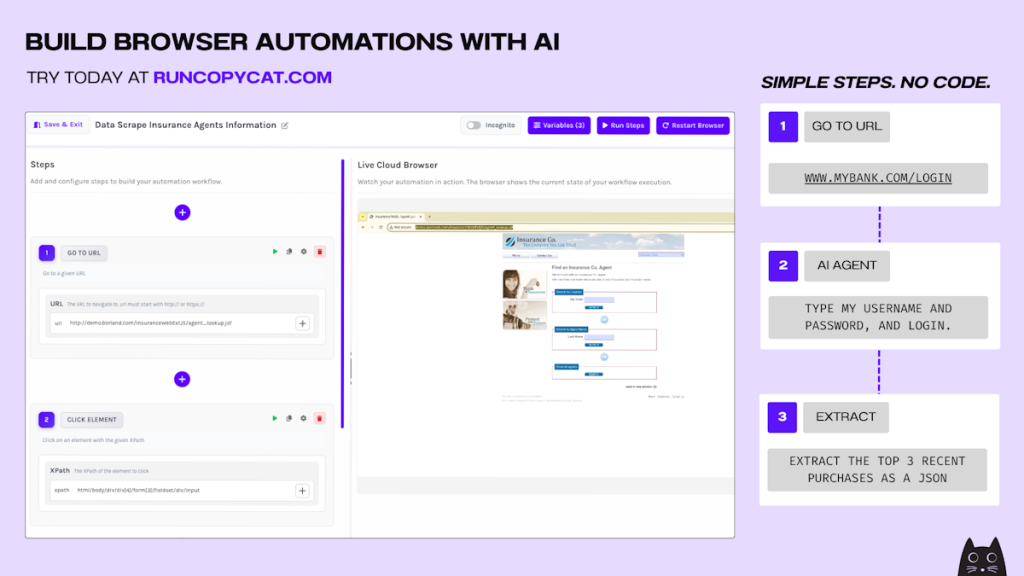
Pure AI browser agents (like Browser Use) are flexible but unpredictable. Pure RPA tools (like UiPath) are reliable but brittle. CopyCat combines both. Deterministic steps use XPath selectors for clicks and navigation that must be exact. AI steps handle dynamic content like “log in with these credentials” or “fill out this form based on this data.” This gives you reliability where you need it and flexibility where the page varies.
Screen Recording Import Is Clever
Record yourself doing a manual task. Upload the recording. CopyCat generates a runnable automation from it. This dramatically lowers the barrier to creating automations. You do not need to understand selectors, data mapping, or workflow logic. Just show the tool what you do, and it figures out the rest.
Cloud Execution Changes the Game
Traditional RPA tools (UiPath, Automation Anywhere) require VMs or local desktop installs. CopyCat runs everything in the cloud. Schedule automations to run overnight, trigger them via API, or set recurring schedules. Your laptop can be closed and the work still happens.
It Works Where APIs Do Not
This is the real value proposition. Zapier needs an API. Make needs an API. If you are automating tasks on a legacy portal from 2012 that has no API and never will, CopyCat is one of the few tools that can help. For operations teams in logistics, healthcare, real estate, and banking, this fills a genuine gap.
Where CopyCat Falls Short
$100/Month Is Expensive for Simple Tasks
If you need to scrape a few pages or fill a form once a day, $100/month is hard to justify. Bardeen and Axiom.ai offer simpler automation at lower prices. CopyCat pricing makes sense for teams running high-volume, complex automations, but the entry point prices out casual users.
Three-Person Team
CopyCat is three founders from YC W25. The product works, but enterprise customers need confidence in support, uptime, and longevity that a 3-person startup cannot guarantee. If CopyCat is acquired, shuts down, or pivots, your automations disappear.
Credit Costs Can Spike
At 20 credits per minute of runtime, a 10-minute automation uses 200 credits. Add proxy costs and AI prompt credits, and heavy usage months get expensive quickly. Without clear credit breakdowns on the pricing page, budgeting is difficult.
CopyCat Pricing Breakdown
The Hobby plan is free with 500 one-time credits for testing. Starter at $100/month includes a monthly credit allotment with cloud execution, scheduling, and API triggers. Enterprise pricing is custom for high-volume needs. Credits consume at approximately 20 per minute of browser runtime.
Who Should Use CopyCat
Operations teams that spend hours on repetitive browser tasks across legacy systems. Logistics companies uploading invoices. Healthcare teams entering patient data. Real estate firms pulling property records. If the task involves a browser and no API, CopyCat is built for you.
For simple web scraping or basic automation, Bardeen or Browse AI are cheaper and easier options.
Alternatives
Bardeen
Chrome extension for browser automation with AI. More consumer and productivity focused. Free plan available, much cheaper than CopyCat. Lacks cloud execution and enterprise features. Best for individuals automating personal web workflows.
UiPath
The enterprise RPA platform with deep desktop and browser automation. Much more expensive and complex than CopyCat. Requires VMs and dedicated infrastructure. Best for large enterprises with dedicated RPA teams and hundreds of automations.
Axiom.ai
No-code browser automation Chrome extension. Simpler interface than CopyCat with lower pricing. No AI-powered steps, so less flexible for dynamic content. Best for straightforward, repeatable browser tasks that do not require AI judgment.
The Bottom Line
CopyCat fills a real gap in the automation market: browser tasks on legacy systems without APIs. The hybrid deterministic/AI approach is technically sound, and screen recording import makes automation creation accessible. But the $100/month starting price and 3-person team make it a tough sell for casual users. Best for operations teams with high-volume, high-value browser automation needs that traditional tools cannot address.
CopyCat Pros & Cons
What We Like
- Hybrid approach combining reliable XPath actions with AI for dynamic, unpredictable steps
- Screen recording import converts manual workflows into automated scripts
- Cloud execution runs automations without requiring your computer to be on
- Specifically designed for legacy systems and websites that lack APIs
What Could Be Better
- $100/month starting price is steep for small teams or simple automations
- Three-person team (YC W25) means limited support and uncertain long-term viability
- Credit costs can escalate with heavy usage (~20 credits per minute of runtime)
- Cannot handle sites with heavy CAPTCHA protection
CopyCat FAQ
How is CopyCat different from Bardeen?
Bardeen is a Chrome extension focused on consumer/productivity automation. CopyCat runs in the cloud with enterprise-grade features like API triggers, scheduling, and proxy support. CopyCat hybrid approach (deterministic + AI steps) is more reliable for complex workflows. Bardeen is simpler and cheaper; CopyCat is built for operations teams.
Can CopyCat automate any website?
CopyCat works on most websites, including legacy systems without APIs. It struggles with sites that have heavy CAPTCHA protection or advanced bot detection. For standard web applications, form filling, data extraction, and multi-step workflows all work reliably.
How does the credit system work?
Automations consume approximately 20 credits per minute of browser runtime. Additional credits are consumed for proxy usage and AI prompt executions. The free plan includes 500 one-time credits for testing.
What is CopyCat?
No-code browser automation tool that records your actions and replays them. Chrome extension for repetitive web tasks.
How much does CopyCat cost?
CopyCat pricing starts at $0 (from $100/mo). A free plan is available.
Is CopyCat worth it?
CopyCat is a no-code browser automation platform that combines reliable XPath-based actions with AI-powered dynamic steps. Cloud execution with scheduling and API triggers. Screen recording import auto-generates automations. YC W25. Good for legacy system automation but expensive at $100/month and very early stage with a 3-person team. We rate it 7.1/10.






