Krock.io Review (2026): Pricing, Features & Honest Verdict
TLDR
Krock.io is a video review and creative collaboration platform that adds storyboarding on the front end and unlimited free reviewers on every plan. At $10 per user per month it undercuts Frame.io by a third and Filestage by an order of magnitude. Best for: small studios and agencies collecting client feedback on video. Price: Free plan available, Pro $10/user/mo. Rating: 8.2/10
What is Krock.io?
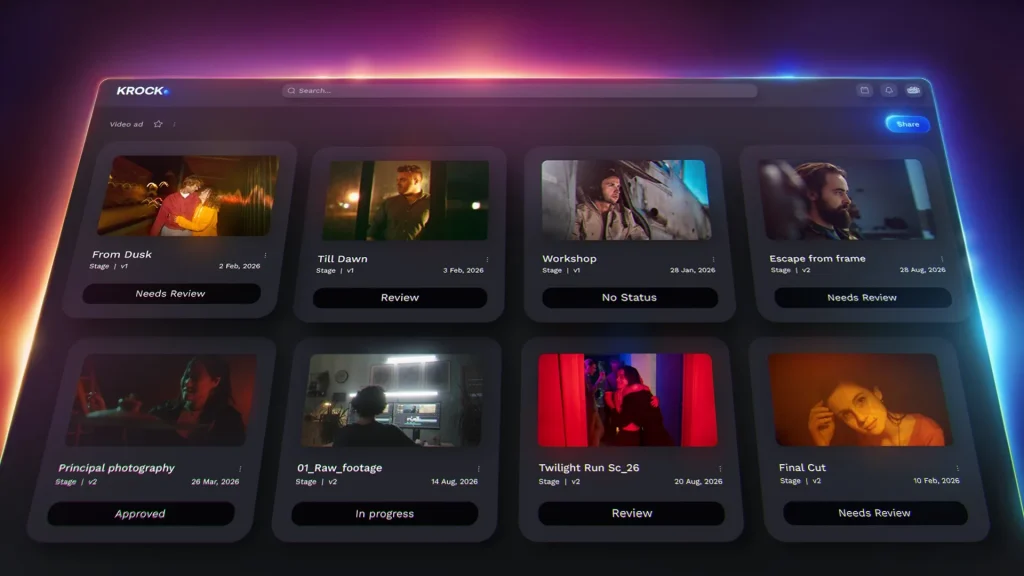
Krock.io is a media review and approval tool built for creative production teams. You upload a cut, an illustration, a PDF or a still, share a link, and clients leave time coded comments and drawings directly on the frame. Versions stack, comments carry across, and an overlay mode shows you exactly what changed between v3 and v4. The core job is killing the email thread where a client writes “the thing at about 40 seconds looks weird” and nobody knows which thing.
What separates it from the rest of the category is where it starts. Most review tools pick up the work once footage exists. Krock.io ships a storyboard and animatic builder, with AI assisted storyboard generation, so teams can share a board for client sign off before a single frame is shot. That makes it the rare tool that spans pre production through delivery, and it explains why animation studios and ad agencies show up disproportionately in its customer base. The company says over 80,000 creative teams use the platform, and it maintains security certifications and data governance compliance for teams that need them.
The case study numbers Krock.io publishes are the usual vendor arithmetic: 59 percent less time managing review and approval, 30 percent fewer versions before final sign off, 56 percent faster project completion. Treat those as directional rather than literal. The underlying claim is fair though. Any team currently collecting notes over email and WeTransfer will cut rounds simply by moving to a tool where feedback is anchored to a timestamp.
What Are Krock.io’s Key Features?
Time coded comments and drawing annotations
Reviewers scrub to a frame, click, and either type or draw on the image. The comment pins to that timestamp and that spot, so feedback arrives as a coordinate rather than a description. Drawings support freehand marks and shapes, which matters for motion and animation notes where “move it left a bit” is useless. Comments thread, get assigned, and can be marked resolved, so the review turns into a checklist an editor can burn down.
Version comparison and difference detection
Upload a new version and Krock.io stacks it against the last one. Overlay mode puts them on top of each other, and the platform auto detects visual differences between versions so you can see at a glance what actually moved. For a studio delivering eight rounds of revisions on a 60 second spot, this is the feature that stops you re reviewing the whole cut every time.
Storyboard and animatic builder
This is the differentiator. You build a board panel by panel, add camera directions and dialogue, and turn the board into a timed animatic that clients can review with the same commenting tools they will use on the finished edit. AI storyboarding generates panel art from prompts, and the free plan includes 50 AI tokens so you can test it without paying. No other dedicated video review tool covers this stage of the work.
Unlimited reviewers on every plan
Every Krock.io plan, including the free one, allows unlimited reviewers at no extra cost. Only team members with editing rights count as billable seats. That sounds like a small policy detail until you price the alternative: on per seat tools, adding twelve client stakeholders to a review can double your bill. Krock.io also integrates with DaVinci Resolve, Adobe Creative Cloud and Final Cut Pro so editors can push versions without leaving the timeline, and role based access controls keep clients out of internal workspaces.
Projects, boards and workspaces
Krock.io includes a light project layer on top of review: boards for tracking shots and deliverables, separate workspaces per client or brand, and role based permissions that decide who sees what. It will not replace Asana for a large agency running twenty concurrent accounts. For a studio juggling four or five projects it removes the need for a second subscription, which is a large part of why teams pick it over a pure review tool.
How Much Does Krock.io Cost?
Krock.io starts free and the first paid tier is $10 per user per month. The free plan gives you one user, 2 GB of storage, one workspace, two projects, 50 AI tokens and unlimited reviewers, with no credit card required. Pro at $10 per user per month removes the project and workspace caps, starts at 2 TB of storage, adds 4K playback and custom branding, and supports unlimited team size. Extra storage is $10 per month per additional terabyte. The Enterprise tier starts from $400 and includes 100 users at a flat rate with unlimited collaborators and reviewers. Annual billing knocks a discount off all of it.
We ran the comparison across the category and Krock.io is the cheapest credible option per user. Frame.io Pro is $15 per user per month and Team is $25, so a ten person team lands around $250 per month against Krock.io’s $100. Wipster sits between roughly $12 and $40 per user per month depending on tier. Filestage runs flat rate and starts at about $129 per month, which is competitive at ten seats but punishing for a team of two. Ziflow is the enterprise proofing option at $199 to $329 per month with a 15 to 20 user minimum.
The storage economics deserve a look before you commit. Krock.io’s 2 TB starting allocation on Pro is generous, but $10 per extra terabyte adds up fast if you work in ProRes or store raw camera files. Frame.io bundles 3 TB per user on some tiers, which flips the maths for teams that hoard media. If you are archiving heavily rather than reviewing heavily, price both.
One pricing quirk worth flagging: the Enterprise tier is priced as a flat $400 for 100 users rather than per seat. That means a 45 person team is better off on Pro at $450, while a 60 person team should jump to Enterprise and save money as it grows. Do the arithmetic at your actual headcount rather than assuming the higher tier costs more.
| Plan | Price | Plan Features | Best For |
|---|---|---|---|
| Free | $0/mo | 1 user, 2 GB storage, 1 workspace, 2 projects, 50 AI tokens, unlimited reviewers | Freelancers testing the workflow |
| Pro | $10/user/mo | Unlimited projects and workspaces, from 2 TB storage, 4K playback, custom branding | Small studios and agencies doing client review |
| Enterprise | From $400/mo | 100 users included at a flat rate, unlimited collaborators and reviewers | Larger production teams with many editors |
| Storage add on | $10/mo per TB | Additional 1 TB of media storage on top of your plan | Teams working in ProRes or storing raw files |
Who is Krock.io Best For?
Use Krock.io if you are a two to fifteen person studio or agency running client review on video, animation or mixed creative deliverables. This is the sweet spot. The per seat price is low, the unlimited reviewer policy means client stakeholders cost nothing, and the storyboard tool covers a stage of the workflow you are currently doing in Google Slides or Figma.
Use Krock.io if your work is mixed format. Video, stills, illustration and PDFs all proof in the same place, which suits agencies that deliver a campaign rather than just a cut.
Use Krock.io if you are a freelancer. The free plan is small but real, and $10 per month for the full toolset is the cheapest professional review setup you will find.
- Skip it if frame accurate review is the entire job. Reviewers who live in Frame.io report that Krock.io’s time coding and frame precision are good but not best in class, and specialist tools invest more in clean version stacking and side by side comparison.
- Skip it if you need a legally solid approval record. Approvals here can live inside comment threads, and a client typing “looks good” is not a timestamped sign off. If contract disputes are a real risk, use a tool with a formal approval gate.
- Skip it if your editors need deep NLE panels. There is no Premiere Pro or After Effects panel with the depth Frame.io offers, and no Camera to Cloud ingest.
Best Krock.io Alternatives
Frame.io
The category leader, now part of Adobe, and the right answer if video review is your core business. Pro is $15 per user per month and Team is $25, so you pay 50 to 150 percent more than Krock.io per seat. What you get for it is deeper Premiere Pro and After Effects panel integration, Camera to Cloud ingest straight from set, and the most refined frame accurate commenting in the category. Choose it if your editors want to never leave the timeline.
Filestage
Flat rate rather than per seat, which changes the calculation entirely for larger review groups. Filestage has a free plan (one active project, two reviewer groups, five files per month) and paid tiers starting around $129 per month. It is stronger than Krock.io on structured approval workflows with formal sign off steps and deadline chasing, and it handles documents and web pages as well as video. Weaker on anything pre production.
Ziflow
The enterprise online proofing option, priced at roughly $199 to $329 per month with a 15 to 20 user minimum. Ziflow exists for regulated and heavily governed review: compliance trails, automated proof routing, and approval records that hold up in an audit. It is overkill and overpriced for a small studio, and exactly right for a pharma or finance marketing team.
Final Verdict: Is Krock.io Worth It?
Krock.io earns 8.2 out of 10 because it wins on the two things that actually decide this purchase for small teams: price and reviewer access. Ten dollars per seat with unlimited free reviewers is the best value in creative review software right now, and the storyboard and animatic builder gives you a stage of the workflow that no competitor bundles. Version overlay with automatic difference detection is a proper time saver, and the Resolve, Adobe and Final Cut integrations mean editors are not fighting the tool.
The honest caveats are that frame level precision trails Frame.io, the approval record is casual rather than contractual, and the free plan at 2 GB and two projects is a demo rather than a working tier. None of that should stop a small studio or agency from switching. Start on the free plan, put one live client project through it, and if the storyboard tool sticks you will not go back. If you are an enterprise team with compliance requirements or editors who need Camera to Cloud, pay more and go to Frame.io or Ziflow instead.
Krock.io Pros & Cons
What We Like
- Unlimited reviewers on every plan including free, so client stakeholders never add to the bill
- $10 per user per month undercuts Frame.io Pro at $15 and Team at $25 for the same core job
- Storyboard and animatic builder with AI panel generation covers pre production, which no rival review tool does
- Version overlay with automatic visual difference detection makes round eight of revisions reviewable in minutes
What Could Be Better
- Frame accuracy and time coding are good but not best in class next to Frame.io
- Approvals can live in comment threads rather than a formal timestamped sign off, which is thin if a client disputes an approval later
- No deep Premiere Pro or After Effects panels and no Camera to Cloud ingest for editor centric teams
Krock.io FAQ
What is Krock.io?
Krock.io is a video review and creative collaboration platform where teams upload media, collect time coded comments and drawings from clients, and compare versions side by side. It also includes a storyboard and animatic builder with AI assisted panel generation, so teams can get sign off before production starts.
How much does Krock.io cost?
Krock.io has a free plan with one user, 2 GB of storage and two projects. Pro is $10 per user per month with unlimited projects, 2 TB of storage, 4K playback and custom branding. Enterprise starts from $400 per month with 100 users included, and extra storage is $10 per month per terabyte.
Is Krock.io worth it?
Yes for small studios and agencies. At $10 per seat with unlimited free reviewers it is the cheapest professional review setup available, and the storyboard tool covers work you are otherwise doing in slide decks. If you need frame perfect precision or Camera to Cloud ingest, pay more for Frame.io instead.
What are the best Krock.io alternatives?
Frame.io is the category leader at $15 to $25 per user per month with deep Adobe integration and Camera to Cloud. Filestage is flat rate from around $129 per month with stronger formal approval workflows and a free tier. Ziflow is the enterprise proofing option at $199 to $329 per month for compliance heavy review.
Does Krock.io offer a free plan?
Yes. The free plan gives you one user, 2 GB of storage, one workspace, two projects, 50 AI tokens and unlimited reviewers, with no credit card required. It is small but genuinely usable for a single freelancer testing the review workflow on one client.
Who is Krock.io best for?
Two to fifteen person video studios, animation shops and creative agencies that run client review on mixed media. It also suits freelancers who want a professional review link for under $15 per month. It is a weaker fit for enterprise teams with compliance requirements or editors who need native NLE panels.






