LinkRaider Review (2026): Pricing, Features & Honest Verdict
TLDR
LinkRaider is a social bookmark manager that saves any URL with a rich preview and auto-detected tags, then surfaces trending links across 24 curated categories. We found it genuinely fast to use and refreshingly social for a bookmark tool. Best for: individuals who want bookmarks plus a discovery feed. Price: Free plan: yes. Rating: 8.1/10.
What is LinkRaider?
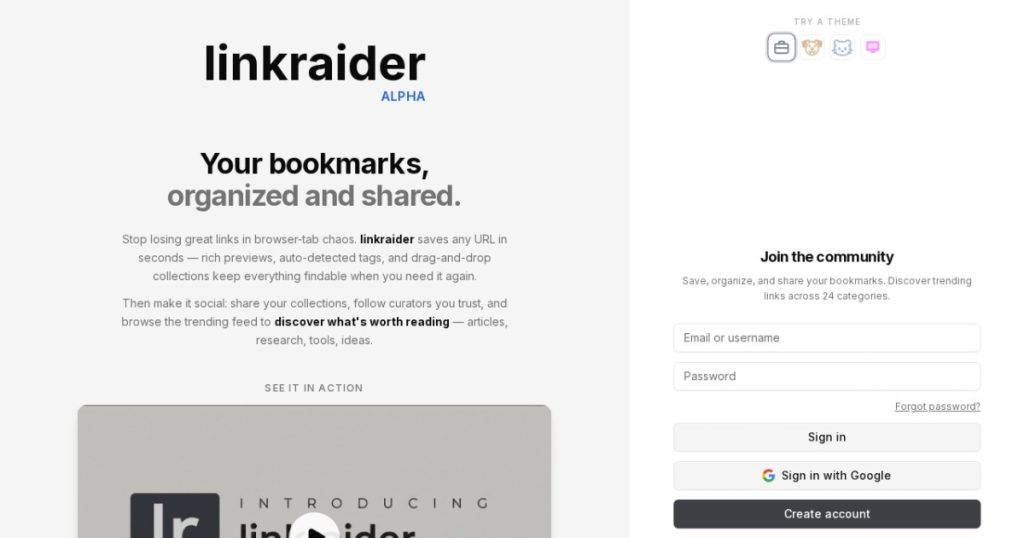
LinkRaider is a bookmark management and discovery platform. You paste any URL and it saves in seconds, pulling a rich preview with title, description, and favicon, then auto-detecting tags so you do not have to file anything manually. Links go into drag-and-drop collections you can mark public or private. The twist is the social layer: a trending feed across 24 curated categories like Technology, Design, AI and ML, Finance, and Gaming, plus the ability to follow curators whose taste you trust.
It was built by independent maker Luca Paolo Sotgiu and is current as of 2026. The pitch lands because browser bookmarks are where links go to die. Most people pile up hundreds of them, then never open the folder again. LinkRaider treats saved links as content you will want to re-browse, not a folder you forget. That framing, save and rediscover rather than save and forget, is what separates it from a plain bookmark dump and puts it in the same conversation as Raindrop.io and Diigo.
We dug into the product as a working tool, not a pitch. The thing that stood out is how much it leans on the social and discovery side. Plenty of apps store links. Far fewer give you a reason to come back to old saves, and almost none let you browse what other people are saving by category. That is the bet LinkRaider is making, and it is a sensible one.
What Are LinkRaider’s Key Features?
One-paste saving with rich previews
The core action is saving a URL, and LinkRaider keeps it to one step. Paste a link and it grabs a rich preview, title, description, and favicon, then auto-detects tags from the page. There is no manual form to fill out. That speed matters because the failure mode of every bookmark tool is friction: if saving takes effort, you stop doing it within a week. Here it takes seconds, which is the bar a save tool has to clear to actually get used.
Drag-and-drop collections
Saved links live in collections you build by dragging and dropping. You can favorite items for quick favicon shortcuts and toggle each collection between public and private. This is the organization layer, and it is the difference between a searchable library and an unusable pile. For anyone who saves dozens of links a week, the drag-and-drop model is faster than digging through nested folder menus, and the public toggle means a collection can double as a shareable resource list.
Trending discovery feed
This is the feature most bookmark tools lack. LinkRaider runs a trending feed across 24 curated categories, so the links other people save become a browsable stream. The category list is broad: Technology, Science, Design, Business, Programming, AI and ML, Finance, Gaming, and more. You can explore it as a guest with no account. It turns the product from a private vault into a discovery surface, which is the main reason to pick LinkRaider over a tool that only stores your own links.
Follow curators and share collections
You can follow curators and share your own public collections. If you trust someone’s taste in design or AI links, their saves flow to you, which is closer to following a good newsletter than browsing a search engine. This social graph is the long-term bet behind LinkRaider. It is also the youngest part of the product, so the depth here depends on how many active curators join. Early, that means the feed is promising but not yet deep across every category. The upside is that follows compound: the more people you follow whose interests match yours, the more your home feed becomes a personalized stream rather than a generic trending list. That is a different experience from a search-driven bookmark tool, and it is the part of LinkRaider that gets better with time and scale.
How Much Does LinkRaider Cost?
LinkRaider is free to use today. You can browse the trending feed as a guest with no signup, and creating a free account unlocks saving, auto-tags, collections, public and private toggles, following, and sharing. We could not find any published paid tier on the site as of 2026, so the full feature set currently sits behind a free login and nothing more.
For comparison, Raindrop.io is free with a Pro plan at roughly $3/mo billed yearly that adds full-text search, nested collections, and a duplicate finder. Diigo’s paid research tiers run higher, in the range that targets students and professional researchers. Against those, LinkRaider’s all-free model is attractive on day one, but it also means the eventual paid limits are unknown. If LinkRaider becomes core to your workflow and later gates search or collection counts behind a plan, you want to know that going in.
The honest read: free is great for trying it and for light to moderate use. Power users who need guaranteed limits, deep search, or a billing relationship with a support SLA should treat LinkRaider as promising rather than proven until pricing is public. There is no risk in starting, only in betting your whole system on it before the plans are clear.
| Plan | Price | Plan Features | Best For |
|---|---|---|---|
| Guest | $0 | Browse the trending feed across 24 categories, no signup | Anyone trying it out |
| Free account | $0 | Save URLs, auto-tags, drag-and-drop collections, public/private toggles, follow curators | Individuals organizing links |
Who is LinkRaider Best For?
Use LinkRaider if you save a lot of links and your browser bookmarks have become unusable. It fits individuals, freelancers, and content people who want fast saving, clean collections, and a discovery feed that makes old saves useful again. If you like the idea of following curators and browsing trending links by category, this is exactly the tool for that, and the free account means there is nothing to lose.
Use LinkRaider if you also publish or share resource lists. The public collection toggle turns your saves into something other people can browse, which is handy for creators who curate links for an audience.
Skip LinkRaider if you need a mature, enterprise-grade tool with guaranteed limits, team permissions, or full-text search you can rely on for work. The young social graph and undefined paid tiers make it a weaker fit for teams that need stability today. Heavy researchers who want annotation and highlighting will be better served by Diigo, and anyone who mainly saves long articles to read later will prefer a read-it-later app.
Best LinkRaider Alternatives
Raindrop.io
Raindrop.io is the polished category leader. It is free with a Pro plan at about $3/mo billed yearly that adds full-text search, nested collections, and a duplicate finder, plus apps and browser extensions on every platform. It is more mature and more reliable than LinkRaider, but it leans private vault rather than social discovery. Pick Raindrop if you want proven stability, strong search, and cross-device apps you can depend on.
Diigo
Diigo is the power-user research option. Beyond bookmarking it adds web annotation, highlighting, and outliner features that LinkRaider does not have. Its paid tiers cost more than Raindrop, but for researchers and students who mark up pages and build study notes, it earns the price. Pick Diigo if you do deep reading and need to annotate, not just save and rediscover.
Pocket-style read-it-later tools
Read-it-later apps in the Pocket mold focus on saving articles for distraction-free reading rather than building a browsable link library. They handle long-form content, text extraction, and offline reading better than LinkRaider. Most have free tiers and cheap upgrades. Pick one of these if your saves are mostly articles you intend to read, not links you want to organize and rediscover by category.
Final Verdict: Is LinkRaider Worth It?
LinkRaider gets the hard part right. Saving is fast, collections are tidy, and the trending feed across 24 categories turns a private vault into something you actually browse again. That discovery angle is the reason to choose it over a plain bookmark dump, and because the whole thing is free today, there is almost no cost to trying it. For the right user it solves a real and common problem: bookmarks you never look at.
The caveats are real but not dealbreakers for the right user. The social graph is young, there is no published paid pricing, and power features like guaranteed search depth are not confirmed. For individuals, freelancers, and content people who live in links, LinkRaider is an easy recommendation right now. Teams that need enterprise stability should wait for the product to mature and publish its plans. The combination of a sharp core idea, a fast core workflow, and a free entry point is why it earned 8.1. It does one thing better than most rivals, which is making your saved links worth revisiting.
LinkRaider Pros & Cons
What We Like
- Saving a URL takes seconds and pulls a rich preview plus auto-detected tags automatically
- Drag-and-drop collections keep large libraries findable instead of buried
- The trending feed across 24 categories makes saved links discoverable, not just stored
- Guest browsing means you can test the discovery side with no account
What Could Be Better
- No published paid pricing yet, so power-user limits and long-term cost are unclear
- The social graph is young, so curator follows and trending depth are still thin
- No mobile app or browser extension highlighted, which competitors ship as standard
LinkRaider FAQ
What is LinkRaider?
LinkRaider is a social bookmark manager. You save any URL and it captures a rich preview, auto-detects tags, and lets you sort links into drag-and-drop collections. It also runs a public trending feed across 24 categories so saved links stay discoverable.
How much does LinkRaider cost?
LinkRaider is free to use today. You can browse the trending feed as a guest with no signup, and a free account unlocks saving, collections, and sharing. Paid tiers are not yet published on the site.
Is LinkRaider worth it?
Yes, if you want a bookmark tool that doubles as a discovery feed and you are fine with a young product. The free account covers the core workflow. Heavy users should wait for published pricing before relying on it.
What are the best LinkRaider alternatives?
Raindrop.io is the polished category leader at about $3/mo for Pro. Pocket-style read-it-later tools handle articles better. Diigo adds annotation and research features for power users.
Does LinkRaider offer a free plan?
Yes. The core product is free: guests can browse trending links with no account, and a free account adds saving, auto-tags, collections, and sharing. No credit card is required.
Who is LinkRaider best for?
Individuals, freelancers, and content people who save a lot of links and want them organized and re-browsable. It suits anyone who finds browser bookmarks unusable and wants a discovery feed on top.






