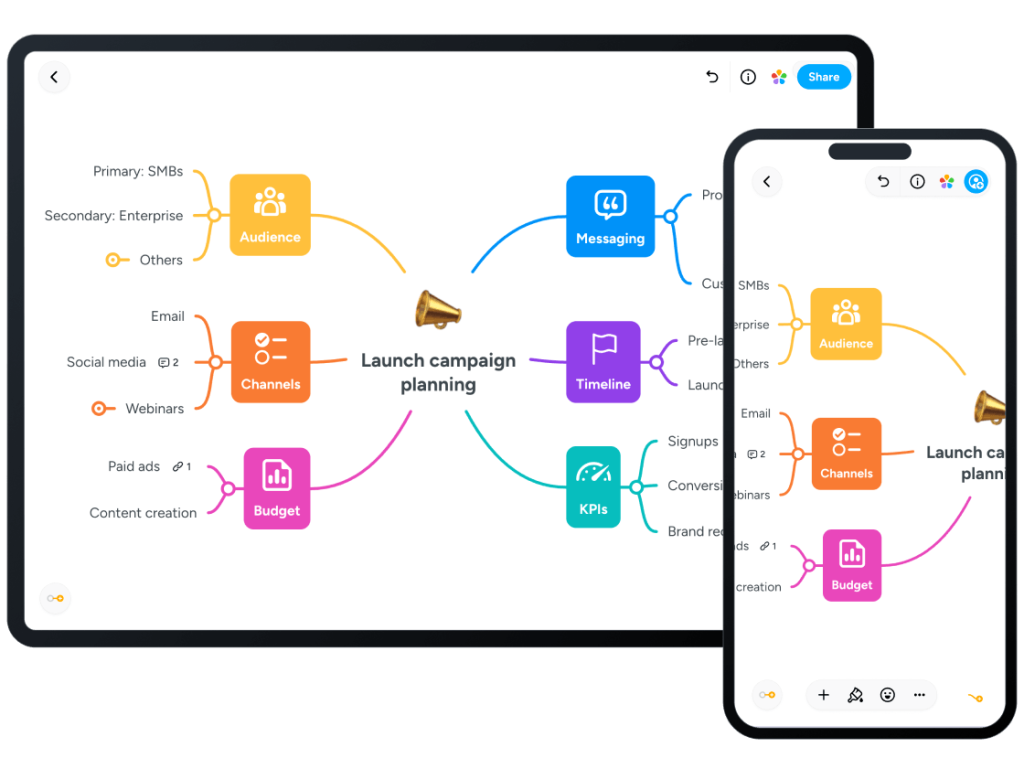
MindMeister Review (2026): Pricing, Features & Honest Verdict
TLDR
MindMeister is a cloud-based collaborative mind mapping tool for brainstorming, planning, and presenting ideas. It’s one of the smoothest real-time mapping apps out there, with handy AI generation. Best for: teams and educators. Price: free plan (3 maps), paid from $6/user/mo. Rating: 7.6/10.
What is MindMeister?
MindMeister is an online mind mapping app that lets you visualize ideas as branching maps, collaborate on them live with your team, and present them as slideshows without ever leaving the canvas. It runs entirely in the browser, syncs across iOS and Android apps, and can generate a full map from a text prompt or an uploaded document using AI.
It’s made by Meister (MeisterLabs GmbH), a company founded in 2006 by Michael Hollauf and Till Vollmer with offices in Munich and Vienna. MindMeister launched in 2007 and now claims more than 3 million users. It pairs naturally with MeisterTask, Meister’s task-management app, so the maps you brainstorm in can be turned into real project boards.
What Are MindMeister’s Key Features?
Real-time collaboration
Multiple people can edit the same map at once and see each other’s changes instantly, with comments, votes, and a built-in chat. This is where MindMeister shines: it handles live group brainstorming sessions without the lag or conflicts you sometimes hit in heavier whiteboard tools.
AI map generation
You can type a prompt or upload a file and MindMeister will spin up a structured mind map in seconds. It’s a genuine time-saver for getting past the blank-canvas problem, and the generated maps are fully editable rather than locked artifacts.
Presentation mode
Any map can become a slideshow directly inside MindMeister, letting you walk an audience through your ideas branch by branch. There’s no need to export to PowerPoint just to present, which keeps your single source of truth in one place.
MeisterTask integration
Branches from a map can be pushed straight into MeisterTask as tasks on a project board. If your team uses both apps, this closes the loop between ideation and execution far better than most standalone mind mappers.
How Much Does MindMeister Cost?
MindMeister starts with a free plan capped at 3 mind maps, then paid tiers run roughly $6/user/mo for Personal, $10/user/mo for Pro, and $15/user/mo for Business, with up to 22% off when you pay annually. That puts it in the same ballpark as Coggle (around $5/user/mo) and noticeably cheaper than Miro, whose paid plans start around $8-$10/user/mo but scale up fast for full whiteboard features. XMind, by contrast, sells a flat annual desktop subscription rather than per-user team pricing, which can be cheaper for solo users.
| Plan | Price | Plan Features | Best For |
|---|---|---|---|
| Free | Free | Up to 3 mind maps, unlimited collaborators, templates, presentation mode, AI map creation, iOS/Android apps | Trying it out or occasional personal mind maps |
| Personal | $6/user/mo | Unlimited mind maps, private maps, file exports, print, 7-day version history, Microsoft Teams integration | Individuals who need unlimited maps and exports |
| Pro | $10/user/mo | Everything in Personal plus full version history, multiple admins, Google Workspace integration, custom branding, unlimited attachments | Small teams that want admin controls and branding |
| Business | $15/user/mo | Everything in Pro plus group sharing, compliance exports/backups, SAML SSO, automated access approval, dedicated customer success manager | Larger organizations needing SSO and compliance |
Who Is MindMeister Best For?
Use MindMeister if you run collaborative brainstorming sessions, teach or study with visual maps, or want a clean way to present ideas without building slides. It’s especially strong if you already use or plan to use MeisterTask, since the two apps work as a single ideation-to-execution pipeline.
Skip MindMeister if you need a full freeform whiteboard with diagrams, sticky notes, and frameworks beyond mind maps, where Miro is the better fit. Solo users on a tight budget may also chafe at the 3-map free limit and per-user pricing, which adds up if you only need occasional personal maps.
What Are the Best MindMeister Alternatives?
Miro
Miro is a far broader visual collaboration whiteboard that handles mind maps alongside flowcharts, sticky notes, and frameworks. It’s the pick if you want more than mapping, though paid plans (from around $8/user/mo) get pricey for advanced features.
XMind
XMind is a powerful desktop-first mind mapping app with rich structures and offline support, sold as a flat annual subscription rather than per user. It’s better for individual power users who want depth over live team collaboration.
Coggle
Coggle is a simpler, cheaper online mind mapper (around $5/user/mo) focused on clean collaborative diagrams. It lacks MindMeister’s AI generation and presentation polish but is easy to pick up for basic team mapping.
Final Verdict: Is MindMeister Worth It?
MindMeister does one thing and does it well: collaborative mind mapping that feels fast, looks clean, and turns into presentations or tasks without friction. The AI generation is a real convenience, and the MeisterTask link gives it a workflow advantage most standalone mappers can’t match.
The catches are the stingy 3-map free tier and per-user pricing that scales with team size. If you brainstorm and present with a team, it’s an easy recommendation at $6-$15/user/mo. If you want a do-everything whiteboard or just dabble solo, look at Miro or XMind instead.
MindMeister Pros & Cons
What We Like
- Real-time collaboration is smooth and reliable, even with multiple editors on one map
- Built-in presentation mode turns any map into a slideshow without exporting
- AI generates a full mind map from a prompt or uploaded file in seconds
- Tight MeisterTask integration converts map branches directly into actionable tasks
What Could Be Better
- Free plan caps you at just 3 mind maps, which fills up fast
- Pricing is per user, so costs scale quickly for larger teams
- Export to Word, PowerPoint, and PDF is locked behind paid tiers
MindMeister FAQ
What is MindMeister?
MindMeister is a cloud-based collaborative mind mapping tool made by Meister (MeisterLabs). It lets you brainstorm, organize, and present ideas as visual maps in real time with your team, and can generate maps automatically using AI.
How much does MindMeister cost?
MindMeister has a free plan limited to 3 maps. Paid plans start at about $6/user/mo (Personal), then $10/user/mo (Pro) and $15/user/mo (Business), with up to 22% off when billed annually.
Is MindMeister worth it?
For teams and educators who brainstorm and present together, yes. Its real-time collaboration, presentation mode, and MeisterTask integration are excellent. Solo users on a budget may find the 3-map free cap and per-user pricing limiting.
What are the best MindMeister alternatives?
The strongest alternatives are Miro (broader visual collaboration whiteboard), XMind (powerful offline desktop mind mapping), and Coggle (a simpler, cheaper online mind mapper).
Does MindMeister offer a free plan?
Yes. The free plan includes up to 3 mind maps with unlimited collaborators, templates, presentation mode, and AI map creation, but no file exports or version history.
Who is MindMeister best for?
MindMeister is best for teams, educators, and students who collaborate on brainstorming and need to present ideas visually, especially those already using or considering MeisterTask for task management.






