Outlierkit Review (2026): Pricing, Features & Honest Verdict
TLDR
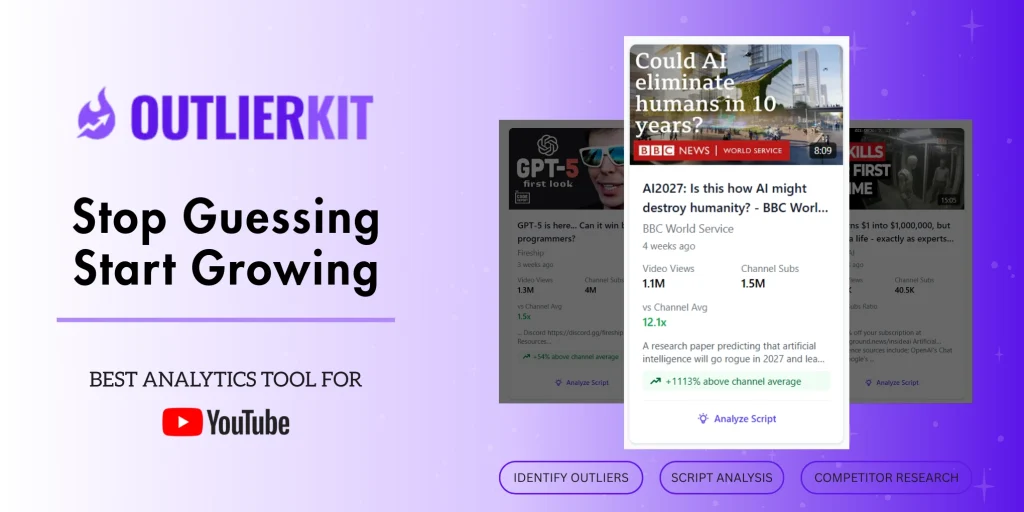
Outlierkit is an AI YouTube research tool that surfaces over-performing outlier videos, finds low-competition high-RPM keywords, and analyzes scripts and hooks so you validate ideas before you film. The outlier detection is genuinely good, though it runs on credits and has no built-in analytics dashboard. Best for: YouTube creators and channel managers researching ideas. Price: from $29/mo, no free plan. Rating: 7.8/10.
What is Outlierkit?
Outlierkit is a research tool for YouTube creators. Its core job is to tell you what to make next, backed by data instead of gut feel. It analyzes huge volumes of videos to find outliers, the clips that massively over-perform their channel’s baseline, then surfaces the keywords and topics behind that over-performance. It also finds low-competition keywords weighted toward high-RPM niches, predicts trends, and runs AI analysis on scripts and hooks. The company cites scale figures like 10M-plus videos processed and 1M-plus outliers detected.
It was built by a three-person team, Jose, Ayush, and Aditi, who developed it in stealth for about six months and launched publicly in early November 2025 across Product Hunt, Microlaunch, and Uneed. It reads as an indie, bootstrapped maker product. The reason it matters now is that YouTube success has become a research problem as much as a production one. The creators who win are the ones who pick winnable topics, and Outlierkit is built to answer that single question before you spend days filming and editing.
It helps to place Outlierkit against the tools creators already know. vidIQ and TubeBuddy grew up as optimization extensions, focused on tags, titles, and your own channel’s stats. Outlierkit comes at the problem from the research side: it is less about polishing the video you already decided to make and more about deciding what to make in the first place. That distinction shapes everything about it, from the outlier-first interface to the credit-based pricing. If you think of your biggest YouTube risk as making the wrong video rather than mistagging the right one, Outlierkit is aimed squarely at you.
What Are Outlierkit’s Key Features?
Outlier video detection
The signature feature finds videos that dramatically beat their own channel’s normal view count, which is the cleanest signal that a topic or format is resonating. Each outlier search costs one credit. This is the part that earns the rating, because spotting outliers in your niche tells you which ideas already have proven demand. Instead of inventing topics, you reverse-engineer the ones that are quietly going off.
Low-competition, high-RPM keyword finder
Outlierkit surfaces keywords that have real search demand but weak competition, and it weights toward high-revenue niches so you are not chasing views that pay nothing. At one credit per search, it is cheap to explore. For a creator deciding between five video ideas, this is the tool that points to the one with the best shot at both ranking and earning.
AI script and hook analysis
For five credits, Outlierkit analyzes a script and its hook for retention potential. The hook is where most videos win or lose their audience, so getting a read on it before you film is genuinely useful. It will not write your video for you, but it flags weak openings so you can fix them on the page rather than discover the problem in your retention graph later.
Deep Research and competitor analysis
Deep Research, at 20 credits a session, runs a comprehensive look at a niche or competitor, while standard competitor and channel analysis costs five credits. These give you the broader map of who is winning and how. The honest caveat is that Deep Research is credit-expensive, so even on Pro’s 500-credit budget you can only run a couple dozen sessions a month. Use it for big decisions, not casual browsing.
How Much Does Outlierkit Cost?
Outlierkit starts at $29/mo for the Hobby plan, which includes 100 credits a month covering keyword research, outlier detection, and video analysis. Pro is $49/mo with 500 credits, an extra 50 credits per connected channel, and API access. Max is $199/mo with 2,000 credits, support for 50-plus channels, advanced competitor research, and team collaboration. There is a free trial of 10 credits with no card, plus lifetime deal options, but no permanent free plan. The homepage markets a $19 headline, but the real entry plan is $29/mo.
Against the YouTube tool field, Outlierkit is priced for serious creators rather than dabblers. vidIQ has a free plan with Boost from $39/mo. TubeBuddy is the budget champion with a free plan and paid tiers from just $3/mo. Subscribr, the closest AI research and scripting comparison, has a free tier and paid plans from $59/mo. So Outlierkit at $29/mo undercuts Subscribr and sits below vidIQ’s Boost tier, while doing deeper outlier and keyword research than the cheaper TubeBuddy plans.
The thing to watch is credits. Because Deep Research and analysis pull from a monthly pool, heavy users can burn through Hobby’s 100 credits quickly, which pushes you toward Pro’s 500. Match the plan to how much research you actually do. A creator validating a video a week is fine on Hobby, while an agency running deep niche research needs Pro or Max.
| Plan | Price | Plan Features | Best For |
|---|---|---|---|
| Hobby | $29/mo | 100 credits/mo, keyword and outlier research, video analysis | Solo creators validating ideas |
| Pro | $49/mo | 500 credits/mo, 50 credits per connected channel, API access | Growing channels and managers |
| Max | $199/mo | 2,000 credits/mo, 50+ channels, advanced research, team features | Agencies and multi-channel teams |
Who is Outlierkit Best For?
Use Outlierkit if you publish on YouTube regularly and want to stop guessing which videos to make. It is ideal for creators and channel managers who treat ideation as research, who want to find proven-demand topics through outliers, and who care about targeting keywords that both rank and earn. Small content agencies running multiple channels will get the most from the Pro and Max tiers.
Skip Outlierkit if your main need is analytics on your own channel, because it has no built-in dashboard and you will still live in YouTube Studio for your own numbers. Skip it too if you are brand new and price-sensitive, where TubeBuddy’s cheaper tiers cover the basics, or if a credit-based model frustrates you. And do not buy it expecting it to write your videos, since it analyzes scripts rather than producing them.
The creators who get the most from Outlierkit tend to share a habit: they research before they commit. If you already sketch several ideas, check what is working in your niche, and pick the strongest before filming, Outlierkit slots into that process and makes it sharper and faster. If you film whatever you feel like in the moment and check the numbers afterward, the tool will mostly sit unused, and a cheaper optimization extension would serve you better. Match it to how you actually work, not how you wish you worked.
Best Outlierkit Alternatives
vidIQ
vidIQ is the all-round YouTube growth tool, with a free plan and a Boost tier from $39/mo. It blends keyword research, competitor tracking, and AI coaching with a daily-action focus, and it has a much longer track record than Outlierkit. It is less specialized in outlier detection but broader overall. Pick vidIQ if you want one tool that handles research, optimization, and ongoing channel coaching together.
TubeBuddy
TubeBuddy is the budget option, with a free plan and paid tiers starting at just $3/mo, scaling up to Legend at $49/mo. It is a browser extension packed with optimization, tag, and A/B testing tools built right into YouTube Studio. It does not match Outlierkit’s outlier research depth, but it is far cheaper and great for hands-on optimization. Choose TubeBuddy if you want practical optimization tools on a tight budget.
Subscribr
Subscribr focuses on AI scripting and research, with a free tier and paid plans from $59/mo. It leans harder into actually helping you write and structure videos, where Outlierkit leans into finding the right idea to make. If your bottleneck is turning a validated idea into a strong script rather than finding the idea itself, Subscribr is the alternative to weigh, though it costs more.
Final Verdict: Is Outlierkit Worth It?
Outlierkit earns its 7.8 by answering the question every creator wrestles with: what should I make next. The outlier detection is genuinely strong, the low-competition high-RPM keyword finder steers you toward topics that both rank and pay, and the script analysis catches weak hooks before you film. For a working YouTube creator, that research can save days of wasted production on ideas that were never going to land.
It falls short of the top of the range for fair reasons. There is no built-in analytics dashboard, Deep Research eats credits fast, and trend detection can lag. We would recommend Outlierkit to creators and channel managers who treat ideation seriously and want data behind their bets. If you mostly need optimization tools or analytics on your own channel, vidIQ or TubeBuddy will serve you better for less.
Outlierkit Pros & Cons
What We Like
- Outlier detection surfaces videos massively over-performing their channel baseline
- Finds low-competition, high-RPM keywords so you target winnable, profitable topics
- AI script and hook analysis flags weak openings before you film
- Entry price of $29/mo is reasonable for the research depth
What Could Be Better
- No built-in analytics dashboard, so you still rely on YouTube Studio for your own metrics
- Deep Research costs 20 credits a session, which adds up fast
- Trend detection can be slow, flagging topics after other creators jump on them
Outlierkit FAQ
What is Outlierkit?
Outlierkit is an AI-powered YouTube research and competitor-analysis tool. It analyzes large volumes of videos to surface outliers that massively over-perform their channel norm, find low-competition and high-RPM keywords, and run AI script and hook analysis so creators validate ideas before producing them.
How much does Outlierkit cost?
The Hobby plan is $29/mo with 100 credits, Pro is $49/mo with 500 credits and API access, and Max is $199/mo with 2,000 credits and team features. There is a free trial of 10 credits with no card required, but no permanent free plan. Lifetime deals are also offered.
Is Outlierkit worth it?
If you publish on YouTube regularly and want to stop guessing what to make, yes, the outlier and keyword research pays for itself by cutting flops. If you mainly want analytics on your own channel, YouTube Studio plus a cheaper tool may be enough.
What are the best Outlierkit alternatives?
vidIQ (free plan, Boost from $39/mo) for all-round channel growth, TubeBuddy (free plan, paid from $3/mo) for budget optimization, and Subscribr (free tier, paid from $59/mo) for AI scripting and research.
Does Outlierkit offer a free plan?
No. Outlierkit offers a free trial of 10 credits with no credit card required so you can test all features, but there is no permanent free tier. After the trial you move to a paid plan starting at $29/mo, or buy a lifetime deal.
Who is Outlierkit best for?
YouTube creators, channel managers, and small content agencies who research video ideas before filming. It fits people who want to validate topics with outlier data and keyword opportunity rather than guess, and who are comfortable with a credit-based tool.






