Read AI Review (2026): Pricing, Features & Honest Verdict
TLDR
Read AI is an AI meeting copilot that records, transcribes, and summarizes meetings while adding sentiment analytics and a cross-app search that answers questions across your meetings, email, and chat. Best for: teams that live in back-to-back calls. Price: From $15/mo (free plan: yes). Rating: 7.4/10
What is Read AI?
Read AI is an AI-powered meeting assistant that joins your Zoom, Google Meet, or Microsoft Teams calls, transcribes them in real time, and spits out a summary with action items, key questions, and highlights before you’ve even left the room. What sets it apart from a plain transcription tool is its patented multimodal measurement: it reads signals like speaking pace, engagement, and sentiment to score how a meeting actually went, not just what was said. On top of that sits a copilot layer that searches across your meetings, emails, and messages so you can ask “what did we decide about the Q3 budget?” and get a cited answer.
The company, Read AI, Inc., was founded in Seattle in 2021 by David Shim, Rob Williams, and Elliott Waldron. It started life as an engagement-and-sentiment tool riding the pandemic Zoom boom, then pivoted hard into the meeting-copilot space. It has raised roughly $81M, including a $50M Series B in October 2024, and claims adoption across a majority of the Fortune 50. In early 2026 it shipped “Ada,” a digital twin that handles email and scheduling autonomously, pushing its “copilot everywhere” ambitions well beyond meetings.
What Are Read AI’s Key Features?
Automatic meeting summaries and action items
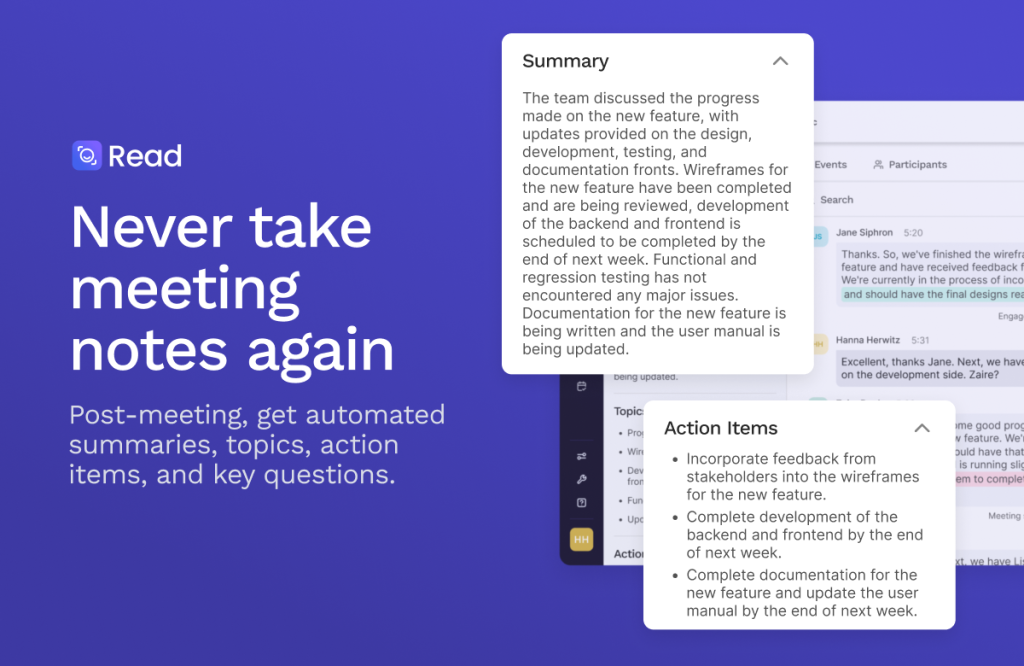
Read AI joins your calls automatically and generates a clean recap the moment the meeting ends: a topic-by-topic summary, action items assigned to people, key questions, and highlight clips. The summaries are genuinely among the best in the category, well-structured and short enough to actually read, which is the whole point.
Sentiment and engagement analytics
This is Read AI’s signature differentiator. Using its multimodal measurement tech, it scores meetings on engagement, sentiment, and even speaker balance, flagging when a call ran long or when someone dominated the conversation. For managers and sales teams trying to read the room after the fact, this is data most competitors simply don’t offer.
Cross-app search and copilot
Beyond meetings, Read AI indexes your emails and chat threads (Slack, Gmail, and more) and lets you query all of it in one place with cited sources. Ask what was decided or who owns a task, and it pulls the answer from across your entire work history rather than a single transcript.
Digital twin (Ada) and integrations
The newer Ada digital twin can draft emails and manage scheduling on your behalf. All of this plugs into 20+ tools including Notion, Salesforce, HubSpot, Jira, Confluence, and Zapier, so summaries and action items land where your team already works instead of getting stranded in yet another app.
How Much Does Read AI Cost?
Read AI starts free with a genuinely usable plan (5 meeting transcripts a month plus unlimited cross-app search), and paid plans begin at $15/mo for Pro when billed annually, or $19.75/mo billed monthly. Enterprise runs $22.50/mo annual (and adds audio/video playback), while Enterprise+ at $29.75/mo annual layers on HIPAA compliance, SAML/SCIM, and custom data retention for teams of five or more. That’s competitive: Otter.ai’s Pro plan lands around $16.99/mo and its Business tier near $30/mo, so Read AI is priced right in the same neighborhood while throwing in sentiment analytics Otter doesn’t have. The catch is that features you might expect on Pro, like video playback, are gated behind Enterprise.
| Plan | Price | Plan Features | Best For |
|---|---|---|---|
| Free | $0 | 5 meeting transcripts/mo, unlimited cross-app search, summaries, meeting coach, 20+ languages | Trying it out |
| Pro | $15/mo (annual) | Unlimited transcripts, 100 file upload credits/mo, premium integrations (Notion, Salesforce, HubSpot, Jira, Zapier) | Solo pros and small teams |
| Enterprise | $22.50/mo (annual) | Everything in Pro plus audio/video playback, video highlights, 200 file credits/mo, premium support | Teams needing playback and support |
| Enterprise+ | $29.75/mo (annual) | 5+ licenses, HIPAA, SAML & SCIM, domain capture, custom data retention, 300 file credits/mo | Regulated or larger organizations |
Who Is Read AI Best For?
Read AI is aimed at people whose calendars are a wall of meetings and who need the takeaways without rewatching recordings.
Use Read AI if you run or attend heavy meeting loads, want sentiment and engagement data on top of transcripts, and would benefit from asking questions across meetings, email, and chat in one search box. Sales teams, managers, and consultants get the most out of it.
Skip Read AI if you just need a cheap, no-frills transcript, you’re privacy-averse about a bot analyzing facial expressions and engagement, or you want video playback without paying up to the Enterprise tier.
Best Read AI Alternatives
Read AI sits in a crowded meeting-assistant market. Here are the three most credible alternatives depending on what you value.
Otter.ai
The best-known meeting transcription tool, Otter is strong on live transcription and search and starts around $16.99/mo for Pro. It’s cheaper to reach full functionality but lacks Read AI’s sentiment and engagement analytics.
Fireflies.ai
Fireflies focuses on searchable meeting notes and CRM integrations with a generous free tier and paid plans from around $10/mo. It’s a great value pick for sales teams, though its analytics are less distinctive than Read AI’s multimodal scoring.
Fathom
Fathom offers a genuinely powerful free plan for individual note-taking and unlimited recordings, with paid team plans from roughly $15/mo. It’s the go-to for solo users who want polished summaries without paying, but it doesn’t match Read AI’s cross-app copilot search.
Final Verdict: Is Read AI Worth It?
Read AI is one of the more ambitious tools in the meeting-assistant space. The summaries are top-tier, the sentiment and engagement analytics are a real differentiator, and the cross-app copilot that searches meetings, email, and chat together is where it pulls ahead of pure transcription tools. For teams drowning in calls, it earns its keep quickly.
The knocks are real, though: the pricing tiers gate obvious features like video playback behind Enterprise, and some people will be uneasy about a tool scoring engagement from facial cues. If you want the analytics and copilot breadth, Read AI is worth it and its free plan makes trying it risk-free. If you only need clean transcripts, Fireflies or Fathom will save you money. Recommended, with the caveat that you check which features live on which tier before committing.
Read AI Pros & Cons
What We Like
- Best-in-class meeting summaries with clear action items
- Unique sentiment and engagement analytics via multimodal measurement
- Cross-app copilot searches meetings, email, and chat with cited answers
- Genuinely usable free plan with no credit card required
- 20+ integrations including Salesforce, HubSpot, Notion, and Zapier
What Could Be Better
- Video playback and highlights gated behind the Enterprise tier
- Engagement-from-facial-cues analytics may feel invasive to some teams
- Per-seat pricing adds up quickly for larger teams
Read AI FAQ
What is Read AI?
Read AI is an AI meeting copilot that records, transcribes, and summarizes meetings across Zoom, Google Meet, and Teams, adds sentiment and engagement analytics, and offers a cross-app search that answers questions across your meetings, email, and chat with cited sources.
How much does Read AI cost?
Read AI has a free plan with 5 transcripts a month. Paid plans start at $15/mo for Pro (billed annually), $22.50/mo for Enterprise, and $29.75/mo for Enterprise+ which requires 5 or more licenses. Monthly billing costs more.
Is Read AI worth it?
For teams with heavy meeting loads, yes. Its summaries are top-tier and the sentiment analytics and cross-app copilot go beyond what pure transcription tools offer. If you only need basic transcripts, cheaper tools like Fireflies or Fathom may suit you better.
What are the best Read AI alternatives?
The strongest alternatives are Otter.ai (best-known transcription, from ~$16.99/mo), Fireflies.ai (great value with CRM integrations, from ~$10/mo), and Fathom (excellent free plan for individuals).
Does Read AI offer a free plan?
Yes. Read AI's free plan includes 5 meeting transcripts per month, unlimited cross-app enterprise search, summaries, a personalized meeting coach, and 20+ language support, with no credit card required.
Who is Read AI best for?
Read AI is best for meeting-heavy teams, managers, consultants, and sales professionals who want strong summaries plus sentiment and engagement analytics and the ability to search across meetings, email, and chat in one place.






