Remio Review (2026): Pricing, Features & Honest Verdict
TLDR
Remio is a local-first personal knowledge base for macOS and Windows that auto-captures information from your browser, files, and meetings, then uses AI to organize and surface connections. Best for product managers, researchers, and consultants drowning in tabs and scattered notes. Free plan available, Pro at $9.99/mo. It earned 482+ upvotes as a Product Hunt weekly runner-up, but the personal knowledge management space is brutally competitive. Rating: 6.4/10.
What is Remio?
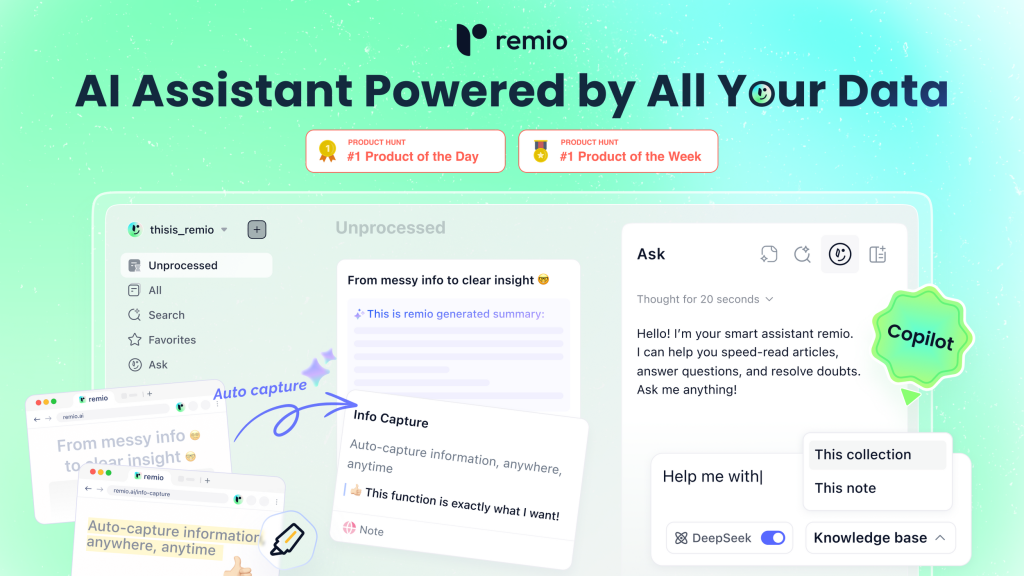
Remio is a desktop app and Chrome extension that acts as a “second brain” for individual knowledge workers. Instead of manually copying information into Notion or bookmarking URLs you will never revisit, Remio auto-captures content from webpages, documents, and meetings, then uses AI to organize everything into searchable collections with suggested connections between related pieces.
Built by Andrew Wang (also CEO of Everdent AI), Remio 2.0 launched on Product Hunt in January 2026 and earned 482+ upvotes, landing as the #4 product of Week 3. The key differentiator is the local-first approach: your data stays on your machine, not in someone else’s cloud. The AI features use a bring-your-own-key model, supporting OpenAI, Google Gemini, Anthropic, xAI, and Open Router.
What Are Remio’s Key Features?
Auto-Capture from Any Source
The Chrome extension captures webpage content, highlights, and annotations as you browse. Remio also ingests local files including Word documents, PowerPoints, PDFs, and Google Docs. The capture happens in the background without interrupting your workflow. For anyone who spends hours researching competitors, reading documentation, or collecting references, this removes the friction of manual note-taking.
AI-Suggested Collections
Remio’s AI automatically organizes captured content into thematic collections and surfaces connections between knowledge pieces you might have missed. Find a blog post about pricing strategy and a competitor’s teardown? Remio links them. This is the promise of every “second brain” tool, and execution quality varies, but the BYOK model means you can use the best available AI models.
AI Copilot for Research
Ask questions about your collected knowledge and Remio’s AI searches across everything you have captured. It supports multi-turn conversations, so you can drill down into topics without starting fresh. The copilot works with DeepSeek for extended conversations and supports multiple LLM providers via OpenRouter.
Meeting Summaries
Remio can record and summarize meetings, generating notes with real-time webpage overviews. This connects meeting context with your existing knowledge base, so action items and decisions are not trapped in a separate meeting notes app. Useful for product managers who need to reference meeting decisions alongside research findings.
How Much Does Remio Cost?
Remio offers a free plan with limited captures and AI queries. The Pro plan costs $9.99 per month. Compared to Notion’s free tier (which is more generous for basic note-taking) or Mem’s $14.99/mo, Remio sits in a reasonable price range. The BYOK model means you also pay your own AI provider costs, which could add $5-20/mo depending on usage. That makes the total cost of ownership higher than the sticker price suggests.
| Plan | Price | Plan Features | Best For |
|---|---|---|---|
| Free | Free | 100 AI credits/month, auto-capture, highlights, Slack/email | Testing the tool |
| Pro | $8.25/mo (annual) | 2,000 AI credits/month, full AI features, multi-device sync | Active knowledge workers |
| BYOK | $6.20/mo (annual) | Unlimited with your own API keys, enhanced privacy | Privacy-conscious power users |
Who is Remio Best For?
Use Remio if you are a solo knowledge worker who collects information from dozens of sources and struggles to find things later. Product managers running competitive analysis, consultants managing client research, and academics compiling literature reviews will get the most value. The local-first architecture is a real advantage if data privacy matters for your work.
Skip Remio if you need team collaboration. Remio is explicitly personal, not built for shared workspaces. Skip it if you are already invested in Notion or Obsidian with established workflows. And skip it if you are on mobile: there is no mobile app yet, which limits capture to desktop sessions only.
Best Remio Alternatives
Notion
The dominant workspace tool that combines notes, databases, wikis, and project management. Notion’s free tier is generous and its ecosystem of templates and integrations is unmatched. Less automated than Remio but far more flexible and mature. Free for personal use, $10/mo for teams.
Mem
AI-powered note-taking that auto-organizes and surfaces relevant notes. Mem takes a similar “AI second brain” approach but is cloud-based. Stronger mobile experience than Remio. Priced at $14.99/mo. The tradeoff: your data lives on their servers.
Saner.ai
Another “virtual second brain” that captures and organizes information with AI. Saner focuses on simplifying information overload with smart organization. Free tier available. Less established than Remio but targeting the same use case.
Final Verdict: Is Remio Worth It?
Remio does several things well. The auto-capture from browser and files reduces friction. The local-first architecture is a genuine differentiator in a space dominated by cloud tools. And the BYOK model means you are not locked into one AI provider’s quality ceiling.
The challenge is that personal knowledge management is a graveyard of ambitious tools. Evernote, Roam Research, Mem, and dozens of others have promised to be your “second brain.” Most users abandon them within months because the value only materializes if you consistently use the system. Remio’s auto-capture lowers that barrier, but it does not eliminate it. At $9.99/mo plus BYOK costs, you are paying a meaningful amount for a tool that requires habit change to deliver value. Try the free tier first and give it at least two weeks before deciding.
Remio Pros & Cons
What We Like
- Auto-capture from browser and files reduces friction
- Local-first architecture keeps data on your machine
- BYOK model supports OpenAI, Gemini, Anthropic, and more
- AI copilot for searching across all captured knowledge
What Could Be Better
- Personal knowledge management has high abandonment rates
- No mobile app limits capture to desktop sessions
- BYOK costs add $5-20/mo on top of subscription
Remio FAQ
What is Remio?
Remio is a local-first personal knowledge base for macOS and Windows that auto-captures information from your browser, files, and meetings, then uses AI to organize and surface connections.
How much does Remio cost?
Remio offers a free plan with limited features. The Pro plan costs $9.99 per month with unlimited captures and full AI features. BYOK AI costs are additional.
Is Remio worth it?
Remio is worth trying if you struggle with information overload across many sources. The auto-capture reduces friction compared to manual note-taking tools. Give the free tier at least two weeks before deciding.
What are the best Remio alternatives?
Key alternatives include Notion (free for personal use, more flexible), Mem ($14.99/mo AI-powered notes), and Saner.ai (another AI second brain tool).
Does Remio offer a free plan?
Yes, Remio offers a free plan with limited captures and AI queries. The Pro plan at $9.99/mo unlocks all features.
Who is Remio best for?
Remio is best for product managers, researchers, consultants, and academics who collect information from dozens of sources and need AI help organizing and retrieving it.






