Storyflow Review (2026): Pricing, Features & Honest Verdict
TLDR
Storyflow is an AI visual workspace built on an infinite canvas, aimed at creative and marketing teams who plan on boards. The board-aware AI is the real hook: it reads the whole canvas, not just your last message. Best for: small creative teams and solo creators who storyboard and moodboard. Price: from $9.99/mo, free plan coming later in 2026. Rating: 7.9/10.
What is Storyflow?
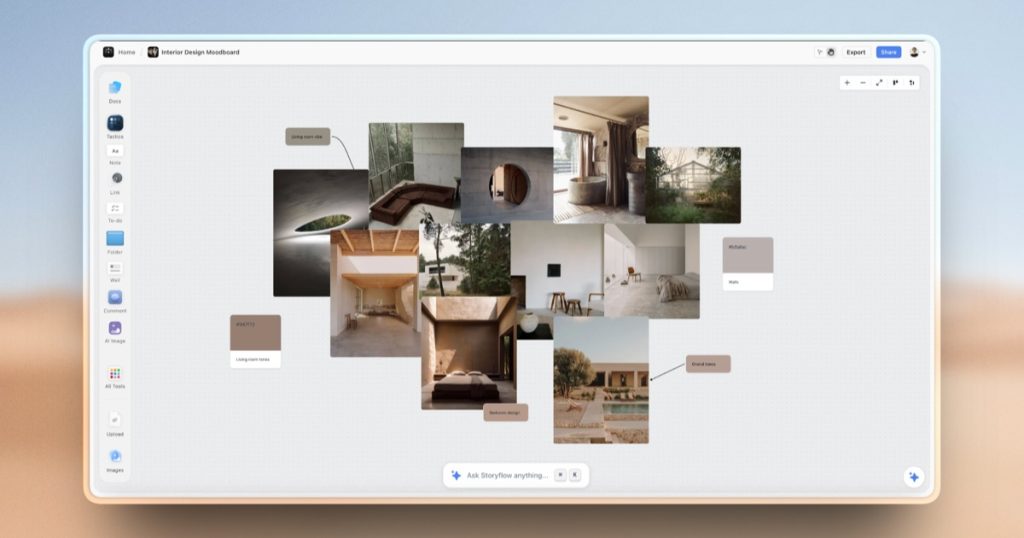
Storyflow is a visual collaboration tool that mixes an infinite whiteboard with an AI assistant that can read and build on the entire board. Instead of a chatbot in a side panel, the AI sees every card, sticky note, image, and connection on the canvas, then helps you plan, expand, or reorganize. You can spin up storyboards, mind maps, kanban boards, moodboards, and content plans in one place. It pitches itself as a replacement for juggling ChatGPT, Milanote, and Notion at the same time.
We dug into Storyflow because it targets a specific gap: creative planning that keeps context. Most AI tools forget what you were doing two prompts ago. Storyflow keeps the board as the memory. The company launched the product through 2026 and is still filling out the free tier, so this is an early but usable product. The core promise is fewer handoffs between “thinking” tools and “doing” tools, with an AI that actually understands the layout in front of it.
The positioning is deliberate. Storyflow is not trying to be a general project manager or a Notion clone. It is aimed at the messy middle of creative work, where ideas start as scattered notes and slowly become a plan. That focus shows up in the templates, which lean toward storyboards, campaign maps, and content calendars rather than engineering sprints or CRM pipelines. If your work looks like moving cards around until a story emerges, this is built for you.
What Are Storyflow’s Key Features?
Board-aware AI
The headline feature is an AI that reads the full canvas. Ask it to expand a storyboard, cluster loose ideas, or draft the next three cards, and it uses everything already on the board as context. On the Pro plan it also keeps memory across conversations, so it remembers earlier decisions in a project. This is the piece that separates Storyflow from a generic chatbot bolted onto a whiteboard.
Blueprint Tactics templates
Storyflow ships with more than 200 templates it calls Tactics, covering storyboards, content calendars, campaign plans, mind maps, and kanban layouts. Each one starts from real structure rather than a blank page, so the AI has a framework to build inside. The free plan will limit you to 3 of the 200-plus Tactics, while paid plans unlock the full library.
AI image generation
From the Pro plan up, Storyflow can generate images directly onto the board. That matters for moodboards and storyboards where you want a rough visual in place before commissioning real art. Image generation is gated behind Pro ($19/mo) and Max ($49/mo); the cheaper Plus plan gives you more text AI but no image generation.
Infinite canvas collaboration
All plans include unlimited objects, unlimited shared boards, and unlimited file uploads on paid tiers (the free plan caps uploads at 20). Invited collaborators can join a paid member’s workspace for free today, which is unusual and generous. The Max plan adds a proper team workspace with permissions and roles for teams that need control over who edits what.
How Much Does Storyflow Cost?
Storyflow starts at $9.99/mo for the Plus plan (or $7.99/mo billed annually). Pro is $19/mo ($14 annual) and adds AI image generation, 30x more AI usage, and cross-conversation memory. Max is $49/mo ($39 annual) with 60x more AI usage and a team workspace with roles. A free plan is advertised but listed as coming before the end of 2026, so as of now you cannot fully sign up for a permanent free account, though invited collaborators join free.
Compared to the incumbents, Storyflow is priced sensibly. Miro’s Plus plan is $8 per user per month but charges you per seat, so a five-person team runs $40/mo. Milanote’s Pro plan is $12.50/mo flat. FigJam is cheaper at roughly $3 per editor per month but is a pure whiteboard with no board-reading AI. Storyflow’s angle is that a single Plus or Pro subscription replaces a whiteboard tool plus a separate ChatGPT subscription, which is where the value shows up.
The one caveat: heavy AI users will feel the usage caps. The multiplier language (6x, 30x, 60x more AI) means the cheaper plans meter your AI, and if you lean on it all day you will push toward Max at $49/mo. Budget for the tier that matches how much you actually generate.
Annual billing is where the real savings sit. Plus drops to $7.99/mo, Pro to $14/mo, and Max to $39/mo when paid yearly, which is a meaningful cut if you already know Storyflow fits your workflow. There is no free trial gimmick to trip over on the paid tiers, and the free-collaborator model means you can bring reviewers and clients onto a board without buying them seats. That single detail makes Storyflow noticeably cheaper for agencies than any per-seat whiteboard.
| Plan | Price | Plan Features | Best For |
|---|---|---|---|
| Plus | $9.99/mo | 6x AI usage, unlimited boards, 200+ Tactics | solo creators starting with AI planning |
| Pro | $19/mo | AI image generation, 30x AI, cross-chat memory | creators who generate visuals daily |
| Max | $49/mo | 60x AI usage, team workspace with roles | small teams needing permissions |
| Free | $0 (coming 2026) | 10 AI generations, 3 Tactics, 20 uploads | trying the product |
Who is Storyflow Best For?
Use Storyflow if you are a solo creator, marketer, or small creative team who thinks visually and wants an AI that understands your whole board. It fits storyboarding, campaign planning, content calendars, and moodboards especially well. If you currently bounce between ChatGPT for ideas and a whiteboard for layout, Storyflow collapses that into one screen.
It also suits freelancers pitching clients. You can build a campaign board, let the AI flesh out the plan, and share it with a client who joins free to comment. Content teams running an editorial calendar get similar mileage, since the AI can turn a rough list of topics into a structured plan on the same canvas.
Skip Storyflow if you need enterprise governance, deep integrations, or a mature whiteboard with thousands of shapes and diagramming power. Miro is the safer pick for large orgs and technical diagramming. Skip it too if a free forever plan is a hard requirement right now, since Storyflow’s free tier is still rolling out. And if you never touch AI, you are paying for a feature you will not use; a cheaper whiteboard makes more sense. Teams that live inside Figma may also prefer FigJam to avoid adding another tool.
Best Storyflow Alternatives
Miro
Miro is the category leader for visual collaboration and the obvious comparison. It has a free plan, a huge template library, deep integrations, and far more diagramming muscle than Storyflow. Its Plus plan is $8 per user per month billed annually, and it added AI features of its own. The trade-off is that Miro charges per seat and its AI is more of an add-on than a board-native brain. Pick Miro for scale and integrations; pick Storyflow for the tighter AI-plus-canvas loop.
Milanote
Milanote is the closest match in spirit: a moodboard-first tool loved by designers, writers, and creative directors. It has a genuinely useful free plan (capped at 100 notes and 10 uploads) and a Pro plan at $12.50/mo flat, not per seat. Milanote is more polished for pure moodboarding but has no board-aware AI. If you want beautiful visual planning without the AI layer, Milanote is the value pick.
FigJam
FigJam from Figma is the cheapest serious option at around $3 per editor per month, with a free tier. It is a fast, friendly whiteboard for brainstorming and workshops, and it fits teams already living in Figma. It lacks Storyflow’s structured Tactics and canvas-reading AI, so it is better for loose collaboration than guided creative planning. Choose FigJam if price and Figma integration matter most.
Final Verdict: Is Storyflow Worth It?
Storyflow earns its 7.9 because the core idea works: an AI that reads the entire canvas is genuinely more useful than a chatbot in a sidebar, and the 200-plus Tactics give it real structure. For solo creators and small creative teams, a $9.99 or $19 subscription that replaces a whiteboard plus a separate AI tool is easy math. The free-collaborator model is a nice touch that lowers the cost of bringing a team on.
It is not a 9, and the reasons are fair. The free plan is still coming, the AI usage caps push heavy users up the pricing ladder, and it cannot match Miro on integrations or enterprise features. This is an early product betting on a smart core loop. If visual planning with a context-aware AI is your daily work, Storyflow is worth a trial today. If you need maturity and free-forever access, wait a cycle or start with Miro. For most solo creators and lean creative teams, though, the Plus or Pro plan is an easy recommendation and the fastest way we found to keep ideas and AI in the same place.
Storyflow Pros & Cons
What We Like
- Board-aware AI reads the whole canvas, not just the last message
- 200+ structured templates (Tactics) beat a blank whiteboard
- Invited collaborators join a paid member's workspace for free
- One subscription replaces a whiteboard plus a separate AI tool
What Could Be Better
- Free forever plan is still coming and not fully live yet
- AI usage caps push heavy users toward the $49/mo Max plan
- Fewer integrations and less diagramming depth than Miro
Storyflow FAQ
What is Storyflow?
Storyflow is an AI visual workspace built on an infinite canvas. Its AI reads the entire board and helps you build storyboards, mind maps, moodboards, and content plans. It targets creative and marketing teams.
How much does Storyflow cost?
Plus is $9.99/mo ($7.99 annual), Pro is $19/mo ($14 annual), and Max is $49/mo ($39 annual). A free plan is advertised as coming before the end of 2026.
Is Storyflow worth it?
Yes for creative teams who plan visually and want context-aware AI. The board-reading AI is genuinely useful and the pricing undercuts running a whiteboard plus a separate AI subscription. Enterprises should still consider Miro.
What are the best Storyflow alternatives?
Miro (category leader, $8/user/mo, deep integrations), Milanote (moodboard favorite, $12.50/mo flat), and FigJam (cheapest at about $3/editor/mo).
Does Storyflow offer a free plan?
A free plan is advertised but listed as coming before the end of 2026. Invited collaborators can join a paid member's workspace for free today, but a permanent free account is not fully live yet.
Who is Storyflow best for?
Solo creators, marketers, and small creative teams who think visually and want an AI that understands their whole board. It fits storyboarding, moodboards, and campaign planning.






