Tactiq Review (2026): Pricing, Features & Honest Verdict
TLDR
Tactiq is a browser-extension AI meeting transcriber that captures live transcripts and one-click AI summaries for Google Meet, Zoom, and Teams without a bot joining the call. Best for: solo operators and small teams who want frictionless meeting notes. Price: From $8/user/mo (free plan: yes). Rating: 7.8/10
What is Tactiq?
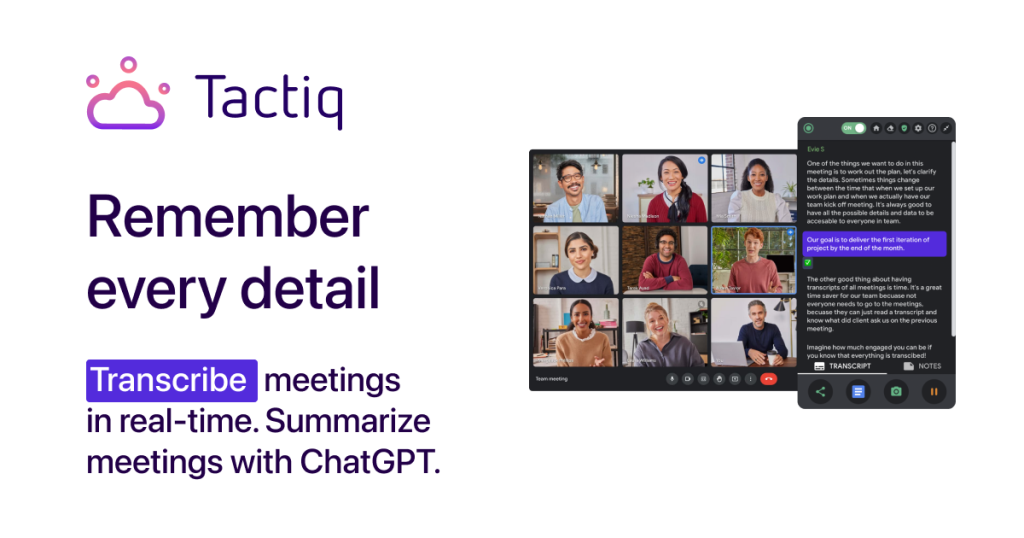
Tactiq is an AI-powered meeting transcription and notes tool that runs as a browser extension rather than a bot. Install it in Chrome (or Edge), and it sits quietly in your video calls capturing a live, real-time transcript with speaker names in 60+ languages. When the meeting ends, one click generates an AI summary, extracts action items, and lets you run custom prompts against the transcript to pull out decisions, questions, or follow-ups. Because it reads the meeting’s own captions instead of sending a recording bot into the room, there is no awkward “Tactiq has joined” moment and no audio file to store.
The company behind it, Tactiq, has been building meeting-intelligence tooling since 2020 and now claims usage across hundreds of thousands of professionals. It carves out a specific niche in a crowded transcription market: it is bot-free and text-only (no audio recording), which makes it easier to deploy in privacy-sensitive organizations. It is SOC 2 Type II and ISO 27001 certified and offers GDPR and HIPAA compliance, and it integrates with Slack, Notion, HubSpot, and Linear so notes land where your team already works.
What Are Tactiq’s Key Features?
Bot-free live transcription
The core draw is that Tactiq transcribes calls in real time as a browser extension, so nothing joins the meeting. You see the transcript scroll live during the call, with speaker attribution, and you can highlight moments on the fly. It works across Google Meet, Zoom, and Microsoft Teams and supports 60+ languages.
One-click AI summaries and action items
After a meeting, Tactiq generates a structured summary and pulls out action items automatically using an enterprise LLM (not a consumer ChatGPT account). This turns a wall of transcript text into a shareable recap in seconds, which is where most of the day-to-day value lives.
Custom AI prompts and in-meeting AI
Beyond canned summaries, you can save reusable custom prompts (“list all decisions,” “draft a follow-up email,” “extract the client’s objections”) and run them against any transcript. There is also an in-meeting AI assistant that can answer questions from the live conversation while the call is still happening.
Integrations and sharing
Transcripts and summaries can be shared or exported, and Tactiq pushes into Slack, Notion, HubSpot, and Linear. Team plans add auto-sharing so meeting notes are distributed to the right people without anyone remembering to hit send.
How Much Does Tactiq Cost?
Tactiq starts free forever with 10 transcripts and 5 AI credits per month, which is enough to genuinely try it. Paid plans begin at $8/user/mo for Pro (billed annually, or $12 month-to-month), which unlocks unlimited transcripts but keeps AI credits capped at 10 per month. Team runs $16.67/user/mo annually ($20 monthly) and is the sweet spot: unlimited transcripts and unlimited AI credits plus auto-sharing and priority support. Business is $29.17/user/mo annually with SSO and advanced data retention, and Enterprise is custom. Compared with Otter.ai, whose Pro plan is $16.99/user/mo, Tactiq’s Pro tier is meaningfully cheaper, though Otter bundles more AI usage at that price. The catch to watch is the AI credit limit on Free and Pro, since summaries and custom prompts consume credits.
| Plan | Price | Plan Features | Best For |
|---|---|---|---|
| Free | $0 | 10 transcripts/mo, 5 AI credits/mo, AI insights, share & export | Trying it out |
| Pro | $8/user/mo | Unlimited transcripts, 10 AI credits/mo, pause auto-transcription | Solo operators |
| Team | $16.67/user/mo | Unlimited transcripts & AI credits, auto-share, priority support (1-20 users) | Small teams |
| Business | $29.17/user/mo | Everything in Team plus SAML SSO, advanced data retention, CSM (20-200 users) | Larger orgs needing SSO |
| Enterprise | Custom | Custom DPA, dedicated account manager, customizable SSO (200+ users) | Enterprises |
Who Is Tactiq Best For?
Tactiq fits people who live in back-to-back calls and want notes without changing how they meet. The bot-free approach makes it especially good for sales reps, consultants, and founders who take external calls where a visible recording bot feels intrusive.
Use Tactiq if you take a lot of Google Meet, Zoom, or Teams calls, want frictionless transcripts with no bot in the room, and value a text-only (no audio recording) footprint for privacy. Skip Tactiq if you need full audio/video recording and playback, do a very high volume of AI summaries on a budget tier (the credit caps on Free and Pro will bite), or want a tool that also joins calls you are not personally attending.
Best Tactiq Alternatives
Tactiq is not the only meeting AI worth considering. Here are three strong alternatives depending on what you weight most.
Otter.ai
Otter is the best-known name in meeting transcription, with a free tier and Pro at $16.99/user/mo. It offers audio recording, a polished mobile app, and OtterPilot bot that can join calls for you. It is a better fit if you want recording and a standalone app rather than a browser-extension workflow.
Fireflies.ai
Fireflies uses a recording bot that joins your calls and starts free, with Pro around $10/user/mo. Its strength is a searchable conversation database and strong CRM integrations, making it appealing for revenue teams. Choose it over Tactiq if you want a bot to attend meetings automatically and a deeper analytics layer.
Fathom
Fathom offers a genuinely generous free plan with unlimited recording and AI summaries, and paid plans from about $15/user/mo. It records video and audio and is well-loved by sales teams. Pick Fathom if free-tier generosity and full recording matter more than Tactiq’s bot-free, text-only approach.
Final Verdict: Is Tactiq Worth It?
Tactiq nails a specific, underrated problem: getting a clean, live transcript and a fast AI summary without a recording bot barging into the room. The browser-extension model is genuinely frictionless, the summaries and custom prompts are useful, and the security posture (SOC 2, ISO 27001, HIPAA) makes it an easy sell to IT. For solo operators and small teams that mostly need reliable notes and recaps, the free plan is a real try-before-you-buy and Pro at $8/user/mo is fair.
The main reservation is the AI credit metering: because summaries and prompts consume credits, heavy AI users on Free or Pro will hit the ceiling and effectively need the Team plan for unlimited use. And if you want full audio/video recording, this is the wrong tool. But for its core promise, bot-free live transcription with quick AI notes, Tactiq is one of the best options available and well worth installing.
Tactiq Pros & Cons
What We Like
- Bot-free browser extension captures live transcripts with no recorder joining the call
- One-click AI summaries and custom prompts turn transcripts into recaps fast
- Text-only, no-audio-recording approach with SOC 2, ISO 27001 and HIPAA compliance
- Genuinely usable free plan and cheap $8/user/mo Pro tier
What Could Be Better
- AI credits are metered on Free and Pro, so heavy summary users must jump to Team
- No full audio or video recording and playback
Tactiq FAQ
What is Tactiq?
Tactiq is an AI meeting transcription tool that runs as a browser extension. It captures live, real-time transcripts with speaker names for Google Meet, Zoom, and Teams, then generates one-click AI summaries and action items without a recording bot joining the call.
How much does Tactiq cost?
Tactiq is free forever with 10 transcripts and 5 AI credits per month. Paid plans start at $8/user/mo for Pro (billed annually), $16.67/user/mo for Team with unlimited AI credits, $29.17/user/mo for Business with SSO, and custom Enterprise pricing.
Is Tactiq worth it?
Yes, if you want frictionless, bot-free meeting notes. The browser-extension model is genuinely low-friction, summaries are fast, and the security posture is strong. The main caveat is that AI credits are metered on Free and Pro, so heavy AI users need the Team plan.
What are the best Tactiq alternatives?
The strongest alternatives are Otter.ai (recording plus a call-joining bot, Pro at $16.99/user/mo), Fireflies.ai (recording bot with strong CRM integrations, Pro around $10/user/mo), and Fathom (very generous free tier with full recording).
Does Tactiq offer a free plan?
Yes. Tactiq's free plan is free forever with no credit card required and includes 10 transcripts and 5 AI credits per month, plus AI-generated insights and the ability to share and export transcripts.
Who is Tactiq best for?
Tactiq is best for solo operators, sales reps, consultants, and small teams who take a lot of Google Meet, Zoom, or Teams calls and want reliable transcripts and AI recaps without a visible recording bot in the meeting.






