TypeBoost Review (2026): Pricing, Features & Honest Verdict
What is TypeBoost?
TLDR
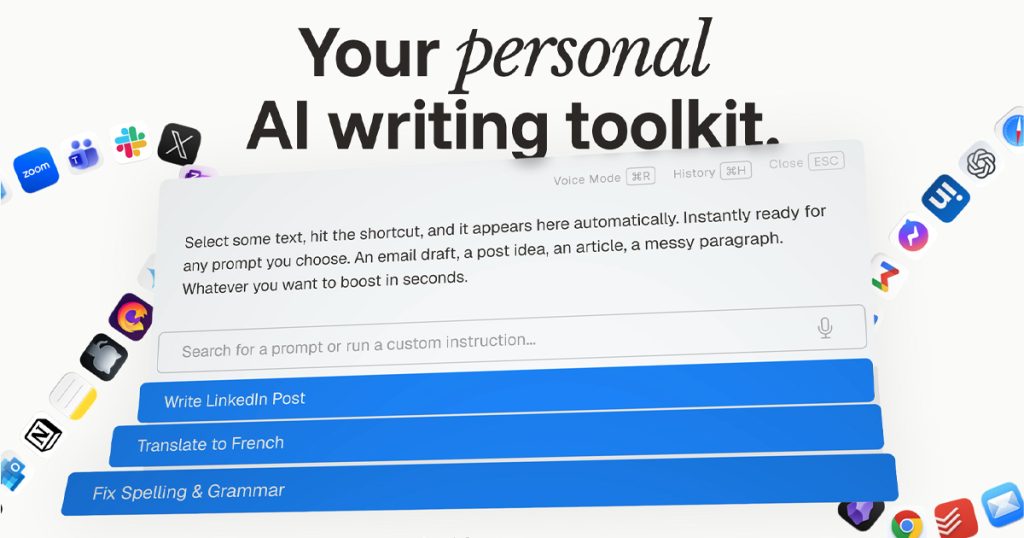
TypeBoost is a macOS app that lets you apply AI prompts to any selected text with a keyboard shortcut. No tab switching, no copy-pasting into ChatGPT, no context loss. You highlight text in any app, hit Ctrl+Space, pick a prompt, and the AI rewrites your text in place. It also has a voice mode that transcribes speech into polished text.
Built by Palmio, TypeBoost launched on Product Hunt in February 2026 and picked up 366 upvotes. It has over 10,000 users. The core pitch is writing speed: stop switching between your work app and your AI tool. Instead, bring the AI directly into whatever app you are already using. It works in Gmail, Slack, Notion, VS Code, basically anything on macOS where you can select text.
What Are TypeBoost’s Key Features?
System-Level Text Rewriting
TypeBoost operates at the OS level on macOS. Select text in any application, press the shortcut, and it sends your selection to an AI model with your chosen prompt. The rewritten text replaces your selection. You see exactly what changed and can accept or reject edits on a granular level. This is the killer feature. No other writing tool works this seamlessly across every app on your Mac.
Custom Prompt Library
You build your own library of prompts. “Make this more concise.” “Translate to Spanish.” “Fix grammar but keep my tone.” “Rewrite for a technical audience.” These are saved and reusable. TypeBoost also ships with pre-built templates to get started. Over time, you accumulate a toolkit tailored to exactly how you write.
Voice Mode
Voice Mode lets you dictate text that gets automatically cleaned up and formatted. TypeBoost claims a 4x productivity boost with voice input, which tracks if you are someone who thinks faster than you type. The free plan includes 10 minutes of voice mode. Pro gets 180 minutes per month, which is about 6 minutes per day.
Multiple AI Models
The free plan uses GPT-4o. Pro subscribers can switch between OpenAI, Anthropic (Claude), and Google models. This matters because different models handle different tasks better. Claude tends to be better at long-form writing. GPT-4o is faster for quick edits. Having the choice is a real advantage for power users who know the strengths of each model.
How Much Does TypeBoost Cost?
TypeBoost starts at $0/month with 50,000 one-time credits. The Pro plan costs $8/month (billed annually at $96/year) and gives you 1,000,000 credits per month plus 180 minutes of voice mode. For comparison, Grammarly Premium costs $12/month and only does grammar and tone. TextExpander starts at $3.33/month but lacks AI rewriting. At $8/month, TypeBoost sits in a sweet spot for what you get.
| Plan | Price | Plan Features | Best For |
|---|---|---|---|
| Free | Free | 50,000 one-time credits, 10 min voice mode, GPT-4o only | Trying out the workflow |
| Pro | 8/mo (96/yr) | 1,000,000 credits/mo, 180 min voice/mo, multiple AI models | Daily writers who need speed and model choice |
| Enterprise | Custom | Shared prompts, team collaboration, priority support | Teams with shared writing standards |
Who is TypeBoost Best For?
Use TypeBoost if you write a lot throughout your day across multiple apps and you are already on macOS. Founders drafting emails, marketers writing social posts, freelancers polishing client deliverables. Anyone who currently copies text into ChatGPT, waits for a response, and pastes it back will save real time with TypeBoost.
Skip TypeBoost if you are on Windows or Linux. It is macOS only. Also skip it if you need deep document editing with track changes and collaboration features. TypeBoost is a quick-touch tool, not a Google Docs replacement. And if you rarely write or are happy with Grammarly, the extra capabilities will not justify switching.
Best TypeBoost Alternatives
Grammarly: The obvious comparison. Grammarly focuses on grammar, clarity, and tone detection. It works across platforms (not just Mac) and has a browser extension. Starts free, Premium at $12/month. But Grammarly does not let you run custom AI prompts or switch between models. It is more rigid.
Raycast AI: If you already use Raycast on macOS, its AI features overlap with TypeBoost. You can run AI commands on selected text. Raycast Pro starts at $8/month. The difference is that TypeBoost is purpose-built for writing, while Raycast AI is one feature among many in a productivity launcher.
Wispr Flow: A voice-first dictation tool that also launched on Product Hunt recently. If voice input is your main use case, Wispr Flow goes deeper on that feature. But it does not offer the text selection and custom prompt workflow that makes TypeBoost unique.
Final Verdict: Is TypeBoost Worth It?
TypeBoost solves a specific annoyance well. The “select text, hit shortcut, apply AI prompt” workflow is faster than anything else we have tested for quick text improvements. Custom prompts mean it gets more useful over time as you build your personal toolkit. The $8/month Pro plan is fairly priced for what you get, and the free tier is generous enough to evaluate properly.
The limitations are real though. macOS only cuts out a huge chunk of potential users. The free plan’s credits are one-time, not monthly, so they will eventually run out. And voice mode at 180 minutes per month is tight for heavy users. But if you are a Mac user who writes across multiple apps daily, TypeBoost is one of those tools that feels obvious once you start using it. The friction it removes is small per instance but adds up fast over a full workday.
TypeBoost Pros & Cons
What We Like
- Works in any macOS app, no tab switching or copy-pasting
- Custom prompt library becomes a personalized writing toolkit
- Pro plan at 8 dollars per month is well-priced for the feature set
- Multiple AI model support (OpenAI, Anthropic, Google) on Pro
What Could Be Better
- macOS only, no Windows or Linux support
- Free plan credits are one-time, not monthly
- Voice mode limited to 180 minutes per month on Pro
TypeBoost FAQ
What is TypeBoost?
TypeBoost is a macOS AI writing toolkit that lets you apply custom AI prompts to selected text in any app using a keyboard shortcut. It also includes voice dictation mode.
How much does TypeBoost cost?
TypeBoost is free to start with 50,000 one-time credits. The Pro plan costs 8 dollars per month (96 dollars per year) with 1 million credits monthly and multiple AI model access.
Is TypeBoost worth it?
If you write across multiple apps on macOS daily, yes. The time saved by not copy-pasting into ChatGPT adds up fast. The free plan lets you evaluate before committing.
What are the best TypeBoost alternatives?
Grammarly (from 12 dollars per month, focuses on grammar), Raycast AI (8 dollars per month, broader productivity launcher), and Wispr Flow (voice-first dictation tool).
Does TypeBoost offer a free plan?
Yes. The free plan includes 50,000 one-time credits, 10 minutes of voice mode, and access to GPT-4o. No credit card required.
Who is TypeBoost best for?
Mac users who write frequently across multiple applications: founders drafting emails, marketers creating social posts, freelancers polishing client deliverables.






