Ecamm Live Review (2026): Pricing, Features & Honest Verdict
TLDR
Ecamm Live is a Mac-exclusive live streaming studio with multi-camera support and professional production tools. Best for: Mac-based streamers and content creators. Price: from $16/mo. Rating: 7.7/10
What is Ecamm Live?
Ecamm Live is a desktop application for Mac that turns your computer into a live streaming production studio. While OBS Studio dominates the streaming software market with its free, open-source approach, Ecamm takes a different path: a polished, Mac-native experience that prioritizes usability over infinite configurability.
The result is a tool that lets you produce professional-looking live streams with multi-camera switching, green screen effects, custom overlays, lower thirds, and remote guest interviews. All without the steep learning curve that comes with OBS or similar broadcast tools. If you have ever spent an evening wrestling with OBS settings, you will appreciate Ecamm’s approach.
Key Features
Multi-Camera Support
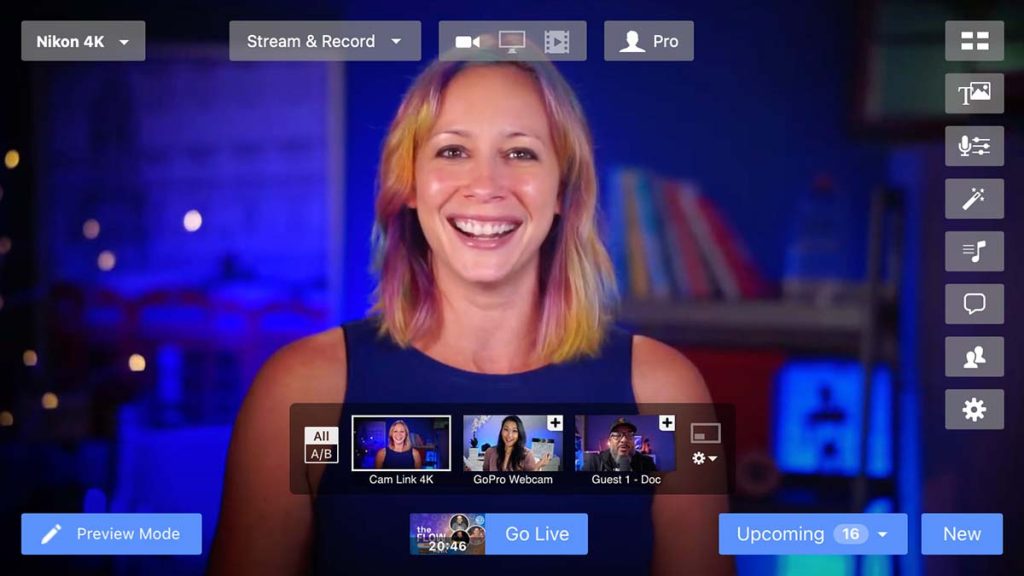
Switch seamlessly between multiple camera sources during your stream. Ecamm supports webcams, DSLR and mirrorless cameras connected via HDMI capture cards, and iOS devices used as wireless cameras. Transitions between cameras are smooth, and you can set up preset layouts combining different sources. For podcasters recording video, this means you can switch between a wide shot and close-ups without any post-production.
Interview Mode
Up to 10 remote guests can join your stream through a simple browser link. No downloads or accounts required for guests. Ecamm handles the layout, letting you switch between split-screen, picture-in-picture, and speaker-focused views. The audio quality is good, and you can record each guest’s feed separately for post-production. This feature alone makes Ecamm valuable for interview-based shows.
Multi-Platform Streaming
Broadcast simultaneously to Facebook Live, YouTube Live, LinkedIn Live, Twitch, Amazon Live, and more. Ecamm handles the encoding and distribution. You can monitor chat from multiple platforms within the app, though the chat integration is basic compared to dedicated tools.
Production Tools
Green screen support with real-time keying, custom overlays and lower thirds, image and video backgrounds, digital pan and zoom, color correction with LUTs, and a sound board for effects and music. These tools are accessible through a drag-and-drop interface that does not require technical knowledge to use effectively.
Recording
Everything you stream can also be recorded locally in up to 4K resolution. The recording captures your full produced output, making it easy to repurpose live content for podcasts, YouTube videos, or social clips. You can also record without streaming, using Ecamm purely as a production tool.
Pricing Breakdown
Standard at $16/month provides core streaming features suitable for simple broadcasts. Pro at $25/month adds multi-camera, interview mode, 4K, and the advanced production features that make Ecamm worth using. Business at $32/month includes everything in Pro with a commercial use license. A 14-day free trial is available.
The Pro plan is the sweet spot. Most of what makes Ecamm special (multi-camera, interviews, 4K) requires it. At $25/month, it is more expensive than OBS (free) but dramatically easier to use. The time savings alone justify the cost for regular streamers.
Where Ecamm Falls Short
The Mac-only limitation is the biggest barrier. If anyone on your team uses Windows, Ecamm is not an option. The hardware requirements also mean older Macs are excluded. And while Ecamm is great for live production and recording, it is not a video editor. You will still need a separate tool for serious post-production work.
Alternatives
OBS Studio
OBS is free and cross-platform with nearly unlimited customization. It is more powerful than Ecamm in terms of raw capability, but significantly harder to learn and configure. For technically inclined users who want maximum control, OBS is unbeatable. For everyone else, Ecamm is worth the subscription.
StreamYard
StreamYard is browser-based, works on any platform, and requires zero installation. It is simpler than Ecamm with fewer production features, but the convenience of browser-based streaming with easy guest invites is compelling. Better for simple multi-guest shows, worse for polished production.
Restream Studio
Restream focuses on multi-platform distribution with a browser-based studio. It is less production-focused than Ecamm but excels at simultaneous streaming to many destinations. If multi-platform reach matters more than production quality, Restream is worth considering.
| Plan | Price | Plan Features | Best For |
|---|---|---|---|
| Standard | $16/mo | Core streaming features, single camera, basic overlays | Getting started with live streaming |
| Pro | $25/mo | Multi-camera, interview mode (10 guests), 4K, advanced features | Professional streamers and content creators |
| Business | $32/mo | All Pro features plus team/commercial use license | Businesses and agencies streaming regularly |
Who Should Use Ecamm Live?
Mac users who stream regularly and want professional production quality without the OBS learning curve. Podcasters recording video interviews, course creators doing live teaching, and brands streaming events will all find Ecamm hits the right balance of power and usability. Windows users need to look elsewhere.
FAQ
Does Ecamm Live work on Windows?
No. Ecamm Live is exclusively for Mac. Windows users should look at OBS Studio (free), Streamlabs, or StreamYard as alternatives.
Can I stream to multiple platforms simultaneously?
Yes. Ecamm Live supports multi-destination streaming to Facebook Live, YouTube Live, LinkedIn Live, Twitch, Amazon Live, and more. You can broadcast to several platforms at once.
How many guests can join an Ecamm Live stream?
Interview mode supports up to 10 remote guests who join via a browser link. No additional software is needed for guests. Each guest’s feed can be positioned and styled within your stream layout.
Ecamm Live Pros & Cons
What We Like
- Most intuitive live streaming interface for Mac, far easier than OBS
- Multi-camera switching with smooth transitions between sources
- Interview mode supports up to 10 remote guests without extra software
- 4K streaming and recording on Pro plan and above
- Green screen, custom overlays, and lower thirds built in
What Could Be Better
- Mac-only with no Windows or Linux version available
- Requires macOS 11.2 or later and a Mac from 2015 or newer
- No free plan, only a 14-day trial
- Cannot replace a full video editor for post-production work
Ecamm Live FAQ
Does Ecamm Live work on Windows?
No. Ecamm Live is exclusively for Mac. Windows users should look at OBS Studio (free), Streamlabs, or StreamYard as alternatives.
Can I stream to multiple platforms simultaneously?
Yes. Ecamm Live supports multi-destination streaming to Facebook Live, YouTube Live, LinkedIn Live, Twitch, Amazon Live, and more. You can broadcast to several platforms at once.
How many guests can join an Ecamm Live stream?
Interview mode supports up to 10 remote guests who join via a browser link. No additional software is needed for guests. Each guest's feed can be positioned and styled within your stream layout.
What is Ecamm Live?
Professional live streaming and video production studio for Mac. Multi-camera support, guest interviews, green screen, and simultaneous streaming to multiple platforms.
How much does Ecamm Live cost?
Ecamm Live pricing starts at $16/mo.
Is Ecamm Live worth it?
Ecamm Live is the best live streaming tool for Mac users who want broadcast-quality production without the complexity of OBS. Multi-camera switching, interview mode, and green screen support are all handled through an intuitive interface. The Mac-only limitation is real, but if you are in the Apple ecosystem, nothing else combines this level of production quality with this much ease of use. We rate it 7.7/10.






