VoxCraft Review (2026): Pricing, Features & Honest Verdict
TLDR
VoxCraft is an AI dictation app that turns natural speech into polished, formatted text in real time, with inline AI commands that rephrase and restyle as you talk. It is fast, formats cleanly, and undercuts rivals on price. Best for: people who dictate daily and want clean output. Price: free Basic plan, Pro $6/mo billed annually. Rating: 8.3/10.
What is VoxCraft?
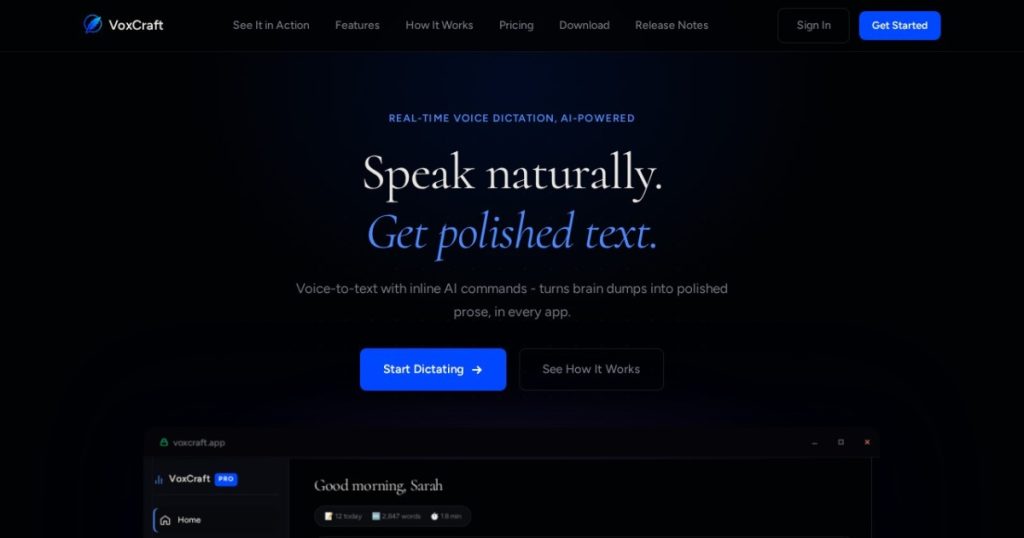
VoxCraft is a voice-to-text application that converts what you say into professionally formatted text. The pitch is simple: speak naturally and get polished text out the other side. Where basic dictation dumps a wall of run-on words with no punctuation, VoxCraft formats as you go, dropping filler words, fixing capitalization, handling code syntax, and rendering dates and numbers the way you actually meant them. It runs on desktop and in the browser, with global keyboard shortcuts and a system tray presence so you can dictate into any app.
The product is from VoxCraft (the site carries a 2026 copyright), arriving in a category that has heated up fast around tools like Wispr Flow and Superwhisper. What sets VoxCraft apart is that it does not stop at transcription. It adds inline AI commands, so mid-dictation you can say something like “make this professional” or “rephrase for email” and the text restyles itself. That turns dictation from a transcription step into something closer to writing with an editor sitting next to you. It also detects self-corrections, so when you stumble and restate a sentence, it keeps the corrected version rather than both. That last detail is the kind of thing that separates a dictation tool you actually keep using from one you abandon after a week, because nobody speaks in clean finished sentences, and a tool that transcribes every false start verbatim creates more editing than it saves.
What Are VoxCraft’s Key Features?
Real-time transcription with speculative rendering
VoxCraft transcribes as you speak using speculative rendering, which means text appears almost instantly and refines itself as the sentence completes. The practical effect is that there is no awkward lag between speaking and seeing words, which is the single biggest factor in whether dictation feels usable. We found this responsiveness comparable to the best in the category.
Inline AI commands
This is the standout. Instead of dictating raw text and then manually editing it, you issue AI commands by voice. Tell it to “make professional” or “rephrase for email” and it rewrites the relevant text on the fly. For people who dictate emails, documents, or messages all day, this collapses two steps into one and is genuinely faster than dictate-then-edit workflows.
Smart formatting
VoxCraft’s formatting engine handles the details that usually require cleanup: it removes filler words like “um” and “uh,” capitalizes correctly, punctuates, and formats technical terms, proper nouns, code syntax, dates, and numbers. For developers dictating code comments or anyone writing structured text, this matters more than raw word accuracy because it is the part you would otherwise fix by hand.
Voice-addressable notes and shortcuts
You can capture voice-addressable notes with AI integration, and global keyboard shortcuts plus system tray access let you trigger dictation in any application without switching windows. Combined with self-correction detection, the workflow stays in flow rather than constantly breaking to fix mistakes.
Works across desktop and browser
VoxCraft runs on desktop and in the browser, which is a meaningful edge over Mac-only rivals like Superwhisper. Because it sits in the system tray with global shortcuts, you can dictate into your email client, a code editor, a document, or a web form without copying text between apps. For people who switch contexts constantly through the day, having one dictation layer that follows you everywhere matters more than any single accuracy benchmark, and it is the kind of thing you only appreciate after a week of use.
How Much Does VoxCraft Cost?
VoxCraft starts free. The Basic plan costs nothing and includes 1,000 words and 5,000 AI tokens per week, which is enough to test the experience properly but not enough for daily professional use. Pro Beta is $6 per month, billed annually, and lifts the limits to 100,000 words and 500,000 AI tokens per week. The Pro price is described as beta and locked for early adopters.
That $6/month figure is aggressive. Wispr Flow, the polished cross-platform leader, charges $15/month, or $12/month if you pay annually. Superwhisper Pro is about $8.49/month or $84.99/year, with a one-time license at $249.99. So VoxCraft Pro at $6/month annually is the cheapest serious option of the three, and it includes both desktop and browser, where Superwhisper is Mac-only.
The honest caveat is in the word “beta.” Early-adopter pricing locked at $6 is great if it sticks, but there is no guarantee it survives once the product matures. Anyone signing up should treat the current price as the deal, not a permanent promise. Even so, on day-one value, VoxCraft is the cheapest of the credible AI dictation tools.
It is also worth understanding the limits, not just the price. The free Basic plan’s 1,000 words and 5,000 AI tokens per week are sized for evaluation, not real work; you will hit the ceiling within a day or two of serious dictation. Pro’s 100,000 words and 500,000 AI tokens per week are generous enough that most individuals will never come close, so for the vast majority the practical choice is simple: test on free, then move to the $6 Pro plan once you are sold.
| Plan | Price | Plan Features | Best For |
|---|---|---|---|
| Basic | $0 | 1,000 words/week, 5,000 AI tokens/week | Casual dictation |
| Pro Beta | $6/mo (billed annually) | 100,000 words/week, 500,000 AI tokens/week | Daily heavy users |
Who is VoxCraft Best For?
Use VoxCraft if you dictate frequently and want clean, formatted text without a manual cleanup pass. Writers, marketers, founders firing off emails, and developers dictating comments or documentation all benefit from the inline AI commands and smart formatting. If you work across both desktop and a browser, the cross-platform support is a plus over Mac-only rivals. And at $6/month, the cost barely registers if you use it daily.
The inline AI commands deserve special mention for non-native English speakers and anyone who writes a lot of customer-facing text. Being able to dictate a rough thought and then say “make professional” to clean up the phrasing turns dictation into a drafting tool, not just a transcription one. That is a real productivity gain for support reps, salespeople, and founders who write the same kinds of messages dozens of times a day.
Skip VoxCraft, or at least wait, if you only dictate occasionally, because the free tier’s 1,000 words per week may be all you need and the Pro upgrade would be wasted. Be cautious if you require a long-established tool with a proven track record, since VoxCraft is newer than Wispr Flow and Superwhisper. And if you specifically want fully local, on-device transcription for privacy, a tool like MacWhisper fits that better.
Best VoxCraft Alternatives
Wispr Flow
Wispr Flow is the polished cross-platform category leader, running on Mac, Windows, iOS, and Android with one subscription that syncs across devices. It costs $15/month, or $12/month billed annually. It is more established and more broadly supported than VoxCraft, but it is more than twice the price, and VoxCraft’s inline AI commands hold their own against it.
Superwhisper
Superwhisper is a Mac-only dictation tool with a non-expiring free tier, Pro at about $8.49/month or $84.99/year, and a one-time license at $249.99 if you want to own it. Its big advantages are local processing options and that lifetime purchase. The trade-off is no Windows client and no mobile app, where VoxCraft covers desktop and browser.
MacWhisper
MacWhisper is a one-time-purchase Mac app focused on local, on-device transcription using Whisper models. It is the privacy pick because audio never leaves your machine, and you pay once instead of subscribing. It is less about real-time dictation-into-any-app and more about transcribing files and recordings, so it serves a slightly different need than VoxCraft’s live formatting.
Final Verdict: Is VoxCraft Worth It?
VoxCraft is one of the stronger AI dictation tools we have looked at. The real-time formatting is genuinely fast, the smart handling of filler words, code, and numbers removes the cleanup that makes most dictation annoying, and the inline AI commands push it past simple transcription into something closer to voice-driven writing. At $6/month it undercuts both Wispr Flow and Superwhisper while covering desktop and browser. That combination earns the 8.3 rating.
The two things keeping a clear eye on are the beta pricing, which could climb once the product matures, and its relative youth against more established rivals. Neither is a dealbreaker. If you dictate regularly, the free plan is risk-free to test, and if it clicks, $6/month is the best value in the category right now. Recommended.
VoxCraft Pros & Cons
What We Like
- Real-time transcription with speculative rendering feels instant
- Inline AI commands rephrase and reformat text as you speak, not just transcribe it
- Smart formatting handles filler words, capitalization, code syntax, dates, and numbers
- Pro is just $6/month annually, cheaper than Wispr Flow and Superwhisper
What Could Be Better
- Pro pricing is labeled beta and locked for early adopters, so it may rise later
- Free tier caps at 1,000 words/week, enough to test but not for daily work
- Newer product with a smaller track record than Wispr Flow or Superwhisper
VoxCraft FAQ
What is VoxCraft?
VoxCraft is a voice-to-text dictation app that converts natural speech into polished, formatted text in real time. It adds inline AI commands so you can rephrase or restyle text by voice, and it handles filler words, punctuation, code, dates, and numbers automatically across desktop and browser.
How much does VoxCraft cost?
VoxCraft has a free Basic plan with 1,000 words and 5,000 AI tokens per week. Pro Beta is $6 per month billed annually and raises limits to 100,000 words and 500,000 AI tokens per week. The Pro price is locked for early adopters.
Is VoxCraft worth it?
Yes, for anyone who dictates regularly. The real-time formatting and inline AI commands save the cleanup step that plain transcription leaves behind, and at $6/month Pro is cheaper than Wispr Flow or Superwhisper. Just know the beta price may not last.
What are the best VoxCraft alternatives?
Wispr Flow is the polished cross-platform leader at $15/month, Superwhisper is a Mac-only option with a free tier and a $249.99 lifetime license, and MacWhisper is a one-time-purchase local transcription app for Mac.
Does VoxCraft offer a free plan?
Yes. The Basic plan is free forever and includes 1,000 words and 5,000 AI tokens per week. It is enough to evaluate the experience, but daily users will hit the cap and need the $6/month Pro plan.
Who is VoxCraft best for?
VoxCraft is best for writers, developers, marketers, and professionals who dictate frequently and want clean, formatted output without manual editing. The inline AI commands make it especially useful for people writing emails, docs, or code comments by voice.






