Dock Review (2026): Pricing, Features & Honest Verdict
TLDR
Dock is a revenue enablement platform that turns sales deals and customer onboarding into shared, trackable workspaces. Buyers love it, and the engagement tracking is genuinely useful, but the jump from the free tier to $350 a month is brutal for small teams. Best for: mid-market B2B sales and customer success teams. Price: Free plan yes, paid from $350/mo. Rating: 7.2/10
What is Dock?
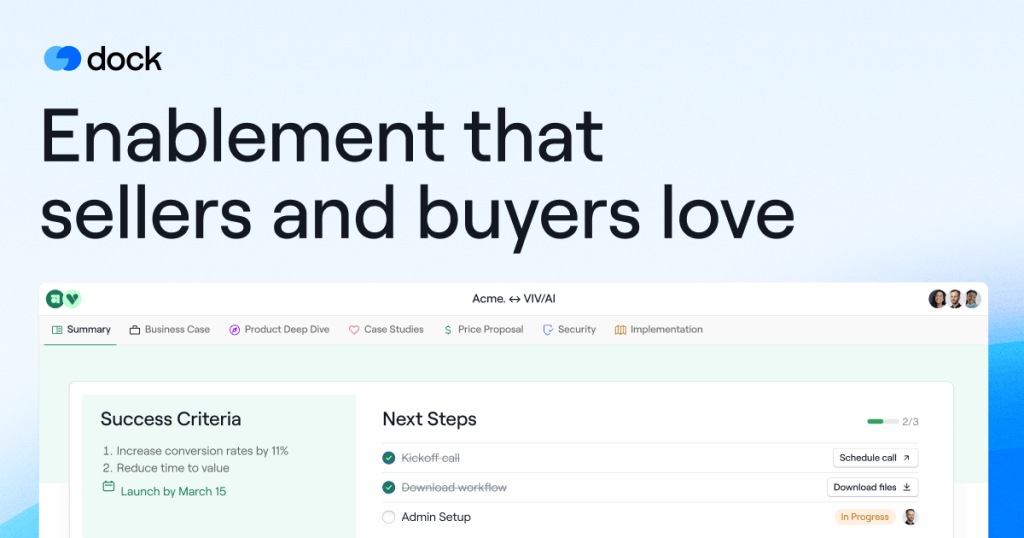
Dock is a workspace tool for revenue teams. Instead of emailing a prospect twelve attachments over a three month sales cycle, a rep spins up one branded page that holds the business case, pricing, security documentation, a mutual action plan and the next steps. The buyer gets a single link and never has to create an account. The seller gets to see exactly who opened what. When the deal closes, that same workspace becomes the onboarding hub, so the context built during the sale does not evaporate at handoff. Dock markets itself as an AI revenue enablement platform, which is a wide label, but in practice it does three things: digital sales rooms, customer onboarding portals, and an internal content and training library.
The company behind it is Dock Labs, Inc. Alex Kracov, Victor Kmita and Luc Chaissac left Lattice in 2021 to build it, with Kracov having run marketing at Lattice through its growth years. Dock raised a $3 million seed round in May 2022 led by Altman Capital, with Flexport and Operator Collective joining. That background shows in the product. Dock is unusually opinionated about the buyer side of a transaction, where most sales enablement software optimises for the seller’s internal workflow instead. The 2026 version leans hard on AI agents that read your own content and CRM records to draft proposals and follow-ups.
What Are Dock’s Key Features?
Deal rooms and onboarding hubs
The core unit in Dock is a workspace. You pick a template, drop in a deck, pricing, an action plan and embedded Loom videos, then share the link. External collaborators are free forever: prospects, clients and partners never consume a seat. That single pricing decision is what makes the product work, because it removes the friction of asking a buyer to sign up for yet another tool. Rooms take minutes to build and do not need design or RevOps help, which is the reason speed to value keeps showing up in user feedback. After close, the same room flips into an onboarding hub so the customer is not sent to a new URL with none of the history.
Engagement analytics
Every workspace tracks who opened it, which sections they read and how long they stayed. Reps get real-time alerts when a prospect returns to the pricing section. We found this is the feature teams actually cite when they justify the spend, because it replaces guesswork about follow-up timing with a signal. It also surfaces silent stakeholders, the person who never joined a call but read the security documentation twice. Activity rolls up into a manager view, so you can see which collateral genuinely moves deals and which just sits there. Over a quarter that turns into a decent audit of your content library, and it is the closest thing Dock has to a forecasting input.
Content library, playbooks and courses
Dock ships a CMS with AI tagging, plus sales playbooks and internal training courses. The limits are the thing to watch. The free plan caps you at 25 CMS assets, one playbook and one course. Standard raises that to 100 assets and 5 playbooks but still only one course. Unlimited content, playbooks and courses arrive on Premium, which is also the first tier with Google Drive and SharePoint sync. If your collateral already lives in Drive and you want it mirrored automatically, that is a $1,000 a month decision, not a $350 one.
Dock AI and CRM automation
Dock AI lets you build custom agents on top of connected content and business data, and it drafts documents such as proposals and post-meeting follow-ups. Native Salesforce and HubSpot integrations push room activity back into the CRM and can generate workspaces straight from an opportunity record. AI usage is tiered as limited on Free, standard on Standard and high on Premium, which is vaguer than we would like from a 2026 pricing page. One honest gap: Dock does not find contacts, verify emails or enrich accounts, so you still need a separate data layer feeding the top of the funnel.
How Much Does Dock Cost?
Dock starts at $0 and the first paid tier is $350 a month. The free plan is not a stunt. You get 5 internal users, 10 workspaces, 25 CMS assets, one playbook, one course, one order form and limited AI, forever, with no time limit. For a founding team running ten live deals at once, that is a working product rather than a trial.
Standard is $350 a month and includes 10 internal seats, with additional seats at $50 a month each. It unlocks unlimited workspaces, 100 CMS assets, unlimited slides and order forms, 5 playbooks and the Salesforce and HubSpot integrations. Premium is $1,000 a month billed annually, includes 25 or more seats, and removes essentially every cap while adding Google Drive and SharePoint sync, CRM-integrated order forms, custom fields, webhooks and the option to strip Dock branding. Enterprise is a custom annual contract that layers on custom domains and sending addresses, API access, SCIM provisioning, a dedicated CSM and managed implementation.
The comparison that matters is against per-seat rivals. Aligned starts at $29 per user per month with a $49 Pro tier. Trumpet Pro is $45 per user per month. GetAccept Professional is $49 per user per month with a five user minimum, so a five person team pays $245 before anything else. Run the maths on Dock: ten reps on Standard is $35 per seat, which beats all three. Three reps on Standard is $117 per seat, which is terrible. Dock’s pricing rewards teams that fill every seat they pay for and punishes everyone else. This is also the source of most complaints that Dock is expensive.
| Plan | Price | Plan Features | Best For |
|---|---|---|---|
| Free | $0/mo | 5 internal users, 10 workspaces, 25 CMS assets, 1 playbook, limited AI | Founders and solo reps testing deal rooms |
| Standard | $350/mo | 10 seats included, unlimited workspaces, 100 CMS assets, 5 playbooks, Salesforce and HubSpot | Mid-market sales teams of 10 or more |
| Premium | $1,000/mo | 25+ seats, unlimited everything, Drive and SharePoint sync, webhooks, white label | Enablement teams with large content libraries |
| Enterprise | Custom pricing | Custom domain and emails, API access, SCIM, dedicated CSM | Large revenue orgs with security requirements |
Who is Dock Best For?
Use Dock if you run a mid-market B2B sales motion where deals involve four or more stakeholders, where security reviews and procurement drag the cycle past a month, and where there is a genuine handoff from sales to customer success. Those are the conditions where a persistent shared workspace beats a thread of attachments, and where engagement analytics change what a rep does on Tuesday morning.
Use Dock if you already run Salesforce or HubSpot and want room activity written back automatically. Use it if you want to give clients a permanent portal after onboarding, since Dock covers the post-sale side better than most digital sales room tools that stop at signature.
Skip Dock if your team is under five people and you would be paying $350 a month for three seats. Skip it if your deals close in one call, because a deal room adds ceremony to a transaction that does not need it. Skip it if your quoting is complex, since the proposal and pricing section is one of the more commonly criticised parts of the product and will not replace a real CPQ. Skip it too if only half your reps will adopt it, because you pay for the seats either way and that is where the cost per active user quietly doubles. And skip it if you expected contact data or email verification, because Dock does none of that.
Best Dock Alternatives
Aligned
Aligned is the closest like-for-like competitor and the obvious pick for small teams priced out of Dock. Plans start at $29 per user per month, with Pro at $49 per user per month for AI features and the main integrations. Three reps on Aligned Pro cost $147 a month against Dock’s $350 floor. Aligned is strong on the buyer-facing collaborative workspace and mutual action plans. It is weaker than Dock on the post-sale side, since Dock’s onboarding hubs, courses and content library go further than a deal room product usually does.
Trumpet
Trumpet builds highly designed, branded buyer microsites, and it is the better choice if the visual polish of the room is part of your pitch. Trumpet Pro runs $45 per user per month, or $450 per user per year. It is a stronger fit for SaaS teams selling a design-led product where the room itself is a credibility signal. Dock wins on breadth: content management, enablement courses and order forms all live in one place, whereas Trumpet stays focused on the room.
GetAccept
GetAccept is the option when you want the deal room and the contract in the same tool. Professional is $49 per user per month billed annually with a five user minimum, and it bundles e-signature and document workflow that Dock leaves to a separate vendor. If your bottleneck is getting signatures rather than getting attention, GetAccept removes a tool from your stack. Dock’s engagement analytics and onboarding handoff are better, and its free tier has no equivalent here.
Final Verdict: Is Dock Worth It?
Dock is a good product with a pricing model that will decide the answer for you. The rooms are fast to build, buyers do not complain about them, the engagement tracking is the kind of thing reps actually check, and the free plan is more generous than any direct competitor offers. We rate it 7.2 out of 10. The score is held down by the $350 a month cliff, by content limits that push serious enablement teams towards the $1,000 tier, and by a proposal builder that struggles with anything complex.
Our recommendation is straightforward. Start on the free plan and stay there until you are actually running out of workspaces, because Dock lets you do that indefinitely. If you have ten or more people who will use it every week, Standard at $35 an effective seat is good value and worth the upgrade. If you have three or four reps, go to Aligned at $29 per user per month instead and revisit Dock when the team doubles. Paying $350 a month for a handful of seats is the single most common way to get bad value out of an otherwise solid tool. Whichever tier you land on, budget for a CRM and a data provider alongside it, because Dock deliberately does not do either.
Dock Pros & Cons
What We Like
- External collaborators are free forever, so buyers never need an account or a seat
- Engagement analytics show exactly which stakeholder read which document and when
- The free plan is genuinely usable: 5 users and 10 workspaces with no time limit
- Deal rooms convert into onboarding hubs, so sales context survives the handoff
What Could Be Better
- The jump from free to $350 a month is punishing for teams under five people
- The proposal and pricing section is limited for complex or highly customised quotes
- Google Drive and SharePoint sync and unlimited content require the $1,000/mo Premium tier
Dock FAQ
What is Dock?
Dock is a revenue enablement platform that lets sales and customer success teams build shared workspaces for deals, onboarding and ongoing client management. Buyers open a single branded link instead of digging through email attachments. Dock Labs, Inc. launched it in 2021.
How much does Dock cost?
Dock has a free plan at $0 with 5 internal users and 10 workspaces. Standard is $350 a month for 10 seats, with extra seats at $50 a month. Premium is $1,000 a month billed annually for 25 or more seats, and Enterprise is a custom annual contract.
Is Dock worth it?
It is worth it if you have ten or more people who will use it weekly, where Standard works out to about $35 per seat. For a three or four person team paying $350 a month, it is poor value and Aligned at $29 per user per month is the better buy.
What are the best Dock alternatives?
Aligned is the cheaper per-seat option from $29 per user per month. Trumpet at $45 per user per month builds more visually polished buyer microsites. GetAccept at $49 per user per month bundles e-signature and contract workflow into the deal room.
Does Dock offer a free plan?
Yes. Dock's free plan is $0 forever with 5 internal users, 10 workspaces, 25 CMS assets, one playbook, one course and one order form. All external collaborators are free on every plan, including this one.
Who is Dock best for?
Mid-market B2B teams with multi-stakeholder deals, long security and procurement cycles, and a real sales to customer success handoff. It is a poor fit for one-call closes, tiny teams and anyone needing complex quoting.






