Timing Review (2026): Pricing, Features & Honest Verdict
TLDR
Timing is a native macOS app that automatically tracks the apps, files, and websites you use, then turns that into clean, billable, categorized time with no timers. We found it the deepest Mac-native automatic tracker around, ideal for freelancers who bill clients. It is Mac-only, subscription-only, and light on team analytics. Best for: solo Mac professionals billing by the hour. Price: from $9/mo, 30-day trial, no free plan. Rating: 7.2/10.
What is Timing?
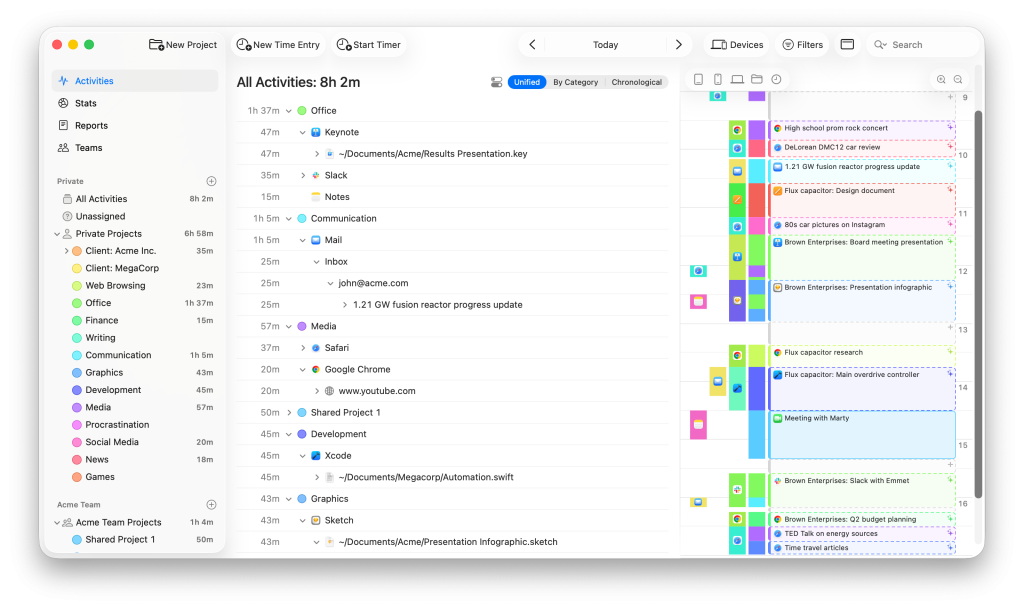
Timing is an automatic time tracker for the Mac. Instead of asking you to start and stop timers, it runs quietly in the background and records what you actually do: which apps you open, which documents you edit (down to the file path), which websites you visit, plus phone calls, meetings, and calendar events. At the end of the day you have a complete, timestamped picture of where your hours went, which you can review and turn into accurate billable time. The premise is that humans are terrible at remembering and logging their own time, so the software should capture it for you and let you sort it out afterward.
It is a long-running, well-built independent product. Timing has been developed since 2017 by Daniel Gräfe through Timing Software GmbH, based near Munich, Germany. The same developer also makes Cotypist, the on-device Mac autocomplete app MakerStack reviewed earlier today at 6.2, so this is a developer with a real track record of polished, privacy-minded native Mac software. That heritage shows: Timing is a genuine Cocoa app, not an Electron wrapper, and it leans hard on doing one thing, accurate automatic tracking on the Mac, extremely well rather than spreading across every platform.
What Are Timing’s Key Features?
Automatic, timer-free tracking
This is the foundation. Once installed, Timing tracks every app, document, and website automatically, capturing full file paths and URLs so you can see not just that you were in your editor, but which file you had open. There are no timers to remember, which means you never lose an hour because you forgot to hit start. It can also pull in phone calls, calendar events, and meetings, and import Screen Time data from your iPhone, so more of your real working day shows up. For anyone who has lost billable time to a forgotten timer, this hands-off approach is the whole appeal.
Rule-based categorization
Raw activity logs are only useful if they get organized, and this is where Timing pulls ahead. You can option-drag any block of activity onto a project to create a rule, and from then on matching activity sorts itself automatically. Worked in a specific folder for a client? Make a rule, and all future time in that folder lands in that project without another thought. Over a week or two the rules do most of the categorizing for you, so reviewing your time becomes a quick check rather than a chore. This rule engine is more powerful and more flexible than the fixed categories in many rivals.
Native Mac app and privacy
Timing is a true native macOS application, which makes it fast and responsive in a way web and Electron trackers are not, and it integrates deeply with the system. Privacy is a core design choice: your data is stored locally by default, cloud sync is optional and only happens when you turn it on, and it deliberately does not track incognito browser windows. For professionals handling sensitive client work, keeping tracking data on your own machine unless you choose otherwise is a meaningful advantage over cloud-first trackers.
Reports, API, and integrations
Timing produces detailed reports you can filter and customize, with more control on the Expert plan, and AI-generated summaries that surface work patterns. The top Connect tier adds two-way integrations with ClickUp, Linear, and the legal tool Clio, a full web API, AppleScript support, and MCP access so an AI assistant can work with your time data. There is a web app and a companion mobile app for managing timers on the go, though the deep automatic tracking is a Mac affair. These connections cover the common handoffs, though Timing is less of an integration hub than broad team platforms.
How Much Does Timing Cost?
Timing starts at $9/month on the Professional plan, billed annually at $108/year, which covers automatic tracking on one Mac with basic reports and the smart-rules engine. Expert is $11/month ($132/year), adds a second Mac, the full web app, customizable reports and filters, and basic scripting. Connect is $16/month ($192/year), covers three Macs, and unlocks the two-way integrations, full API and AppleScript, AI/MCP access, and team reporting. Every plan comes with a 30-day free trial and no credit card is required to start.
There is no permanent free plan, and Timing is subscription-only. That second point is worth flagging honestly: Timing used to offer a one-time purchase, and some long-time users are still annoyed it moved to subscriptions. If you philosophically refuse to rent software, that is a real strike against it.
On price against rivals, Timing is competitive. RescueTime starts around $7/month, Rize is $9.99/month, and Toggl Track is free for small use and $9 per user per month for teams. So Timing’s $9 entry sits right in the pack. What you are paying for over the cheaper options is the depth of the native Mac tracking and the rule-based categorization, which are stronger than most. What you give up is cross-platform support and a free tier, which is why the value is good for the right user rather than universally great.
| Plan | Price | Plan Features | Best For |
|---|---|---|---|
| Professional | $9/mo ($108/yr) | Automatic tracking on 1 Mac, limited web app, basic reports, smart rules, calendar and phone-call tracking | Individuals tracking their own time |
| Expert | $11/mo ($132/yr) | Everything in Professional, 2 Macs, full web app, customizable reports and filters, basic scripting | Power users who bill clients |
| Connect | $16/mo ($192/yr) | Everything in Expert, 3 Macs, two-way integrations (ClickUp, Linear, Clio), full API and AppleScript, AI/MCP access, team reporting | Teams and AI-driven workflows |
Who is Timing Best For?
Use Timing if you work on a Mac and bill clients by the hour. Freelancers, consultants, designers, developers, and lawyers who need defensible, accurate records of where their time went are the core audience, and the automatic capture plus rule-based sorting is close to ideal for them. Use it if you value a fast native app and want your tracking data to stay on your own machine by default. Use it if you have lost billable hours to forgotten timers and want that problem to simply go away.
Skip Timing if you are not on a Mac, because there is no Windows or Linux version and the mobile app is a companion, not a full tracker. Skip it if you want a free tool, since it is subscription-only after the trial. And skip it if your main need is managing and overseeing a team, because Timing is built individual-first and its team analytics are thinner than dedicated workforce trackers. Managers wanting deep team dashboards will find it light.
Best Timing Alternatives
RescueTime
RescueTime is the cross-platform automatic tracker and the one we rated 7.2 today, the same score as Timing. It tracks automatically like Timing, starts around $7/month, runs on Windows and mobile as well as Mac, and adds FocusTime, which can actively block distracting sites rather than just logging them. Where Timing wins is depth on the Mac and its rule-based categorization, which is better suited to billing clients by project; RescueTime is more about personal productivity insight than billable hours. The blunt version: pick RescueTime if you need cross-platform coverage and focus blocking, and pick Timing if you are Mac-only and your priority is accurate, categorized billable time.
Rize
Rize is the AI focus-coaching tracker we reviewed at 6.9. It also tracks automatically and runs on both Mac and Windows, at $9.99/month, but its emphasis is on coaching your focus in real time, with focus scores, smart break reminders, and built-in focus music, rather than on billing. It is prettier and more motivating day to day, but its categorization is less geared toward client projects than Timing’s rule engine, and like Timing it has no free plan. Choose Rize if behavior change and focus habits are your goal; choose Timing if accurate, billable project tracking is what you actually need.
Toggl Track
Toggl Track is the manual-timer standard and the most team-friendly of the three. It is free for up to five users and starts at $9 per user per month, runs everywhere including mobile and web, and has strong billing, project, and team-reporting features Timing lacks. The trade-off is that it is timer-based by default, so you have to start and stop tracking, which reintroduces the exact friction Timing removes. Pick Toggl if you work on a team, need solid billing and reporting across platforms, and do not mind running timers; pick Timing if you want effortless automatic capture on the Mac.
Final Verdict: Is Timing Worth It?
Timing is one of the best automatic time trackers on the Mac, full stop. The hands-off capture means you never lose billable time to a forgotten timer, the rule-based categorization turns a messy activity log into clean project hours with very little effort, and the native app is fast and respectful of your privacy. For a Mac-based freelancer or consultant who bills by the hour, it solves the time-tracking problem about as elegantly as anything out there, and it comes from a developer with a strong track record in polished Mac software.
It lands at 7.2 rather than higher for reasons of reach, not quality. It is Mac-only, so a huge swathe of users cannot run it at all. It is subscription-only with no free plan, which stings given it once sold a one-time license. And its team analytics are thin, so it is firmly an individual’s tool. None of that undercuts how good it is at its core job. Our recommendation: if you live on a Mac and bill clients, start the 30-day trial, because Timing is likely the most accurate and least annoying tracker you will try. If you need cross-platform support, a free tier, or team management, RescueTime or Toggl will fit better.
Timing Pros & Cons
What We Like
- Fully automatic, hands-off tracking: it records every app, file, and website with no timers to start or stop, so nothing slips through
- A true native Mac app, fast and responsive, not a slow Electron or web wrapper, with deep macOS integration
- Rule-based categorization is the standout: option-drag any block to teach a rule, and future activity sorts itself into the right project automatically
- Privacy-first by design, with data stored locally and cloud sync optional, and incognito browsing left untracked
What Could Be Better
- macOS only, with no Windows or Linux version and only a companion mobile timer rather than full phone tracking
- Subscription only now, which frustrates long-time users who remember the one-time license, and there is no permanent free plan
- Team and management analytics are thin compared to dedicated workforce trackers, so it is built for individuals first, teams second
Timing FAQ
What is Timing?
Timing is an automatic time-tracking app for macOS. It runs in the background and records which apps, documents, and websites you use, then uses rules you set to categorize that activity into projects, so you get accurate billable hours without starting or stopping timers.
How much does Timing cost?
Timing has no free plan but offers a 30-day free trial. Professional is $9/month ($108/year), Expert is $11/month ($132/year), and Connect is $16/month ($192/year), all billed annually, covering one, two, and three Macs respectively.
Is Timing worth it?
For Mac-based freelancers and consultants who bill by the hour, yes. Its automatic tracking and rule-based categorization are among the most accurate and hands-off available. It is less worth it if you are not on a Mac, want a free tool, or need deep team management features.
What are the best Timing alternatives?
RescueTime (from $7/mo) is the cross-platform automatic tracker with focus blocking; Rize ($9.99/mo) is the AI focus-coaching tracker for Mac and Windows; Toggl Track (free, paid from $9/user/mo) is the manual-timer standard with strong team and billing features.
Does Timing offer a free plan?
No. Timing offers a 30-day free trial with no credit card required, but no permanent free tier. After the trial you must subscribe to keep tracking, unlike RescueTime or Toggl, which both have free options.
Who is Timing best for?
It best fits freelancers, consultants, lawyers, designers, and other solo professionals who work on a Mac and bill clients by the hour. It suits people who want effortless, accurate tracking over team oversight or cross-platform coverage.






