Hoppscotch Review (2026): Pricing, Features & Honest Verdict
TLDR
Hoppscotch is a free, open-source API development ecosystem that runs in the browser with 66K+ GitHub stars. Best for: developers who want a fast, no-install API client for REST, GraphQL, and WebSocket testing. Price: Free (open source). Rating: 8.1/10
What is Hoppscotch?
Hoppscotch (formerly Postwoman) is an open-source API development platform that runs entirely in your browser. No downloads, no Electron apps eating your RAM, just open a tab and start testing APIs. It has quietly become one of the most popular developer tools on GitHub with over 66,000 stars.
The project supports an impressive range of protocols: REST, GraphQL, WebSocket, Server-Sent Events, Socket.IO, and even MQTT. For a free, browser-based tool, this coverage is remarkable. The team also offers a self-hosted version and a CLI for teams that need more control.
Key Features
Browser-Based Interface
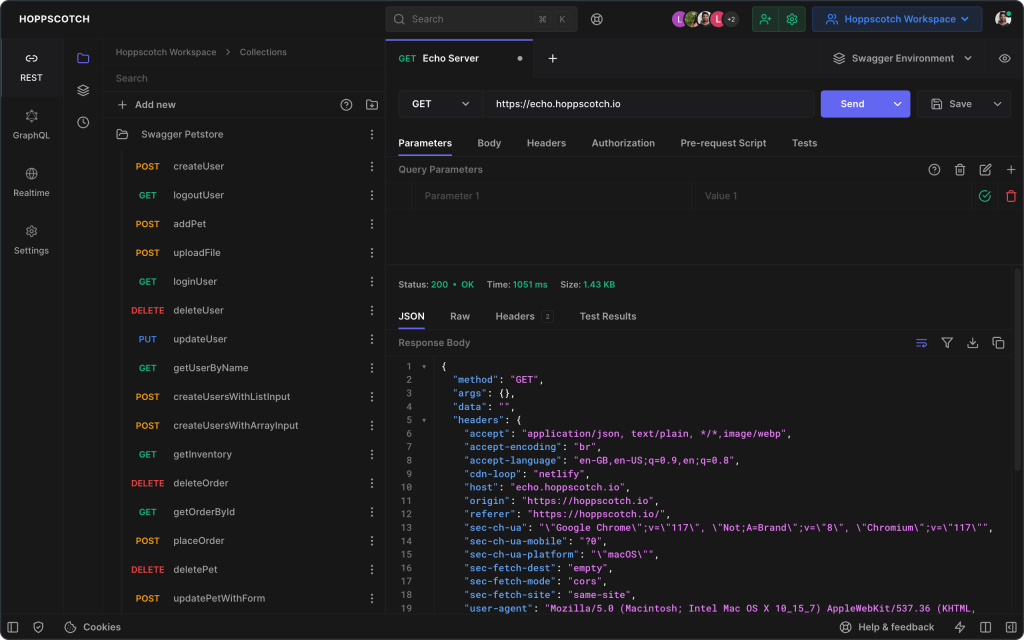
Hoppscotch runs entirely in the browser with no installation required. The interface is fast, responsive, and surprisingly full-featured for a web app. You can be testing APIs within seconds of opening the page. There is also a PWA option for offline access.
Multi-Protocol Support
Beyond standard REST requests, Hoppscotch handles GraphQL (with schema explorer), WebSocket, SSE, Socket.IO, and MQTT. This breadth of protocol support in a free tool is unusual. Most competitors charge for GraphQL or WebSocket support at this level.
Collections and Environments
Organize requests into collections and folders. Define environment variables that swap between contexts. Import and export collections in Hoppscotch format, or import from Postman, Insomnia, OpenAPI, and cURL. The migration path from other tools is smooth.
Authentication Support
Hoppscotch supports Bearer Token, Basic Auth, OAuth 2.0, API Key, and AWS Signature authentication methods. The OAuth 2.0 flow works directly in the browser, which saves the hassle of managing tokens manually.
Team Collaboration
The self-hosted and cloud versions support team workspaces with shared collections and environments. Real-time collaboration means multiple developers can work on the same collection without conflicts. For an open-source project, the team features are surprisingly polished.
CLI Tool
Hoppscotch offers a CLI (hopp-cli) for running collections from the terminal. This enables CI/CD integration, automated testing, and scripting workflows without opening the browser. It reads the same collection format, so there is no conversion step.
Pricing
Hoppscotch takes a refreshingly simple approach to pricing.
Community Edition – Free
The full platform is free and open source. Self-host it or use hoppscotch.io directly. All protocols, collections, environments, and the CLI are included at no cost.
Cloud (Free)
The hosted cloud version at hoppscotch.io is free to use with account creation. Includes cloud sync, team workspaces, and collaboration features.
Enterprise (Self-Hosted)
For organizations that need SSO, audit logs, and dedicated support, Hoppscotch offers an enterprise self-hosted option with custom pricing. Contact them for details.
Pros and Cons
Pros
- Completely free and open source with no paywalled features
- Runs in the browser with zero installation, instant access
- Supports REST, GraphQL, WebSocket, SSE, Socket.IO, and MQTT
- Lightning-fast interface that loads in under a second
- Import from Postman, Insomnia, and OpenAPI for easy migration
Cons
- Browser-based approach limits some advanced scripting capabilities
- No built-in mock servers or scheduled monitoring
- Smaller community and plugin ecosystem compared to Postman
- Self-hosted setup requires technical knowledge to deploy
- Some enterprise features like SSO require the paid self-hosted edition
| Plan | Price | Plan Features | Best For |
|---|---|---|---|
| Community | $0 | Full platform, all protocols, collections, environments, CLI | Individual developers and open-source enthusiasts |
| Cloud | $0 | Cloud sync, team workspaces, collaboration features | Small teams wanting free cloud collaboration |
| Enterprise | Custom | SSO, audit logs, dedicated support, self-hosted | Organizations needing enterprise security and compliance |
Who Should Use Hoppscotch?
Hoppscotch is perfect for developers who want a fast, lightweight API testing tool without installing anything. It is particularly strong for frontend developers who need quick API checks, for teams that prefer open-source tools, and for anyone tired of Postman’s resource consumption.
Freelancers and solo developers benefit the most since the entire feature set is free. Small teams can use the cloud version for collaboration without any subscription. The only scenarios where Hoppscotch falls short are advanced enterprise needs like audit trails and SSO, which require the self-hosted enterprise edition.
Alternatives
Postman
Postman is the full-featured API platform with testing, mocking, monitoring, and documentation. Choose Postman over Hoppscotch if you need the complete API lifecycle managed in one tool and do not mind the heavier footprint.
Insomnia
Insomnia is a desktop API client by Kong with excellent GraphQL support and Git sync. A good middle ground between Hoppscotch’s simplicity and Postman’s feature depth.
Thunder Client
Thunder Client is a VS Code extension for API testing. Ideal for developers who want API testing embedded directly in their code editor without context-switching.
FAQ
Is Hoppscotch really free?
Yes. Hoppscotch is fully open source under the MIT license. The browser-based version at hoppscotch.io is free to use. Enterprise self-hosted with SSO has custom pricing.
Can Hoppscotch replace Postman?
For most individual developers and small teams, yes. Hoppscotch covers REST, GraphQL, WebSocket, collections, and environments. It lacks Postman’s mock servers, monitors, and advanced documentation, but many developers do not need those features.
Does Hoppscotch work offline?
Yes. Hoppscotch can be installed as a Progressive Web App (PWA) for offline access. The self-hosted version also works without an internet connection.
Verdict
Hoppscotch is a standout in the API tools space. At 8.1/10, it earns a high rating by delivering an excellent developer experience at zero cost. The browser-based approach eliminates installation friction, the multi-protocol support rivals paid tools, and the open-source model means no vendor lock-in. It misses a higher rating only because it lacks advanced features like mock servers and monitoring that some teams need. For the vast majority of API testing workflows, Hoppscotch is more than enough.
Hoppscotch Pros & Cons
What We Like
- Completely free and open source with no paywalled features
- Runs in the browser with zero installation required
- Supports REST, GraphQL, WebSocket, SSE, Socket.IO, and MQTT
- Lightning-fast interface that loads in under a second
- Easy migration with Postman, Insomnia, and OpenAPI import
What Could Be Better
- Browser-based approach limits some advanced scripting capabilities
- No built-in mock servers or scheduled monitoring
- Smaller community and plugin ecosystem compared to Postman
- Self-hosted setup requires technical knowledge
- Enterprise features like SSO require paid self-hosted edition
Hoppscotch FAQ
Is Hoppscotch really free?
Yes. Hoppscotch is fully open source. The browser version at hoppscotch.io is free. Enterprise self-hosted with SSO has custom pricing.
Can Hoppscotch replace Postman?
For most individual developers and small teams, yes. It lacks mock servers and monitors but covers REST, GraphQL, WebSocket, collections, and environments.
Does Hoppscotch work offline?
Yes. Install it as a PWA for offline access, or use the self-hosted version without internet.
What is Hoppscotch?
Free, open-source API development ecosystem running in the browser. Supports REST, GraphQL, WebSocket, SSE, Socket.IO, and MQTT with 66K+ GitHub stars and zero installation required.
How much does Hoppscotch cost?
Hoppscotch pricing starts at Free (open source). A free plan is available.
Is Hoppscotch worth it?
Hoppscotch delivers an outstanding API development experience at zero cost. Browser-based with multi-protocol support that rivals paid tools, backed by a thriving open-source community. Lacks mock servers and monitoring but covers everything else most developers need. We rate it 8.1/10.






