Zcal Review (2026): Pricing, Features & Honest Verdict
TLDR
Zcal is a 100% free scheduling tool with zero limits on bookings, calendars, or features. No paid plans exist at all. Best for: anyone who wants free scheduling without a paywall. Price: $0 forever. Rating: 7.8/10
What is Zcal?
Zcal is a scheduling tool that takes a radically different approach to pricing: everything is free, forever. No premium tier, no feature gates, no usage limits. You get unlimited bookings, unlimited event types, one-on-one scheduling, group scheduling, calendar sync, custom booking pages, and reminders without paying a cent.
The company funds itself through a separate product: a scheduling API that businesses embed into their own applications. The consumer scheduling tool serves as both a standalone product and a showcase for that API technology. This model means Zcal has no incentive to artificially limit features to push you toward a paid plan.
Key Features
Unlimited Everything
Where Calendly limits its free plan to one event type and Cal.com gates features behind paid tiers, Zcal imposes zero restrictions. Create as many event types as you want. Book as many meetings as you need. Add as many calendars as you have. There is no asterisk, no fine print, no “up to X per month” limit.
One-on-One and Group Scheduling
Zcal handles both individual and group bookings. For one-on-one meetings, you share a link and the other person picks a time. For group scheduling, multiple participants can coordinate availability without the typical “reply all” email chain. Both features work well and feel polished.
Calendar Integration
Zcal syncs with Google Calendar and Outlook to read your existing events and prevent double-bookings. It checks availability in real time so your booking page always shows accurate open slots. Setup takes about two minutes.
Custom Booking Pages
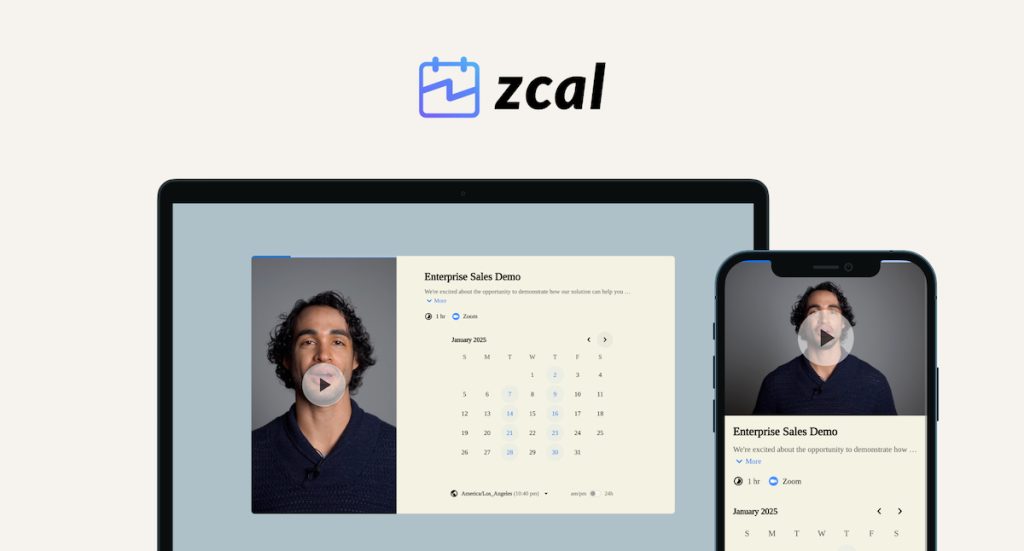
Each event type gets its own booking page with a unique URL. You can customize the page with your name, photo, description, and meeting details. The pages look clean and professional, though customization options are more limited than tools like Acuity or SavvyCal.
Automatic Reminders
Email reminders go out automatically before scheduled meetings. You can configure the timing. This is a feature that some competitors lock behind paid plans, but Zcal includes it for free.
Pricing Breakdown
There is exactly one plan: free. That is the entire pricing page. No annual vs monthly debate. No enterprise tier. No “contact sales” button. You sign up, you get everything, you pay nothing.
This is genuinely unusual in the scheduling space. Calendly charges $10/mo for more than one event type. Cal.com charges $12/mo for team features. SavvyCal starts at $12/mo. Acuity Scheduling has no free plan at all. Zcal undercuts all of them by being completely free.
The sustainability question is fair. If the API business does not generate enough revenue, the free scheduling tool could eventually add paid features or shut down. But for now, the value proposition is unmatched.
Where Zcal Falls Short
The integration ecosystem is thin. If you rely on Zapier workflows, CRM connections, or payment processing through your scheduler, Zcal will not cover those needs. Established tools like Calendly and Acuity have years of integration partnerships that Zcal has not built yet.
Booking page customization is basic. You can set your name, photo, and description, but there is no custom branding, color themes, or embedded forms with conditional logic. For service businesses that want a branded booking experience, this is limiting.
No payment collection means Zcal is not suitable for businesses that need to charge at booking time. If you sell appointments, coaching sessions, or consulting calls, you will need a separate payment tool or a different scheduler entirely.
Alternatives
Calendly
The industry standard for professional scheduling. Calendly has a free tier (limited to one event type) and paid plans starting at $10/mo. Much deeper integrations and a more mature product, but you will hit paywalls quickly.
Cal.com
An open-source scheduling tool with a generous free tier. Cal.com appeals to developers and teams that want self-hosting options. More customizable than Zcal but more complex to set up.
TidyCal
A lifetime-deal scheduling tool from AppSumo. Pay once, use forever. TidyCal covers basic scheduling needs and is popular with budget-conscious solopreneurs.
| Plan | Price | Plan Features | Best For |
|---|---|---|---|
| Free | $0 | Unlimited bookings, unlimited calendars, one-on-one and group scheduling, reminders, custom pages | Everyone. There is no paid plan. |
Who Should Use Zcal
If your scheduling needs are straightforward (share a link, let people book time, get reminders) and you do not want to pay for it, Zcal is the obvious choice. Freelancers, solopreneurs, and small teams will get the most value. If you need payment collection, deep integrations, or enterprise features, look at Calendly or Acuity instead.
Zcal Pros & Cons
What We Like
- Completely free with no limits on bookings, calendars, or features
- No paid tier means you will never hit a paywall or be upsold
- Clean, modern interface that feels polished for a free tool
- Supports one-on-one and group scheduling out of the box
What Could Be Better
- No payment collection or commerce features for service businesses
- Integrations are limited compared to established competitors
- Sustainability is a question mark since there is no revenue from the scheduling product
- Fewer customization options for booking page branding
Zcal FAQ
Is Zcal really free with no catch?
Yes. Zcal has no paid plans for its scheduling product. The company monetizes through a separate scheduling API for businesses that want to embed scheduling into their own products.
How does Zcal compare to Calendly free?
Calendly free limits you to one event type. Zcal has no limits at all. You get unlimited event types, calendars, and bookings. Calendly offers more integrations and a more mature ecosystem.
Can Zcal handle team scheduling?
Yes. Zcal supports group scheduling and team pages where multiple people can share availability, all included in the free plan.
What is Zcal?
100% free scheduling tool with no limits on bookings, calendars, or features. No paid plans exist. Funded through a separate business API.
How much does Zcal cost?
Zcal pricing starts at Free (forever). A free plan is available.
Is Zcal worth it?
Zcal is remarkable for what it offers at its price point, which is nothing. Zero dollars for unlimited scheduling with no artificial limits. The product works well for straightforward booking needs. The concern is long-term sustainability since the scheduling tool generates no revenue directly, relying instead on a separate business API product. If you need a simple, free scheduling link and do not require payment processing or deep integrations, Zcal is genuinely hard to argue against. We rate it 7.8/10.






